So I just upgraded a client who was on 2021.1 and I could not go directly to 2025.1. I had to go to 2022.0, THEN go to 2025.1. I double- and triple-checked that the client's files said they were on 2021 everywhere they needed to say it, but I still ended up with the 140 Production Management files showing up in 2025 and the files would not finish converting.
Dog Mom, first and foremost. The rest is all just necessary to keep the dogs in biscuits.
Original Message:
Sent: 08-19-2025 14:58
From: Wayne Schulz
Subject: Options for upgrading Sage 100 2020 Production Management to Sage 100 2025.1 Production Management
@Susan Pawlowic if you have a list of all the WO tweaks that are recommended I would love to document them in our library. If you have a minute and could post them here that would be great.
------------------------------
Wayne Schulz
wayne@s-consult.com
Schulz Consulting
(860) 516-8990
CT
------------------------------
Original Message:
Sent: 08-19-2025 14:02
From: Susan Pawlowic
Subject: Options for upgrading Sage 100 2020 Production Management to Sage 100 2025.1 Production Management
If I'm reading this correctly, this means:
1. Install v2021 Sage 100 and Scanco PM.
2. Migrate data
3. Reinstall PM
4. Convert data
5. Install v2025 Sage 100 with PM.
6. In v2021 copy, import step 00000 into WOs without this step (and all other data tweaks recommended)
7. Migrate and convert data.
Correct?
------------------------------
Susan Pawlowic
Sage 100 Solutions Architect
RKL eSolutions, LLC
spawlowic@rklesolutions.com
(717) 735-9109 Ext. 4352
Original Message:
Sent: 08-14-2025 16:15
From: David Overholt
Subject: Options for upgrading Sage 100 2020 Production Management to Sage 100 2025.1 Production Management
I don't disagree, but the handoff back from Scanco to Sage may not have been the most cooperative of handoffs and if Sage did not get details on what changed and tried to figure it out and missed something then we would be slamming them for poor programming, I'm leaning towards giving them some leeway here
------------------------------
David Overholt
Programmer/Project Manager
DWD Technology Group
Fort Wayne IN
(260) 399-8655
Original Message:
Sent: 08-14-2025 16:09
From: Kevin Moyes
Subject: Options for upgrading Sage 100 2020 Production Management to Sage 100 2025.1 Production Management
- Sage spends maybe a dozen or two hours to write the data conversion programming to include upgrades from older versions.
- Consultants / clients spend 100's of hours of extra effort going through middle-step upgrade processing.
Passing the buck is easy when you don't pay the price.
------------------------------
Kevin Moyes
Technical Systems Analyst
Munjal White Consulting Co.
Toronto ON
Original Message:
Sent: 08-14-2025 16:02
From: David Overholt
Subject: Options for upgrading Sage 100 2020 Production Management to Sage 100 2025.1 Production Management
yes, If I had to guess, either Scanco did not provide file layouts for earlier versions, and Sage did not want to try and figure out what changes Scanco made to tables from earlier versions and I can't really blame them on this one.
------------------------------
David Overholt
Programmer/Project Manager
DWD Technology Group
Fort Wayne IN
(260) 399-8655
Original Message:
Sent: 08-14-2025 14:15
From: Kevin Moyes
Subject: Options for upgrading Sage 100 2020 Production Management to Sage 100 2025.1 Production Management
That's how I understand things too.
Sage conversion to their version of PM, from a source ScanCo PM install, assumes the source data structure is v2021.
------------------------------
Kevin Moyes
Technical Systems Analyst
Munjal White Consulting Co.
Toronto ON
Original Message:
Sent: 08-14-2025 13:12
From: Wayne Schulz
Subject: Options for upgrading Sage 100 2020 Production Management to Sage 100 2025.1 Production Management
Thanks for this info - just to clarify
The main issue is that when production management originally came out in 2019 it was a module developed by Scanco even though it was labeled as Sage PM. The 2020 and 2021 versions of Production Management were maintained by Scanco. Then at version 2022 Sage took over the Production Management module which also include various table changes to conform to Sage standards. The "hidden gotcha" is that unlike most other Sage 100 programs which allow for you to skip having to do an interim upgrade - the Production Management upgrade should only be done from v2021.
To summarize my understanding - if you're on Sage 100 2020 with PM and want to go to 2025.x with the updated PM (now managed by Sage) then you must get your existing PM To v2021 before you go to 2025.x or you make any jumps at your own risk.
Supported:
2020.x with PM =>2021.x with PM => 2025.x with (sage) PM
NOTE supported:
2020.x with PM =>2025.x with (sage) PM - even if it seems to work without errors
------------------------------
Wayne Schulz
wayne@s-consult.com
Schulz Consulting
(860) 516-8990
CT
Original Message:
Sent: 08-14-2025 12:53
From: Kevin Moyes
Subject: Options for upgrading Sage 100 2020 Production Management to Sage 100 2025.1 Production Management
I did it once with enhancements... you do need the enhancement installers for v2021. Migrate, run both the Sage company data conversion and 3rd party data conversions, then go directly to the next migration. I ignored all the extras (report conversion, custom panel updates...), and just did the core data conversions for the middle step.
A test migration is highly recommended.
If you skip the middle step, Sage warns of possible data conversion issues... which is not a concern I'd ignore.
------------------------------
Kevin Moyes
Technical Systems Analyst
Munjal White Consulting Co.
Toronto ON
Original Message:
Sent: 08-14-2025 12:44
From: Wayne Schulz
Subject: Options for upgrading Sage 100 2020 Production Management to Sage 100 2025.1 Production Management
Thanks - now that you mention it I completely recall this from a prior session.
The main problem that I'm trying to work around is the client has handfuls of enhancements - StarShip, ScanForce, DSD, Insynch.
I'm hoping to avoid having to perform two full upgrades with enhancements just to update PM to the Sage version
------------------------------
Wayne Schulz
wayne@s-consult.com
Schulz Consulting
(860) 516-8990
CT
Original Message:
Sent: 08-14-2025 12:34
From: Kevin Moyes
Subject: Options for upgrading Sage 100 2020 Production Management to Sage 100 2025.1 Production Management
Check the Upgrade Guide PDF. Sage says you need to stop at v2021, convert, then migrate to the version you want.
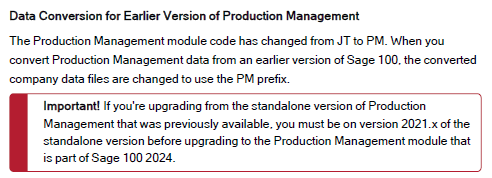
Kent specifically said the requirement was permanent:
https://communityhub.sage.com/us/sage100/f/distribution-manufacturing-and-internet-modules/197866/production-management-upgrade-path-pm-v2020-to-v2022/495184
------------------------------
Kevin Moyes
Technical Systems Analyst
Munjal White Consulting Co.
Toronto ON