Sage 100

 View Only
Expand all | Collapse all

OLE DB SQL Report issue

  • 1.  OLE DB SQL Report issue

    Posted 04-26-2019 19:30
    Customer is on Sage 100 Std 2018 and has DSD SQL Mirror.
    I have created an OLE DB connection in Crystal to access a specific company code in the SQL mirror.
    I have two reports, both pull from AR_InvoiceHistoryHeader, AR_InvoiceHistoryDetail and GL_Account.
    Both have been added to the Sage Custom Reports Menu.
    Both have selections on dates, one on Invoice Date one on Transaction Date.

    One works, one does not, (the one that selects on Trans Date). 
    It does work however, when the report is run from within Crystal, only when run from the Sage Custom Menu does it not work.

    It gives the following error.
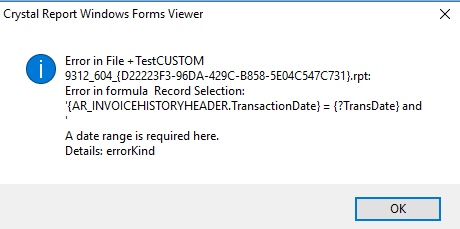
    I have made sure when the report was "moved" to SQL I matched the date fields correctly. I even went back to the original report and did it again, same result. The date fields are strings, the parameters are strings. I made a report from scratch using the same tables, same result. It also does not matter if the selection is parameter based or hard coded.

    One curious thing, which I am sure has something to do with it, is if the selections are removed from the report, the report runs, but the Trans Date is formatted as a date on the report, but only when run from within Sage, not when run from Crystal.

    What am I missing here?


    ------------------------------
    Greg Stiles
    S & W Microsystems
    Torrance CA
    310.787.1010
    ------------------------------


  • 2.  RE: OLE DB SQL Report issue

    Posted 04-27-2019 17:02
    Looks like the data type of your TransactionDate doesn't match your ?TransDate parameter.  You either need to convert your TransactionDate field to a date (It's probably coming across as a string), or convert your parameter to a string.  If you comment out the section of the Record Selection Formula that compares the  TransactionDate to ?TransDate, you should get all records.  What does the Transaction Date look like when it is displayed?  

    ------------------------------
    Chris St. Amand
    Arizona Accounting & Information Systems
    ------------------------------


  • 3.  RE: OLE DB SQL Report issue

    Posted 04-28-2019 14:12
    @Chris St. Amand the field is a string, the parameter is a string, the field displays as a string when run from Crystal and as a date when run from Sage!?​

    FWIW - I also tried removing the parameter and adding a range (as a string: 20190101 to 20190430) to the record selection and it still does not work when run from Sage, works fine when run from Crystal.

    ------------------------------
    Greg Stiles
    S & W Microsystems
    Torrance CA
    310.787.1010
    ------------------------------


  • 4.  RE: OLE DB SQL Report issue

    Posted 04-28-2019 14:57
    Then the parameter should have a type of Date.  That way, when you run from Sage, they will both be dates.

    ------------------------------
    Chris St. Amand
    Arizona Accounting & Information Systems
    ------------------------------


  • 5.  RE: OLE DB SQL Report issue

    Posted 04-29-2019 09:19
    ProvideX dates are stored as String, but in SQL they are stored as proper Date fields, so you have to match that with a SQL data source.  (I expect SQL Mirroring will work the same way Premium does, for storing dates).

    ------------------------------
    Kevin Moyes
    Technical Systems Analyst
    Munjal White Consulting Co.
    Toronto ON
    ------------------------------


  • 6.  RE: OLE DB SQL Report issue

    Posted 04-29-2019 10:05
    I believe the dates are stored as strings, that is how I have always treated dates in DSD SQL mirror. The field type displays "string" in the field explorer, a manual record selection requires the data to be entered as 20190101 and the data in the drop down (or browse) is listed the same way, as a string.

    I have another report using the same tables that works fine, dates are strings in both crystal and in Sage, why would this report be any different? The other report is selecting on the Invoice Date and this report is selecting on the Transaction Date, why would Trans Date be treated differently?

    I'll try making the parameter a date.

    ------------------------------
    Greg Stiles
    S & W Microsystems
    Torrance CA
    310.787.1010
    ------------------------------


  • 7.  RE: OLE DB SQL Report issue

    Posted 04-29-2019 17:02
    I can make the parameter a date, but then cannot add it to record selection because the field is NOT a date.

    Any other ideas?

    ------------------------------
    Greg Stiles
    S & W Microsystems
    Torrance CA
    310.787.1010
    ------------------------------


  • 8.  RE: OLE DB SQL Report issue

    Posted 04-29-2019 17:13
    Create a formula and turn date into a date field  or  use a text selection yyyymmdd in the parameter.  /selections.  

    Jim

    Sent from my iPhone. Please excuse any typos. 


    ------Original Message------

    I can make the parameter a date, but then cannot add it to record selection because the field is NOT a date.

    Any other ideas?

    ------------------------------
    Greg Stiles
    S & W Microsystems
    Torrance CA
    310.787.1010
    ------------------------------


  • 9.  RE: OLE DB SQL Report issue

    Posted 04-29-2019 17:19
    That is odd, that the runtime senses a different field type than the report.  Date parameter, and doing a date() conversion for the field value "should" work.

    ------------------------------
    Kevin Moyes
    Technical Systems Analyst
    Munjal White Consulting Co.
    Toronto ON
    ------------------------------


  • 10.  RE: OLE DB SQL Report issue

    Posted 04-29-2019 17:35
    From what you were experiencing earlier, it seemed like Crystal was interpreting the field to be a string when you ran from the designer, and a date when you ran from Sage (within the Crystal viewer).   If the users will be running the report from within Sage, when the viewer sees the field as a date, you should be able to set the report up with the date parameter, compared to the TransactionDate field (even though it reports an error in the Selection Formula).  Save the report and run it from Sage to see what happens when you are not running from the Designer.

    Another possibility is that your TransactionDate field has mixed data.  It appears to work when the field is being seen as a string, but when the viewer apparently sees it as a date, a value that can't be read as a date causes the data type error.

    Another area to check is your Report Options.  Make sure Convert Database Null Values to Default is checked, and Convert Other Null Values to Default  is Checked.

    ------------------------------
    Chris St. Amand
    Arizona Accounting & Information Systems
    ------------------------------


  • 11.  RE: OLE DB SQL Report issue

    Posted 04-29-2019 18:24
    Cannot set the parameter to date type and create a record selection formula with the mismatched types, will not let me save, keeps give an error A string is required.

    Changed the null options - no change.

    Keep in mind I have another report, using the same tables, and a date field, that works fine!

    Maybe I should use a silent ODBC instead? I was told by another that by using OLE DB is better because the security is embedded in the report, does a Crystal Report with an OLE DB connection not work when added to the Sage Custom Reports Menus?

    ------------------------------
    Greg Stiles
    S & W Microsystems
    Torrance CA
    310.787.1010
    ------------------------------


  • 12.  RE: OLE DB SQL Report issue

    Posted 04-29-2019 18:31
    There can be issues with running non-Sage data sources from  within Sage, but I assumed that was not the issue since the report would run within Sage (from the Viewer) if you did not include the comparison of the TransactionDate field to your parameter.

    ------------------------------
    Chris St. Amand
    Arizona Accounting & Information Systems
    ------------------------------


  • 13.  RE: OLE DB SQL Report issue

    Posted 04-29-2019 18:35
    SQL View to do the type conversion, then change your report's data source?

    ------------------------------
    Kevin Moyes
    Technical Systems Analyst
    Munjal White Consulting Co.
    Toronto ON
    ------------------------------


  • 14.  RE: OLE DB SQL Report issue

    Posted 04-29-2019 18:40
    Added a formula to convert the date string into a proper date and built the selection on the date formula, but now get the error in the formula field instead of the record selection. SO basically same issue, run time crystal viewer still thinks the field is a date and bombs, but Crystal Reports Manager treats it like a string as it should because in SQL it is a string.

    ------------------------------
    Greg Stiles
    S & W Microsystems
    Torrance CA
    310.787.1010
    ------------------------------


  • 15.  RE: OLE DB SQL Report issue

    Posted 04-29-2019 18:54
    So, if I switch the report to use the DSD SQL Mirroring ODBC DSN it works fine. So the problem is in using the OLE DB connection to the SQL server.

    So again, will using a crystal report via OLE DB work when added to the Sage Custom Reports Menu? Or am I mistaken about that?

    ------------------------------
    Greg Stiles
    S & W Microsystems
    Torrance CA
    310.787.1010
    ------------------------------


  • 16.  RE: OLE DB SQL Report issue

    Posted 04-29-2019 19:03
    A Crystal Report via OLE DB can work, although sometimes you have to do a work-around to have the external tables recognized.  When that is the issue, usually the whole report fails, not just a single field comparison.

    ------------------------------
    Chris St. Amand
    Arizona Accounting & Information Systems
    ------------------------------


  • 17.  RE: OLE DB SQL Report issue

    Posted 04-30-2019 15:30
    Edited by Greg Stiles 04-30-2019 17:45
    Can I hire someone to assist with this problem?

    ------------------------------
    Greg Stiles
    S & W Microsystems
    Torrance CA
    310.787.1010
    ------------------------------


  • 18.  RE: OLE DB SQL Report issue

    Posted 04-30-2019 17:57
    A closer inspection of the one report that is working revealed that it was using a different OLE DB connection. Once I changed the broken report to that connection it began working from the Sage Custom Menu.

    I have 3 connections showing in Crystal. All of these are OLE DB (ADO)

    sql_svr1
    sql_svr1_1
    sql_svr1_2

    Only the second one works correctly. I was incorrectly assuming the first one was the one I originally created for the first report.

    Thanks for everyone's help on this problem.

    Thanks @Nicole Ronchetti for the phone call.​

    ------------------------------
    Greg Stiles
    S & W Microsystems
    Torrance CA
    310.787.1010
    ------------------------------