VBScript's Set requires a valid object which GetObject() does not return which as Alnoor pointed out, that is likely the line the error is occurring on.
Also, I avoid using Exit Sub because it will exit the entire sub procedure in the script. If you only ever have one script assign to a combination of event and priority, then this isn't a big deal but if you have more than one script, exiting the sub will prevent any further script execution of the event and priority. I prefer to keep everything wrapped in If...Then...Else...End If blocks. Given the following scripts assigned to CI_Item, take note of the two scripts assigned to the post-read event with the priority of 500.
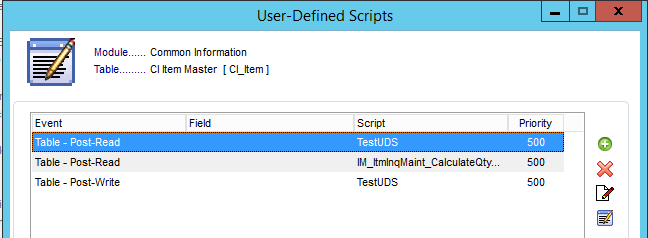
Both of those scripts will be compiled into a single sub procedure in the script file for the business object.

One may debate that every script should use its own priority, and this is indeed important if you need to control the order of execution but in a lot of cases where I have need multiple scripts on the same event, the order of execution was irrelevant.
VBScript uses the colon to separate statements on the same line, so to condense some method calls and to make sure I am initializing variables and resetting things like LastErrorMsg, I like to put them all on the same line. I noticed in your latest post of the script, you moved the GetObject() onto a separate line (6) but left the trailing colon on line 5. If you don't like combining statements, that is fine.
Here is a revised version of your script with some additional pointers. I also renamed variables because I like keeping them as detailed as possible. Since in some scripts, I may have a need to get both *_Svc or *_Bus versions for a given table, I always include it in the variable name so I know what it is capable of.
' Set Credit Hold for customers over credit limit
'Post Write on invoice
nAR_Customer_Bus = 0
oSession.LastErrorMsg = ""
nAR_Customer_Bus = oSession.GetObject("AR_Customer_Bus")
If nAR_Customer_Bus <> 0 Then
Set oAR_Customer_Bus = oSession.AsObject(nAR_Customer_Bus)
' rest of script interacting with AR_Customer_Bus here.
' Get Current customer key fields.
' Reset variable on line right before it is needed to be sure you haven't missed initializing it. Alternatively, can initialize it on the same line using the colon to separate each statement.
sARDivisionNo = ""
oBusObj.GetValue "ARDivisionNo$", sARDivisionNo
' Reset variable on line right before it is needed to be sure you haven't missed initializing it. Alternatively, can initialize it on the same line using the colon to separate each statement.
sCustomerNo = ""
oBusObj.GetValue "CustomerNo$", sCustomerNo
' Reset our variable that will be used to hold the returned value of SetKey.
nRetVal = 0
' Use either of the following to put the customer record in an editable state. For a simple multi-part key like AR_Customer's, SetKey works fairly well because the division number will always be 2 characters, for a key like IM_ItemWarehouse's, this doesn't work because the item code can vary in length so SetKeyValue should be used.
' Method 1.
' Make sure the LastErrorMsg property of the object is reset prior to the method that needs to be checked.
' oAR_Customer_Bus.LastErrorMsg = ""
' nRetVal = oAR_Customer_Bus.SetKey(sARDivisionNo & sCustomerNo)
' Method 2.
oAR_Customer_Bus.SetKeyValue "ARDivisionNo", sARDivisionNo
oAR_Customer_Bus.SetKeyValue "CustomerNo", sCustomerNo
' Make sure the LastErrorMsg property of the object is reset prior to the method that needs to be checked.
oAR_Customer_Bus.LastErrorMsg = ""
nRetVal = oAR_Customer_Bus.SetKey()
If nRetVal <> 0 Then
'Get the open amounts from customer
nCurrentBalance = 0
oAR_Customer_Bus.GetValue "CurrentBalance", nCurrentBalance
nAgingCategory1 = 0
oAR_Customer_Bus.GetValue "AgingCategory1", nAgingCategory1
nAgingCategory2 = 0
oAR_Customer_Bus.GetValue "AgingCategory2", nAgingCategory2
nAgingCategory3 = 0
oAR_Customer_Bus.GetValue "AgingCategory3", nAgingCategory3
nAgingCategory4 = 0
oAR_Customer_Bus.GetValue "AgingCategory4", nAgingCategory4
nCreditLimit = 0
oAR_Customer_Bus.GetValue "CreditLimit", nCreditLimit
oSession.AsObject(oSession.UI).MessageBox "","GotValues"
If nCreditLimit <> 0 Then
nTotal = nCurrentBalance + nAgingCategory1 + nAgingCategory2 + nAgingCategory3 + nAgingCategory4
sMessage = "Total: " & nTotal
oSession.AsObject(oSession.UI).MessageBox "", sMessage
If nTotal > nCreditLimit then
oAR_Customer_Bus.SetValue "CreditHold$", "Y"
nRetval = 0
oAR_Customer_Bus.LastErrorMsg = ""
nRetval = oAR_Customer_Bus.Write()
If nRetVal = 0 Then
oSession.AsObject(oSession.UI).MessageBox "", "Unable to write back to the customer." & vbCrLf & "Last Error Msg: " & oAR_Customer_Bus.LastErrorMsg
End If
End If
End If
oAR_Customer_Bus.Clear
Else
oSession.AsObject(oSession.UI).MessageBox "", "Unable to set the customer number """ & sARDivisionNo & "-" & sCustomerNo & """ into an editable state." & vbCrLf & "Last Error Msg: " & oAR_Customer_Bus.LastErrorMsg
End If
Set oAR_Customer_Bus = Nothing
oSession.DropObject nAR_Customer_Bus
Else
oSession.AsObject(oSession.UI).MessageBox "", "Unable to get object handle to ""AR_Customer_Bus""." & vbCrLf & "Last Error Msg: " & oSession.LastErrorMsg
End If
It is a good practice to check for certain things before displaying message boxes. I like to check if oSession.UI is not equal to 0, if it is zero, then the script event is likely being triggered by an external BOI script/integration (like StarShip) and you would not want to be displaying message boxes if it were otherwise you would halt the integration. For this, it is best to check if the oSession.ObjectInterface property is 0 or not, if 0, then it is not an external BOI script. If you don't want the message box to occur when doing a VI import, you can check if the oSession.StartProgram starts with VI. In the case of VI, you may just want a warning instead of a message box, in this case, you would use oScript.SetWarning but this is only valid in events that start with "pre".
Here is what the script would like if condensed and slimmed down.
' Set Credit Hold for customers over credit limit
'Post Write on invoice
nAR_Customer_Bus = 0 : oSession.LastErrorMsg = "" : nAR_Customer_Bus = oSession.GetObject("AR_Customer_Bus")
If nAR_Customer_Bus <> 0 Then
Set oAR_Customer_Bus = oSession.AsObject(nAR_Customer_Bus)
sARDivisionNo = "" : oBusObj.GetValue "ARDivisionNo$", sARDivisionNo
sCustomerNo = "" : oBusObj.GetValue "CustomerNo$", sCustomerNo
oAR_Customer_Bus.SetKeyValue "ARDivisionNo", sARDivisionNo
oAR_Customer_Bus.SetKeyValue "CustomerNo", sCustomerNo
nRetVal = 0 : oAR_Customer_Bus.LastErrorMsg = "" : nRetVal = oAR_Customer_Bus.SetKey()
If nRetVal <> 0 Then
nCreditLimit = 0 : oAR_Customer_Bus.GetValue "CreditLimit", nCreditLimit
If nCreditLimit <> 0 Then
nCurrentBalance = 0 : oAR_Customer_Bus.GetValue "CurrentBalance", nCurrentBalance
nAgingCategory1 = 0 : oAR_Customer_Bus.GetValue "AgingCategory1", nAgingCategory1
nAgingCategory2 = 0 : oAR_Customer_Bus.GetValue "AgingCategory2", nAgingCategory2
nAgingCategory3 = 0 : oAR_Customer_Bus.GetValue "AgingCategory3", nAgingCategory3
nAgingCategory4 = 0 : oAR_Customer_Bus.GetValue "AgingCategory4", nAgingCategory4
nTotal = nCurrentBalance + nAgingCategory1 + nAgingCategory2 + nAgingCategory3 + nAgingCategory4
oSession.AsObject(oSession.UI).MessageBox "", "Total: " & nTotal
If nTotal > nCreditLimit Then
oAR_Customer_Bus.SetValue "CreditHold$", "Y"
nRetval = 0 : oAR_Customer_Bus.LastErrorMsg = "" : nRetval = oAR_Customer_Bus.Write()
If nRetVal = 0 Then oSession.AsObject(oSession.UI).MessageBox "", "Unable to write back to the customer." & vbCrLf & "Last Error Msg: " & oAR_Customer_Bus.LastErrorMsg
End If
End If
oAR_Customer_Bus.Clear
Else
oSession.AsObject(oSession.UI).MessageBox "", "Unable to set the customer number """ & sARDivisionNo & "-" & sCustomerNo & """ into an editable state." & vbCrLf & "Last Error Msg: " & oAR_Customer_Bus.LastErrorMsg
End If
Set oAR_Customer_Bus = Nothing
oSession.DropObject nAR_Customer_Bus
Else
oSession.AsObject(oSession.UI).MessageBox "", "Unable to get object handle to ""AR_Customer_Bus""." & vbCrLf & "Last Error Msg: " & oSession.LastErrorMsg
End If
Here is what the script would look like if you were saving the numeric object handle using oScript.SetStorageVar to prevent possible memory leaks and/or repeatedly getting a new object handle on every script execution. This isn't usually a problem when a script executes a few times before the task is closed but if someone were to leave the task open all day and perform a lot of entries that would trigger the script, then it can become an issue and cause errors that are very hard to troubleshoot. Since this script only executes on the write of the invoice header and I don't believe you have a need to pass the object handle to any other events, then using oScript's SetStorageVar and GetStorageVar should be sufficient. If you had to share the object handle between the header and detail, then you would want to use oSession.AsObject(oSession.ScriptObject).
' Set Credit Hold for customers over credit limit
'Post Write on invoice
nAR_Customer_Bus = 0 : oScript.GetStorageVar "nAR_Customer_Bus", nAR_Customer_Bus : If IsNumeric(nAR_Customer_Bus) Then nAR_Customer_Bus = CLng(nAR_Customer_Bus) Else nAR_Customer_Bus = 0 End If
If nAR_Customer_Bus = 0 Then
nAR_Customer_Bus = 0 : oSession.LastErrorMsg = "" : nAR_Customer_Bus = oSession.GetObject("AR_Customer_Bus")
End If
If nAR_Customer_Bus <> 0 Then
oScript.SetStorageVar "nAR_Customer_Bus", nAR_Customer_Bus
Set oAR_Customer_Bus = oSession.AsObject(nAR_Customer_Bus)
sARDivisionNo = "" : oBusObj.GetValue "ARDivisionNo$", sARDivisionNo
sCustomerNo = "" : oBusObj.GetValue "CustomerNo$", sCustomerNo
oAR_Customer_Bus.SetKeyValue "ARDivisionNo", sARDivisionNo
oAR_Customer_Bus.SetKeyValue "CustomerNo", sCustomerNo
nRetVal = 0 : oAR_Customer_Bus.LastErrorMsg = "" : nRetVal = oAR_Customer_Bus.SetKey()
If nRetVal <> 0 Then
nCreditLimit = 0 : oAR_Customer_Bus.GetValue "CreditLimit", nCreditLimit
If nCreditLimit <> 0 Then
nCurrentBalance = 0 : oAR_Customer_Bus.GetValue "CurrentBalance", nCurrentBalance
nAgingCategory1 = 0 : oAR_Customer_Bus.GetValue "AgingCategory1", nAgingCategory1
nAgingCategory2 = 0 : oAR_Customer_Bus.GetValue "AgingCategory2", nAgingCategory2
nAgingCategory3 = 0 : oAR_Customer_Bus.GetValue "AgingCategory3", nAgingCategory3
nAgingCategory4 = 0 : oAR_Customer_Bus.GetValue "AgingCategory4", nAgingCategory4
nTotal = nCurrentBalance + nAgingCategory1 + nAgingCategory2 + nAgingCategory3 + nAgingCategory4
oSession.AsObject(oSession.UI).MessageBox "", "Total: " & nTotal
If nTotal > nCreditLimit Then
oAR_Customer_Bus.SetValue "CreditHold$", "Y"
nRetval = 0 : oAR_Customer_Bus.LastErrorMsg = "" : nRetval = oAR_Customer_Bus.Write()
If nRetVal = 0 Then oSession.AsObject(oSession.UI).MessageBox "", "Unable to write back to the customer." & vbCrLf & "Last Error Msg: " & oAR_Customer_Bus.LastErrorMsg
End If
End If
oAR_Customer_Bus.Clear
Else
oSession.AsObject(oSession.UI).MessageBox "", "Unable to set the customer number """ & sARDivisionNo & "-" & sCustomerNo & """ into an editable state." & vbCrLf & "Last Error Msg: " & oAR_Customer_Bus.LastErrorMsg
End If
Set oAR_Customer_Bus = Nothing
Else
oSession.AsObject(oSession.UI).MessageBox "", "Unable to get object handle to ""AR_Customer_Bus""." & vbCrLf & "Last Error Msg: " & oSession.LastErrorMsg
End If
------------------------------
David Speck II
Tennessee Software Solutions
------------------------------
Original Message:
Sent: 05-20-2022 04:17
From: Alnoor Cassim
Subject: GetObject error in script
I just noticed in both your original code and revised, you have GetObject in there twice. Why don't you try commenting out or removing this one here right below the line 'The other way ...' then recompiling, re-opening your screen, and trying again:
'The other way is to use GetObject()'Set oCustomer = oSession.GetObject("AR_Customer_bus")
------------------------------
Alnoor Cassim
Email: alnoor@asifocus.com
Ph:
------------------------------
Original Message:
Sent: 05-19-2022 20:49
From: Robert Osborn
Subject: GetObject error in script
Hi all,
Thanks for sticking with me. As to role permission, this is my test system. I have all rights.. I made the suggested changes and the error 88 persists. I after my first tests, I cleared out some lines that appeared to be redundant. I tried changing the setkeyvalues when getting the div & customer number back to getvalue but still get the exact same error. Seems strange as it specifically refers to GetObject which is pretty much the first line of the script. Are the added lines from David in the right place in the script? Should it be before the GetObject? Grasping at straws here..
As a test, I changed part of David's code to oCustomer, as that is my object name through the rest of the script.
If nAR_Customer_Bus <> 0 Then
Set oCustomer = oSession.AsObject(nAR_Customer_Bus)
' rest of script interacting with AR_Customer_Bus here.
Else
sMessage = "Unable to get object handle to ""AR_Customer_Bus""." & vbCrLf & "Last Error Msg: " & oSession.LastErrorMsg
End If
' Set Credit Hold for customers over credit limit'Post Write on invoice'Init VARssDiv = "" : sCust = "" : nCurr = 0 : nAge1 = 0 : nAge2 = 0 : nAge3 = 0 : nAge4 = 0 : nTotal = 0 : nCL = 0 :nAR_Customer_Bus = 0 : oSession.LastErrorMsg = "" :nAR_Customer_Bus = oSession.GetObject("AR_Customer_Bus")'The other way is to use GetObject()Set oCustomer = oSession.GetObject("AR_Customer_bus")If nAR_Customer_Bus <> 0 Then Set oCustomer = oSession.AsObject(nAR_Customer_Bus) ' rest of script interacting with AR_Customer_Bus here.Else sMessage = "Unable to get object handle to ""AR_Customer_Bus""." & vbCrLf & "Last Error Msg: " & oSession.LastErrorMsgEnd If'Find customerretVal = oBusObj.GetValue("ARDivisionNo$", sDiv)retVal = oBusObj.GetValue("CustomerNo$", sCust)'Concantenate the key fields for AR_CustomerFullCust = sDiv & sCust'Find the Customer record. Note how oCustomer is referenced now.retVal = oCustomer.setkey(FullCust)'Get the open amounts from customerretVal = oCustomer.GetValue("CurrentBalance", nCurr)retVal = oCustomer.GetValue("AgingCategory1", nAge1)retVal = oCustomer.GetValue("AgingCategory2", nAge2)retVal = oCustomer.GetValue("AgingCategory3", nAge3)retVal = oCustomer.GetValue("AgingCategory4", nAge4)retVal = oCustomer.GetValue("CreditLimit", nCL)if nCL = 0 then Exit Subr=oSession.AsObject(oSession.UI).MessageBox("","GotValues")nTotal = nCurr + nAge1 + nAge2 + nAge3 + nAge4 sMsg = "Total: " & nTotal rMsg = oSession.AsObject(oSession.UI).MessageBox("", sMsg) If nTotal > nCL then RetVal = oCustomer.SetValue("CreditHold$", "Y") RetVal = oCustomer.Write() chkWrite = oCustomer.Write() If chkWrite <= 0 Then sMsg = "Error writing back to AR_Customer: " & oCustomer.LastErrorMsg 'r=oScript.DebugPrint(sMsg) 'optionally show MessageBox r=oSession.AsObject(oSession.UI).MessageBox("",sMsg) End If end if
------------------------------
Bob Osborn
Consultant
ACI Consulting
Original Message:
Sent: 05-19-2022 18:30
From: Alnoor Cassim
Subject: GetObject error in script
David is right. A role maintenance permissions error would totally makes sense. You would very likely get an 88 as a "catastrophic" script error too, just like you are. So separating the GetObject into it's 2 part variation would make it clear that's what's going on.
------------------------------
Alnoor Cassim
Email: alnoor@asifocus.com
Ph:
Original Message:
Sent: 05-19-2022 18:16
From: David Speck II
Subject: GetObject error in script
Have you checked to make sure the user has access to Customer Maintenance?
I would split out the GetObject and AsObject. If GetObject doesn't return a value that is not 0, then the current user likely doesn't have the appropriate rights. I typically use the following for this check.
nAR_Customer_Bus = 0 : oSession.LastErrorMsg = "" : nAR_Customer_Bus = oSession.GetObject("AR_Customer_Bus")
If nAR_Customer_Bus <> 0 Then
Set oAR_Customer_Bus = oSession.AsObject(nAR_Customer_Bus)
' rest of script interacting with AR_Customer_Bus here.
Else
sMessage = "Unable to get object handle to ""AR_Customer_Bus""." & vbCrLf & "Last Error Msg: " & oSession.LastErrorMsg
End If
------------------------------
David Speck II
Tennessee Software Solutions
Original Message:
Sent: 05-19-2022 18:05
From: Robert Osborn
Subject: GetObject error in script
Hi Everyone,
Thanks for all the pointers. I changed the Find to SetKey. I added the Write() I even changed the 'Find customer section to SetKeyValue (I tried without this first). I added in the @Alnoor Cassim test section (had to comment out one line as it gave me a syntax error I could not figure out).
I still have the GetObject error that I showed before in the earlier post. Here is my updated version.
' Set Credit Hold for customers over credit limit'Post Write on invoice'Init VARssDiv = "" : sCust = "" : nCurr = 0 : nAge1 = 0 : nAge2 = 0 : nAge3 = 0 : nAge4 = 0 : nTotal = 0 : nCL = 0'Find customerretVal = oBusObj.SetKeyValue("ARDivisionNo$", sDiv)retVal = oBusObj.SetKeyValue("CustomerNo$", sCust)'AR_Customer table available as Data Source so use GetChildHandle()'The other way is to use GetObject()'Set oCustomer=oBusObj.AsObject(oBusObj.GetChildHandle("CustomerNo"))Set oCustomer = oSession.GetObject("AR_Customer_bus")If IsObject(oCustomer) = False Then Set oCustomer = oSession.AsObject(oSession.GetObject("AR_Customer_bus"))End If'Concantenate the key fields for AR_CustomerFullCust = sDiv & sCust'Find the Customer record. Note how oCustomer is referenced now.retVal = oCustomer.setkey(FullCust)'Get the open amounts from customerretVal = oCustomer.GetValue("CurrentBalance", nCurr)retVal = oCustomer.GetValue("AgingCategory1", nAge1)retVal = oCustomer.GetValue("AgingCategory2", nAge2)retVal = oCustomer.GetValue("AgingCategory3", nAge3)retVal = oCustomer.GetValue("AgingCategory4", nAge4)retVal = oCustomer.GetValue("CreditLimit", nCL)if nCL = 0 then Exit SubnTotal = nCurr + nAge1 + nAge2 + nAge3 + nAge4 sMsg = "Total: " & nTotal rMsg = oSession.AsObject(oSession.UI).MessageBox("", sMsg) If nTotal > nCL then RetVal = oCustomer.SetValue("CreditHold$", "Y") RetVal = oCustomer.Write() chkWrite = oCustomer.Write() If chkWrite <= 0 Then sMsg = "Error writing back to AR_Customer: " & oCustomer.LastErrorMsg 'r=oScript.DebugPrint(sMsg) 'optionally show MessageBox r=oSession.AsObject(oSession.UI).MessageBox("",sMsg) End If end if
------------------------------
Bob Osborn
Consultant
ACI Consulting
Original Message:
Sent: 05-19-2022 15:46
From: Alnoor Cassim
Subject: GetObject error in script
Bob - Pretty much what Eric said. I'll add/rephrase a few things.
* GetChildHandle() creates a read-only connection thru the _svc object. Not what you want here since you want to write back.
* GetObject() to AR_Customer_bus is what you want to use for writing back to a secondary table.
* Use SetKey() not Find() when you want to edit, add, or delete a record.
* Since you're editing a secondary table (AR_Customer via oCustomer) instead of the primary table (SO Invc Hdr via oBusObj or Dtl via oLines), after the SetValue on CreditHold you have to Write() the record. Suggest you do something like this:
chkWrite = oCustomer.Write()If chkWrite <= 0 Then sMsg = "Error writing back to AR_Customer: " & oCustomer.LastErrorMsg r=oScript.DebugPrint(sMsg) 'optionally show MessageBox r=oSession.AsObject(oSession.UI).MessageBox("",sMsg)End If
------------------------------
Alnoor Cassim
Email: alnoor@asifocus.com
Ph:
Original Message:
Sent: 05-19-2022 13:07
From: Eric Lunceford
Subject: GetObject error in script
I see a couple of things at first glance:
You are trying to put the customer on credit hold? You need the _bus object not the _svc object. Drop the getchild code and go to the getobject.
Instead of find, you need to setkey.
Finally, you need to write after setting the credithold value.
------------------------------
Eric Lunceford
First Mate Business Solutions
Oklahoma City, OK
877-880-8960