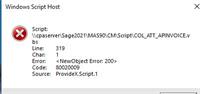
Hi All, I have been trying to update a script that has been working for sometime. It is for Sage 100 Standard 2021. They upgraded from 2020 I believe and got new workstations. I saw a post regarding this for Premium from
@Phil McIntosh but the fixes mentioned do not seem to apply. I have checked to make sure that the home path is being found correctly. (I wasn't sure if it would show mapped drives or UNC). It showed UNC so I updated everything in the script to match but the error persists. This is pretty much the first time I have worked with external scripts so a bit new for me.
Update - in researching this, I found some comments that said there are some DLL's that have to be registered to resolve this but I could not find any details. It was posted by
@David Speck II Does anyone have details on this?
' ------------------------------Set Initial Values -------------------------------------------
CurrentUser = "psi"
CurrentPass = "kiss"
CurrentCmp = "COL"
retVal = 0
MessagePath = "\\cpaserver\Sage2021\MAS90\HOME\TEXTOUT\"
sourcePath = "\\cpaserver\Sage2021\MAS90\IMPORT\"
archivePath = "\\cpaserver\Sage2021\MAS90\IMPORT\Archive\"
sourceXLSX = "\\cpaserver\Sage2021\MAS90\IMPORT\COL_AP.xlsx"
'MessagePath = "M:\MAS90\CM\Script\"
'sourcePath = "M:\MAS90\IMPORT\"
'archivePath = "M:\MAS90\IMPORT\Archive\"
'sourceXLSX = "M:\MAS90\IMPORT\COL_AP.xlsx"
tmpRawAcct = ""
tmpAccountKey = ""
excelFile = ""
'DeleteTargetFile (LogFileName)
tmpMessageCount = 0
accountLength=14
InvoiceCount = 0
companyNotFound = 0
oBalance=0
Year2Digit = ""
Month2Digit = ""
Day2Digit = ""
InvoiceHistKey = ""
InvoiceSeqKey = ""
InvoiceFound = 0
DIM FSO, objF, fcnt, f1
tmpCompareKey = ""
Mas90CompCode = ""
location = "" ' use
Longlocation = ""
sType=""
Account_num = ""
TaxID = ""
Division = "" ' use
Vendor = "" ' use
nBalance = 0
Balance = ""
irow = 0
Amount = 0 ' use
txtAmount = ""
FoundCompany = 0
txtInvoiceNo = "" ' use
txtInvoiceDate = "" ' use
tmpInvDate = "" ' use
txtDescription = "" 'use
txtHdrSeq = ""
Set FSO = CreateObject("Scripting.FileSystemObject")
Set objF = fso.GetFolder(sourcePath)
Set fcnt = objF.Files
'-------------------------------Locate MAS 90 Home Path--------------------------------
Const HKEY_CURRENT_USER = &H80000001
Set oReg = GetObject("winmgmts:\\.\root\default:StdRegProv")
oReg.GetExpandedStringValue HKEY_CURRENT_USER,"Software\ODBC\ODBC.INI\SOTAMAS90","Directory",PathRoot
PathHome = PathRoot & "\Home"
msgbox "PathHome = " & PathHome
Set oReg = Nothing
'
'------------------------------------Get Current Date ------------------------------------
tmpDate = Date()
tmpYear = Year(tmpDate)
tmpMonth = Month(tmpDate)
tmpDay = Day(tmpDate)
If tmpMonth < 10 then
tempMonth = tmpMonth
tmpMonth = "0"+CStr(tempMonth)
End If
If tmpDay < 10 then
tempday = tmpDay
tmpDay = "0"+CStr(tempDay)
End If
currentDate= CStr(tmpYear)& CStr(tmpMonth)& CStr(tmpDay)
Year2Digit = right(CStr(tmpYear),2)
Month2Digit = right("0" & CStr(tmpMonth),2)
Day2Digit = right("0" & Cstr(tmpDay),2)
LogFileName = MessagePath & "ATT Invoice Messages_" & Year2Digit & Month2Digit & Day2Digit & ".txt"
LogMessage = tmpDate & " Current Company = " & CurrentCmp & " Start Import "
retVal = UpdateSyncLog (LogFileName,LogMessage)
'
'------------------------------Start a new Providex Session------------------------------
Set oScript = CreateObject ("ProvideX.Script")
oScript.Init(PathHome)
Set oSS = oScript.NewObject("SY_SESSION")
sSystemDate = currentDate
retVal = oSS.nSetUser(CurrentUser,CurrentPass)
if retVAL = 0 Then
MsgBox(oSS.sLastErrorMsg & vbCRLF & "set User Quitting.")
CloseObjects()
End if
retVal = oSS.nSetCompany(CurrentCMP)
if retVAL = 0 Then
MsgBox(oSS.sLastErrorMsg & vbCRLF & CurrentCMP & "SetCompany. Quitting.")
CloseObjects()
End If
'-------------------------------------Read COL_AP.xlsx into UDT to store and sort by company & Vendor ----------------------------------
Dim objExcel, objWkbk
Set objExcel = CreateObject("Excel.Application")
Set objWkbk=objExcel.Workbooks.Open(SourceXLSX, False, True)
irow = 2
'msgbox " SourceXLSX = " & SourceXLSX & " trim(objExcel.Cells(irow,1).value) = " & trim(objExcel.Cells(irow,1).value)
do while trim(objExcel.Cells(irow,1).value) <> ""
location = trim(objExcel.Cells(irow,2).value) ' company code
Division = "00"
Vendor = trim(objExcel.Cells(irow,3).value)
txtInvoiceNo = trim(objExcel.Cells(irow,4).value)
Account_num = trim(objExcel.Cells(irow,8).value)
txtDescription = trim(objExcel.Cells(irow,7).value)
txtInvoiceDate = trim(objExcel.Cells(irow,5).value)
tmpInvDate = FormatDate(txtInvoiceDate)
txtAmount = trim(objExcel.Cells(irow,6).value)
Amount = cDbl(txtAmount)
if Amount < 0 then
Amount = Amount * -1
end if
Mas90CompCode = location
GetGL() ' txtAccountKey
nBalance = cDbl(Amount)
Balance = cStr(nBalance)
'msgbox "Mas90CompCode = " & Mas90CompCode & " Vendor = " & Vendor & " txtInvoiceNo = " & txtInvoiceNo & " tmpAccountKey = " & tmpAccountKey & " tmpInvDate = " & tmpInvDate & " Amount = " & Amount
irow = irow + 1
CreateInvoice ()
loop
'if CompanyNotFound = 1 then
CloseObjects()
'end if
'------------------------------ loop through UDT to setup Vendors and Invoice numbers --------------------------------------
CloseObjects()
on error resume next
objWkbk.Saved = true
objWkbk.close
Set objWkbk = Nothing
Set oUDT=nothing
Set oUDTREF=nothing
on error goto 0
CloseObjects ()
Sub CloseObjects()
on error resume next
set fso=nothing
objExcel.Quit()
Set objExcel = Nothing
oAPVendor.dropObject()
oAPVendor = nothing
oGL.dropObject()
oGL = nothing
on error goto 0
'oSS.nCleanup()
oSS.DropObject()
Set oss = Nothing
msgbox "MAS 90 A/P import completed. Invoices created : " & InvoiceCount
Set oScript = Nothing
wScript.Quit
End Sub
'-----------Process a batch of transactions--------------
Sub OpenNotePad ()
Dim fNP
Set fNP = CreateObject("Wscript.Shell")
fNP.run "NotePad.exe " & LogFileName
Set fNP = nothing
end sub
sub GetBatchNo ()
TRYear = ""
TRMo=""
TRYear = Mid(exName,6,2)
TRMo= uCASE(Left(exName,3))
tmpBatchNo = trMo & TRYear
end sub
Function UpdateSyncLog (LogFileName,LogMessage)
Dim fLog, F9
Set fLog = CreateObject("Scripting.FileSystemObject")
if NOT fLog.FileExists(LogFileName) then
Set F9 = fLog.CreateTextFile(LogFileName)
Set F9 = Nothing
end if
Set F9 = fLog.OpenTextFile(LogFileName,8) 'Open for Append
F9.WriteLine(LogMessage)
F9.close
Set fLog = nothing
end function
Function DeleteTargetFile (DelFileName)
Dim fLog
Set fLog = CreateObject("Scripting.FileSystemObject")
if fLog.FileExists(DelFileName) then
fLog.DeleteFile(DelFileName), true
end if
Set fLog = nothing
end function
Function MoveTargetFile (SourceFileName, DestinationFileName)
Dim fLog
Set fLog = CreateObject("Scripting.FileSystemObject")
if fLog.FileExists(DestinationFileName) then
retVal = DeleteTargetFile (DestinationFileName)
end if
fLog.MoveFile SourceFileName, DestinationFileName
Set fLog = nothing
end function
' ---------------------- Create invoices -------------------------
sub CreateInvoice()
retVal = oSS.nSetCompany(Mas90CompCode)
If retVAL = 0 or Mas90CompCode = "" Then
LogMessage = tmpDate & " - " & oSS.sLastErrorMsg & " - Error going to the source company when reading vendor for Company= " & Mas90CompCode & ". Quitting."
retVal = UpdateSyncLog (LogFileName,LogMessage)
msgbox LogMessage
CloseObjects()
end if
retVal = oSS.nSetDate("A/P", currentDate)
retVal = oSS.nSetModule("A/P")
retVal = oSS.nSetProgram(oSS.nLookupTask("AP_Invoice_UI"))
If retVAL = 0 Then
LogMessage = tmpDate & " - " & oSS.sLastErrorMsg & " - AP_Invoice_UI is not available when checking Invoice. Quitting."
retVal = UpdateSyncLog (LogFileName,LogMessage)
CloseObjects()
End If
Set oAPInv = oScript.NewObject("AP_Invoice_BUS", oSS)
retVal = oAPInv.nSetKeyValue("APDivisionNo$", Division)
retVal = oAPInv.nSetKeyValue("VendorNo$", Vendor)
retVal = oAPInv.nSetKeyValue("InvoiceNo$", txtInvoiceNo)
retVal = oAPInv.nSetKey()
if retVal = 0 then
LogMessage = tmpDate & " - " & oAPInv.sLastErrorMsg & " - Error setting the A/P Invoice key values for Company= " & Mas90CompCode & " Vendor=" & txtScrVendor & " Invoice#=" & txtScrInvoiceNo & ". Quiting."
retVal = UpdateSyncLog (LogFileName,LogMessage)
CloseObjects()
End If
retVal = oAPInv.nSetValue("InvoiceAmt", nBalance)
retval = oAPInv.oLines.nAddLine()
if retVal = 0 then
LogMessage = tmpDate & " - " & oAPInv.sLastErrorMsg & " - Error olines addline Company= " & Mas90CompCode & " Vendor=" & txtScrVendor & " Invoice#=" & txtScrInvoiceNo & ". Quitting."
retVal = UpdateSyncLog (LogFileName,LogMessage)
CloseObjects()
End If
txtNewComment = Account_num
retVal = oAPInv.nSetValue("Comment$",txtDescription)
retVal = oAPInv.oLines.nSetValue("CommentText$",txtDescription)
if retVal = 0 then
LogMessage = tmpDate & " - " & oAPInv.sLastErrorMsg & " - Error setting commenttext for Company= " & Mas90CompCode & " Vendor=" & txtScrVendor & " Invoice#=" & txtScrInvoiceNo & ". Quitting."
retVal = UpdateSyncLog (LogFileName,LogMessage)
CloseObjects()
End If
retVal = oAPInv.oLines.nSetValue("AccountKey$",tmpAccountKey)
if retVal = 0 then
LogMessage = tmpDate & " - " & oAPInv.sLastErrorMsg & " - Error setting accountkey values for Company= " & Mas90CompCode & " tmpAccountKey=" & tmpAccountKey & " Invoice#=" & txtScrInvoiceNo & ". Quitting."
retVal = UpdateSyncLog (LogFileName,LogMessage)
CloseObjects()
End If
retVal = oAPInv.oLines.nSetValue("DistributionAmt",nBalance)
if retVal = 0 then
LogMessage = tmpDate & " - " & oAPInv.sLastErrorMsg & " - Error setting Distribution amount for Company= " & Mas90CompCode & " nBalance =" & nBalance & " Invoice#=" & txtScrInvoiceNo & ". Quitting."
retVal = UpdateSyncLog (LogFileName,LogMessage)
CloseObjects()
End If
retval = oAPInv.oLines.nWrite()
if retVal <> 1 then
LogMessage = tmpDate & " - " & oAPInv.sLastErrorMsg & " - Error olines.nWrite for Company= " & Mas90CompCode & " Vendor=" & txtScrVendor & " Invoice#=" & InvoiceNo & " Distribution Amt of $" & nBalance & ". Quitting."
retVal = UpdateSyncLog (LogFileName,LogMessage)
CloseObjects()
end if
'Now write the A/P Header in Destination company
retval = oAPInv.nWrite()
InvoiceCount = InvoiceCount + 1
'LogMessage = "Company :" & Mas90CompCode & " Vendor :" & txtScrAPDivNo & "-" & txtScrVendor & " Invoice: " & InvoiceNo & " Amount: " & nBalance
'retVal = UpdateSyncLog (LogFileName,LogMessage)
if retVal = 0 then
LogMessage = tmpDate & " - " & oAPInv.sLastErrorMsg & " - Error nWrite for Company= " & Mas90CompCode & " Vendor=" & Vendor & " Invoice#=" & txtInvoiceNo & ". Quitting."
retVal = UpdateSyncLog (LogFileName,LogMessage)
CloseObjects()
End If
LogMessage = "Company :" & Mas90CompCode & " Vendor :" & Vendor & " Invoice: " & txtInvoiceNo & " Amount: " & nBalance & " Account: " & Account_num
retVal = UpdateSyncLog (LogFileName,LogMessage)
end sub
sub GetGL()
'----------------- Open G/L Account Service Object to lookup Raw Accounts ------------------------
retVal = oSS.nSetCompany(Mas90CompCode)
retVal = oSS.nSetDate("G/L", currentDate)
retVal = oSS.nSetModule("G/L")
retVal = oSS.nSetProgram(oSS.nLookupTask("GL_Account_ui"))
Set oGL = oScript.NewObject("GL_Account_BUS", oSS)
RetVal = oGL.nSetIndex("KACCOUNT")
'
tmpRawAcct=""
tmpAccountKey = ""
'Read RAW Account
tmpRawAcct = account_num
'---------------------Locate the AccountKey given the RAW G/L Account----------------------
RetVal = oGL.nFind(tmpRawAcct)
if RetVal = 1 Then
tmpAcctKey = ""
retVal = oGL.nGetValue("AccountKey$", tmpAccountKey)
'msgbox "tmpAccountKey = " & tmpAccountKey & " Mas90CompCode = " & Mas90CompCode
Else
msgbox "Account: " & tmpRawAcct, ,"Missing G/L Account"
End If
end sub
Function FormatDate(txtInvoiceDate)
dCheckDate = ""
sFDate = ""
dCheckDate = txtInvoiceDate
sFDate = Year(dCheckDate)
If Len(Month(dCheckDate)) = 1 Then
sFDate = sFDate & "0" & Month(dCheckDate)
Else
sFDate = sFDate & Month(dCheckDate)
End If
If len(Day(dCheckDate)) = 1 Then
sFDate = SFDate & "0" & Day(dCheckDate)
Else
sFDate = SFDate & Day(dCheckDate)
End If
FormatDate = sFDate
end Function
------------------------------
Bob Osborn
Consultant
ACI Consulting
------------------------------