Original Message:
Sent: 10-31-2025 16:08
From: Kevin Moyes
Subject: New PC - Sage acting weird in SO Invoice Entry
Hardware issues are the hardest to troubleshoot.
Maybe have the user do other things and see if the slowness happens outside of Sage 100.
------------------------------
Kevin Moyes
Technical Systems Analyst
Munjal White Consulting Co.
Toronto ON
------------------------------
Original Message:
Sent: 10-31-2025 16:00
From: Greg Stiles
Subject: New PC - Sage acting weird in SO Invoice Entry
@Kevin Moyes - Not wireless, no customizations, no scripts. I am suspecting a hardware issue because of the randomness of it.
------------------------------
Greg Stiles
DSD Business Systems
Original Message:
Sent: 10-31-2025 15:41
From: Kevin Moyes
Subject: New PC - Sage acting weird in SO Invoice Entry
Wireless networking? Customized panel? Scripts?
------------------------------
Kevin Moyes
Technical Systems Analyst
Munjal White Consulting Co.
Toronto ON
Original Message:
Sent: 10-31-2025 14:56
From: Greg Stiles
Subject: New PC - Sage acting weird in SO Invoice Entry
IT disabled BitDefender AV. Uninstalled and reinstalled Sage again - screens still hang halfway through opening. Logged in as Network Administrator - Same thing.
------------------------------
Greg Stiles
DSD Business Systems
Original Message:
Sent: 10-31-2025 12:11
From: Greg Stiles
Subject: New PC - Sage acting weird in SO Invoice Entry
After speaking to IT he says BitDefender is bypassing the Sage folder and it is on another PC that is not having any problems. The one thing he thinks it might be is this PC has Win 11 25H2. Any more ideas?
------------------------------
Greg Stiles
DSD Business Systems
Original Message:
Sent: 10-31-2025 11:11
From: Greg Stiles
Subject: New PC - Sage acting weird in SO Invoice Entry
Thanks for all the suggestions. After seeing it first hand, it feels like AV. All screens are sluggish to open and pause while drawing elements and sometimes freezes at the pause. It does work if you are persistent by closing and re-opening the screen. And it is NOT limited to just SO Invoice Entry. The new PC has BitDefender on it. This is new for the client and may only be on this new PC. I reached out to IT and have not heard back yet.
------------------------------
Greg Stiles
DSD Business Systems
Original Message:
Sent: 10-30-2025 16:56
From: Brett Zimmerman
Subject: New PC - Sage acting weird in SO Invoice Entry
I might also try changing screen resolution.
------------------------------
Brett Zimmerman
Net at Work
Greater Boston Area
Original Message:
Sent: 10-30-2025 13:48
From: David Overholt
Subject: New PC - Sage acting weird in SO Invoice Entry
Also try renaming the Sage100 folder under my Documents folder for that user
------------------------------
David Overholt
Programmer/Project Manager
DWD Technology Group
Fort Wayne IN
(260) 399-8655
Original Message:
Sent: 10-30-2025 13:47
From: David Overholt
Subject: New PC - Sage acting weird in SO Invoice Entry
Greg,
have you tried File>Run and *ESC
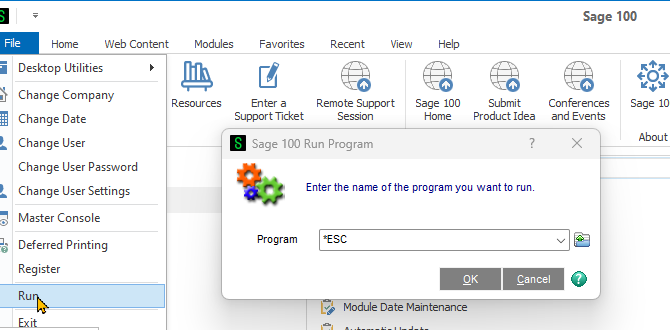
To eliminate the possibility of something custom office related?
------------------------------
David Overholt
Programmer/Project Manager
DWD Technology Group
Fort Wayne IN
(260) 399-8655