Sage 100

 View Only
  • 1.  Multiple Instances of Chrome open on Sage 100 client

    Posted 05-25-2022 16:40
    Hello,

    At the conference one of the speakers let us know of an issue and fix for where chrome launches repeatedly on a Sage 100 workstation.   Unfortunately my scribbled notes just say chrome - turn off :(.   Does anyone else remember the this and the solution?  It may have been in Carmen's session.

    Thanks,
    Christine

    ------------------------------
    Christine Kuhn
    Consultant
    RKL eSolutions, LLC
    ------------------------------


  • 2.  RE: Multiple Instances of Chrome open on Sage 100 client

    Posted 05-25-2022 21:15
    Adding @Carmen Cruz ​in case she knows.

    ------------------------------
    Alnoor Cassim

    Email: alnoor@asifocus.com
    Ph:
    ------------------------------


  • 3.  RE: Multiple Instances of Chrome open on Sage 100 client

    Posted 05-27-2022 16:14
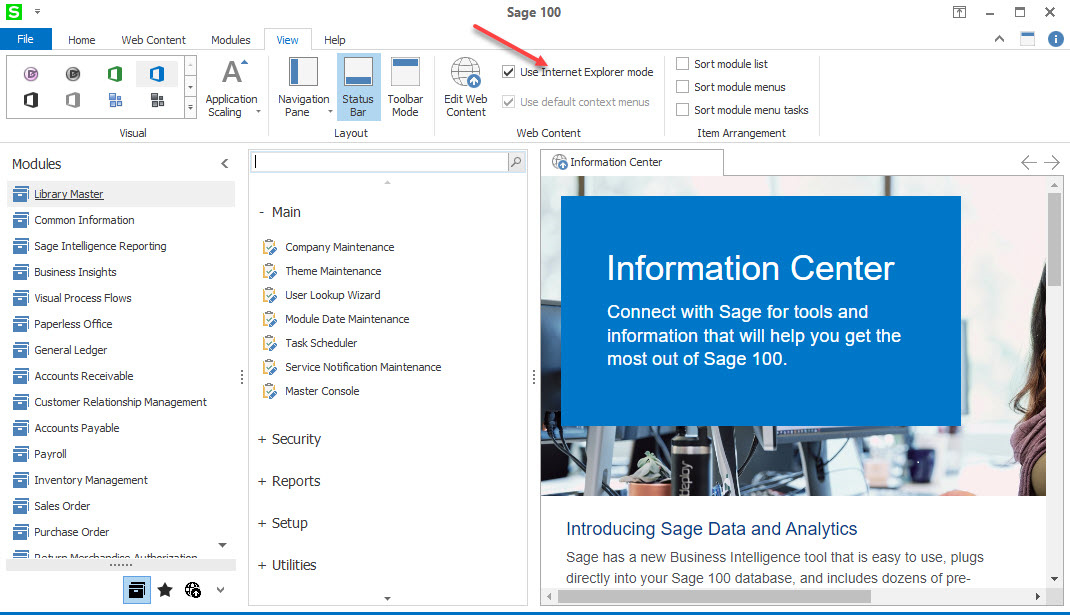
    Now that I can finally connect.  Sorry about the wait.  You want to set the following checked below.  By default this is not selected.  If not select Microsoft Edge will go crazy overloading IE instances.  Although they are using chrome this should lessen the pressure even if opening multiple instances of Google.    By the way if the users have any browser open each tab counts for one instance of that browser.  For instance I have 10 tabs open on my station.  In Task Manager 10 of those Google instances are from outside Sage and whatever remains is how many tabs they have open in Sage on the right side.   Users tend to not clean that up and they really should.  Let me know if you have any more questions for me.  And again, sorry about the wait. 


    ------------------------------
    Carmen Cruz
    Sage Consultant
    CompuData
    ------------------------------


  • 4.  RE: Multiple Instances of Chrome open on Sage 100 client

    Posted 06-03-2022 08:12
    thanks Carmen

    ------------------------------
    Christine Kuhn
    Consultant
    RKL eSolutions, LLC
    ------------------------------


  • 5.  RE: Multiple Instances of Chrome open on Sage 100 client

    Posted 08-30-2022 10:53
    Edited by Brett Zimmerman 08-30-2022 10:55
    It looks like that setting is not available in v2022.  Any thoughts? @Carmen Cruz?

    edit:  Never mind, I was in the wrong version.


    ------------------------------
    Brett Zimmerman
    Net at Work
    Greater Boston Area
    ------------------------------


  • 6.  RE: Multiple Instances of Chrome open on Sage 100 client

    Posted 08-30-2022 10:56
    Never mind, I was in the wrong version.


    ------------------------------
    Brett Zimmerman
    Net at Work
    Greater Boston Area
    ------------------------------


  • 7.  RE: Multiple Instances of Chrome open on Sage 100 client

    Posted 08-30-2022 13:39
    LOL.. Just saw this post after I had responded.  Goodness...

    ------------------------------
    Carmen Cruz
    Sage Consultant
    CompuData
    ------------------------------


  • 8.  RE: Multiple Instances of Chrome open on Sage 100 client

    Posted 08-30-2022 13:28

    Sure your in 2022 Sage


    Carmen Cruz
    Sage Consultant
    carmen.cruz@compudata.com
    215-969-1000 Ext. 279
    www.compudata.com
    Work Smarter... Together 

    CompuData, Inc. • 325 Chestnut St, Ste 700 • Philadelphia • PA • 19106


  • 9.  RE: Multiple Instances of Chrome open on Sage 100 client

    Posted 02-11-2025 08:51

    @Carmen Cruz, others, might there be a way to force-enable the 'Internet Explorer mode' checkbox?  The client pushes their Workstation Setups out to about 50 workstations.


    ------------------------------
    Brett Zimmerman
    Net at Work
    Greater Boston Area
    ------------------------------