I'm very late to the conversation but one way of checking is do a SQL Profiler Trace (somewhere on the SQL Mgmt Studio menu). You can choose a default template for now and just turn on the trace and have it run for say 30 seconds before you click on Stop or Pause on toolbar. Among others, pay attention to the Duration column (shown in milliseconds I think) to see which SELECTs, INSERTs, or UPDATEs are taking a long time. You might also be able to gather that it could be running in an endless loop (hope not), reprocessing the same rows repetitively, due to some condition in the data.
Also it's great you changed the DB Recovery model to Simple to reduce the t-log impact and size but also check to see if Transaction Log Shipping might be enabled or SQL replication is running (pretty unlikely). Also check for (dare I say it) the infernal Change Tracking feature being enabled, the one you know well which can be set not only at the DB level but table level too.
------------------------------
Alnoor Cassim
Email:
alnoor@asifocus.comPh: 949-689-9887
Orange County, CA
------------------------------
Original Message:
Sent: 01-25-2021 13:24
From: Kate Krueger
Subject: Multi-Currency Conversion Premium to Premium
I just checked the time stamps for the .mdf file in the Data folder and the time stamp is almost two hours ago even though sqlserver.exe has been pegging the whole time and the Sage UI just has a progress bar stuck at 100% (which is what it has showed for the last 15 hours). Does this indicate that it isn't actually doing anything? I know I'm being nuts about this one - this is 30+ hours of work over a weekend in the balance here.
------------------------------
Kate Krueger
Business Applications Manager
Eide Bailly, Inc.
Denver CO
970-692-5113
------------------------------
Original Message:
Sent: 01-25-2021 13:02
From: Kevin Moyes
Subject: Multi-Currency Conversion Premium to Premium
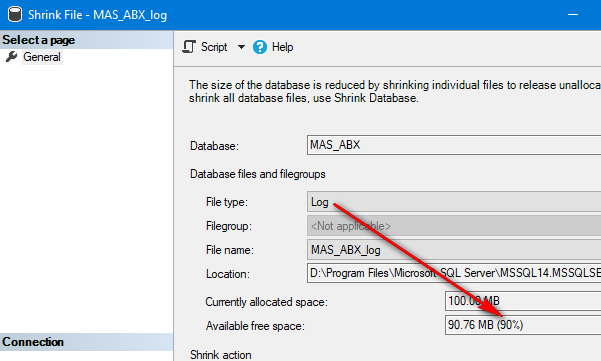
If it is insanely oversized or if you are low on disk space, sure. The important thing for performance sake is that it isn't maintaining the logs while the conversion is processing.
------------------------------
Kevin Moyes
Technical Systems Analyst
Munjal White Consulting Co.
Toronto ON
Original Message:
Sent: 01-25-2021 12:46
From: Kate Krueger
Subject: Multi-Currency Conversion Premium to Premium
I'm showing 99% available free space - should I still shrink the log?
------------------------------
Kate Krueger
Business Applications Manager
Eide Bailly, Inc.
Denver CO
970-692-5113
Original Message:
Sent: 01-25-2021 12:30
From: Kevin Moyes
Subject: Multi-Currency Conversion Premium to Premium
Whenever I change from Full to Simple I always check the File Shrink screen for the Log, to verify the Available free space is high.
------------------------------
Kevin Moyes
Technical Systems Analyst
Munjal White Consulting Co.
Toronto ON
Original Message:
Sent: 01-25-2021 11:52
From: Kate Krueger
Subject: Multi-Currency Conversion Premium to Premium
I've changed the backup method. @Doug Higgs you are totally right. Early on the conversion complained because it filled up the hard drive. I cleared up some space but I haven't seen the free space reduce since I did that. If I look at the time stamp on the .LDF file it was altered about 10 minutes ago. so I think it is still running but sheesh, no update for 10 minutes? I wish I felt better that it was running correctly... and I think the auto backup kicked on which totally messed with my time stamps. sigh.
------------------------------
Kate Krueger
Business Applications Manager
Eide Bailly, Inc.
Denver CO
970-692-5113
Original Message:
Sent: 01-25-2021 11:31
From: Doug Higgs
Subject: Multi-Currency Conversion Premium to Premium
To elaborate of @Kevin Moyes comment, the backup model determines what gets written to the transaction log. If the backup model is set to full then every transaction is writing to the transaction log. With 30M records the server better have a lot of available hard disk space because the transaction log will most like be huge.
------------------------------
Doug Higgs
Midwest Commerce Solutions, Inc
(312) 315-0960
Assistant to the Traveling Secretary
Original Message:
Sent: 01-25-2021 11:22
From: Kate Krueger
Subject: Multi-Currency Conversion Premium to Premium
Hi Kevin! Here's the thing - I don't see any activity on the pvxwin32.exe that are in the task manager but sqlserver.exe is maxed out. Does that concern you?
Is it too late to change the SQL backup model to simple since it is already running?
------------------------------
Kate Krueger
Business Applications Manager
Eide Bailly, Inc.
Denver CO
970-692-5113
Original Message:
Sent: 01-25-2021 11:15
From: Kevin Moyes
Subject: Multi-Currency Conversion Premium to Premium
I've seen some long ones, 6+hrs but with nowhere near 30 million rows. Premium seems to take longer for the DSD conversions for some reason too. I just let it go until it's done, as long as the pvxcom.exe is still showing activity.
Changing your SQL backup model to Simple during the conversion can speed things up... of course you can change things back to Full afterwards if necessary.
------------------------------
Kevin Moyes
Technical Systems Analyst
Munjal White Consulting Co.
Toronto ON