This may not apply to this case, but involves the same error message.
We just completed an upgrade to 2020.1 Advanced/Advanced in which we encountered the same message. Client had TrueCommerce warehouse integration, AVATAX, and APS in 2017 and same in 2020. StarShip and Scanco MB had been discontinued and were removed during the upgrade.
TC threw that error from the Client when importing TC orders into Shipping Data Entry, but not from the Server. Despite TC saying BOI is all Sage and wiped their hands of any responsibility, (as did Sage), TC uses their own modified Sage BOI. Everything inside Sage worked fine. We discovered that the SY_SALESTAXCALCULATION_BUS.pvc file in Links caused the error.
The error message was a "red herring".
We copied the AVATAX folder to the Client and registered the AVATAX dll as Administrator as if it were Standard Edition. Presto!
------------------------------
Bob Pfahnl
General Manager - Silicon Valley Office
DSD Business Systems
CA
408-641-0922
------------------------------
Original Message:
Sent: 04-19-2021 10:11
From: Kevin Moyes
Subject: Module J/C is not on file when accessing SO Entry only for one company
CU... could be the only company integrated with CRM.
------------------------------
Kevin Moyes
Technical Systems Analyst
Munjal White Consulting Co.
Toronto ON
------------------------------
Original Message:
Sent: 04-19-2021 09:57
From: Wayne Schulz
Subject: Module J/C is not on file when accessing SO Entry only for one company
Strange it was only for one company - unless that one company was the only one where you were testing a VI job with ( which I think writes to activity log ).
------------------------------
Wayne Schulz - Schulz Consulting - 860-516-8990
Original Message:
Sent: 04-19-2021 08:49
From: Amber Prayfrock
Subject: Module J/C is not on file when accessing SO Entry only for one company
I did try that but no luck. I had one of our programmers troubleshoot last night and found out that the CU_ActivityLog was to blame. We're not sure if was due to the file size (1.8 GB) and/or bad records, but either way, once we reinitialized the file, Sales Order Entry launched again.
Please move post out of urgent group. Thanks!
------------------------------
Amber Prayfrock, Blytheco
Original Message:
Sent: 04-19-2021 08:36
From: alan niergarth
Subject: Module J/C is not on file when accessing SO Entry only for one company
What if you copy the new copy company back to the original live company? You could always make a backup of the live company first. I have seen that fix weird issues occasionally.
------------------------------
alan niergarth
Velosio LLC
Original Message:
Sent: 04-18-2021 09:54
From: Amber Prayfrock
Subject: Module J/C is not on file when accessing SO Entry only for one company
A couple other things I found today:
I just enabled Job Cost integration in SO_Options just to see what would happen and I received this message when trying to open Sales Order Entry again:
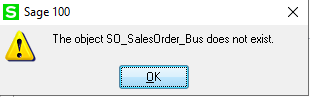
And I copied the affected company to a copy company and I am able to launch Sales Order Entry fine in the copy.
What could be company-specific when it comes to locating or compiling this program file?
------------------------------
Amber Prayfrock, Blytheco
Original Message:
Sent: 04-18-2021 00:08
From: Amber Prayfrock
Subject: Module J/C is not on file when accessing SO Entry only for one company
Thanks, Jeff. I think the thread you're remembering was where MAPADOC had to be installed only post-migration.
------------------------------
Amber Prayfrock, Blytheco
Original Message:
Sent: 04-17-2021 22:21
From: Jeff Schwenk
Subject: Module J/C is not on file when accessing SO Entry only for one company
This sounds very familiar. You don't mention it but do you have PU1 installed and the other hot fixes? Maybe someone posted that the if you installed the PU before doing the migration, that broke it. Don't exactly recall. Found this KB on the subject.
View Document - Sage Knowledgebase
------------------------------
Jeff Schwenk
FORMER 90M Board Member
Bottomline Software, Inc.
Waynesboro VA
540-221-4444