Sage 100

 View Only
  • 1.  Missing Tracking # field on Tracking button in Shipping Entry

    Posted 07-08-2025 11:45

    Somehow a user got rid of the Tracking field on the Tracking button. However, you can't reset that screen like you can other screens with lines.

    How to get it back?


    ------------------------------
    Beth Bowers
    Dog Mom, first and foremost. The rest is all just necessary to keep the dogs in biscuits.
    (269) 358-0989
    ------------------------------


  • 2.  RE: Missing Tracking # field on Tracking button in Shipping Entry

    Posted 07-08-2025 12:32

    Could they have used a hot-key and created a customized screen? I think that's the only way to remove a button. Check custom office.


    ------------------------------
    Bill Pfahnl
    Nims & Associates
    ------------------------------


  • 3.  RE: Missing Tracking # field on Tracking button in Shipping Entry

    Posted 07-08-2025 13:03

    This screen does not appear to be available for Customizer


    ------------------------------
    Beth Bowers
    Dog Mom, first and foremost. The rest is all just necessary to keep the dogs in biscuits.
    (269) 358-0989
    ------------------------------


  • 4.  RE: Missing Tracking # field on Tracking button in Shipping Entry

    Posted 07-08-2025 13:07

    Yes. My bad. I read the post wrong. I thought the tracking 'button' was missing.


    ------------------------------
    Bill Pfahnl
    Nims & Associates
    ------------------------------


  • 5.  RE: Missing Tracking # field on Tracking button in Shipping Entry

    Posted 07-08-2025 13:09
    Edited by Kevin Moyes 07-08-2025 13:09

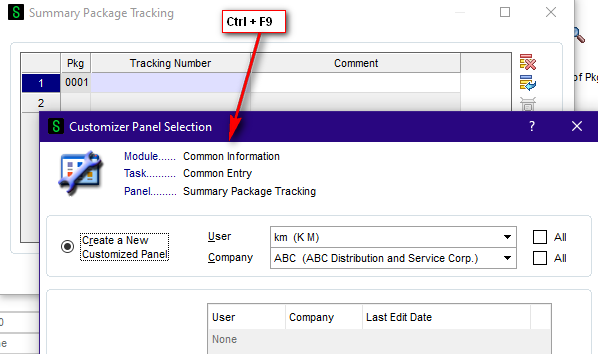
    It is... but not in an obvious place.  Ctrl+F9 allows you to get there easily... but this won't allow you to reset the user's customized grid settings (which are not technically part of the customized panel).


    ------------------------------
    Kevin Moyes
    Technical Systems Analyst
    Munjal White Consulting Co.
    Toronto ON
    ------------------------------


  • 6.  RE: Missing Tracking # field on Tracking button in Shipping Entry

    Posted 07-08-2025 13:25

    Oh, one of those back doors.  Don't have too many of those.

    Waiting to hear back on the first thought - fingers crossed


    ------------------------------
    Beth Bowers
    Dog Mom, first and foremost. The rest is all just necessary to keep the dogs in biscuits.
    (269) 358-0989
    ------------------------------


  • 7.  RE: Missing Tracking # field on Tracking button in Shipping Entry

    Posted 07-08-2025 12:38
    Edited by Kevin Moyes 07-08-2025 12:51

    They probably just dragged the field size to zero width.  Double-click the vertical line beside Pkg, and see if it re-appears.

    Edit: if that doesn't work, try removing the user / workstation specific grid settings...


    ------------------------------
    Kevin Moyes
    Technical Systems Analyst
    Munjal White Consulting Co.
    Toronto ON
    ------------------------------


  • 8.  RE: Missing Tracking # field on Tracking button in Shipping Entry

    Posted 07-08-2025 13:03

    Ah, sneaky, @Kevin Moyes - will check that out


    ------------------------------
    Beth Bowers
    Dog Mom, first and foremost. The rest is all just necessary to keep the dogs in biscuits.
    (269) 358-0989
    ------------------------------


  • 9.  RE: Missing Tracking # field on Tracking button in Shipping Entry

    Posted 07-08-2025 14:34

    BTW - I tried removing those records and nothing happened, BUT it was because they minimized it!  WOO HOO, that was it!  Thanks, @Kevin Moyes - never would have thought of that!


    ------------------------------
    Beth Bowers
    Dog Mom, first and foremost. The rest is all just necessary to keep the dogs in biscuits.
    (269) 358-0989
    ------------------------------