Sage 100

 View Only
  • 1.  Manual FreightAmt on SO / SO Invoices

    Posted 10-21-2021 18:11
    Anyone else have a problem with Sage overwriting FreightAmt values, entered manually?

    Create a ShipVia option for Manual Entry of freight... the only option even remotely implying a manual charge amount.
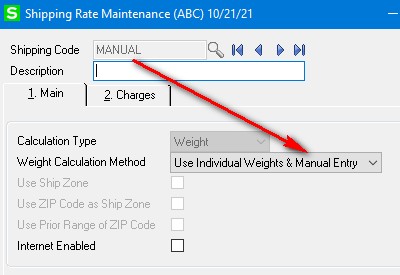
    Set this for the SO

    Enter an amount on the Totals tab...

    ...then edit lines (quantities... something that causes PreTotals to run again).  The freight amount resets to zero?!?!?!?

    Am I missing a technique / configuration option for Shipping Codes that allows 100% manual freight amounts, without Sage ever ever ever changing a manually entered value?

    ------------------------------
    Kevin Moyes
    Technical Systems Analyst
    Munjal White Consulting Co.
    Toronto ON
    ------------------------------


  • 2.  RE: Manual FreightAmt on SO / SO Invoices

    Posted 10-21-2021 21:27
    If you are using shipping rates in some instances - then I'm not sure you can override. Even if you override it in SO entry when you pull it into Invoicing it seems to recalculate. In many cases this might not be a big deal as the shipping might be added at the last step in the process.

    If you don't use the shipping rate codes to pull in a freight amount then you can turn off the calculation altogether. This obviously doesn't work if you need some codes that you rely on for computing freight.

    I'm pretty sure I've had this question a few times in the past and turning off the use of shipping code to calculate freight


    ------------------------------
    Wayne Schulz
    Schulz Consulting
    860-516-8990
    ------------------------------


  • 3.  RE: Manual FreightAmt on SO / SO Invoices

    Posted 10-22-2021 08:12
    Edited by Brett Zimmerman 10-22-2021 08:12


  • 4.  RE: Manual FreightAmt on SO / SO Invoices

    Posted 10-22-2021 08:13
    I hate battling with that setting, the one in S/O Options > Entry.

    ------------------------------
    Brett Zimmerman
    Net at Work
    Greater Boston Area
    ------------------------------


  • 5.  RE: Manual FreightAmt on SO / SO Invoices

    Posted 10-22-2021 08:30
    What I've done for one client is create a UDT that mimics the Ship VIA CODE/NAME (which is all they want) and put it on the screen over the standard Ship Via field and prints on the forms, goes to history, etc.  Otherwise, you have a choice of never being able to add new Ship Via on the fly, or every time you change a line item the freight disappears.

    ------------------------------
    Beth Bowers
    Mom to Samson, Peanut, ChiChi, Canton, Cagney and Daisy (NO Oxford comma - shriek!)
    Tennessee Software Solutions
    269-445-1625
    ------------------------------


  • 6.  RE: Manual FreightAmt on SO / SO Invoices

    Posted 10-22-2021 11:40
    Our usual pattern is customers use Shipping Code as an easy way to print the shipping method (courier, pick-up...) on forms, without modification.  We enable the option, so they can add new codes to the list (with the quick link from data entry screens... set the option to "No" and the Ship Via list can't be edited).
    Then, later on, they try to add a FreightAmt (or ask us to script some advanced logic to automatically calculate freight), and intermittently Sage wipes it out. 
    • Adding a UDF with UDT validation onto the panel works fine, but then we have to go in and modify a significant number of form codes...
    • Setting the SO Option to "No" works, but then users can't edit Ship Via codes... without enabling / editing / disabling the option (not user friendly).
    • Set up a /FREIGHT charge code, and instruct customers to use that... but then they ask: what about that Freight Amount field on the Totals tab?  Ugh.
    • Sage adding an option for "none" to the list solves everything, without extra work.


    ------------------------------
    Kevin Moyes
    Technical Systems Analyst
    Munjal White Consulting Co.
    Toronto ON
    ------------------------------