Sage 100

 View Only
  • 1.  Logo Disappearing on Crystal Report forms for Windows 11

    Posted 01-27-2024 07:20

    Team

    I'm hoping you can help on this. We now have three different situations (two different customers) where the customer's logo will disappear from the Crystal report form when on Windows 11. The fun part is that I think it could be related to user permissions because when I am logged on their network as a domain admin, it works just fine. Any help on this would be greatly appreciated. We tried to call Sage on this but they said to not use an OLE Object for this but when you add a picture into the form, it automatically translates to an OLE object. Our one customer is slowly migrating to all Windows 11 machines and this issue is halting the process so any input would be appreciated. 

    I'm getting one of the user logins and passwords on Monday so I can test under their account. I just isolated down today that the logo not working was Windows login specific.


    Thanks,

    Tara


    ------------------------------
    Tara Schinkel
    Consultant
    Stewart Technologies, Inc.
    ------------------------------


  • 2.  RE: Logo Disappearing on Crystal Report forms for Windows 11

    Posted 01-27-2024 13:09

    What happens if you try a different logo file/format, e.g. jpg, png, tif, or even just some other random image file?


    ------------------------------
    Brett Zimmerman
    Net at Work
    Greater Boston Area
    ------------------------------


  • 3.  RE: Logo Disappearing on Crystal Report forms for Windows 11

    Posted 01-27-2024 13:13
    We have multiple graphical images doing it right now on two different networks - in case that matters for your question below. 
    Sent from my iPhone


  • 4.  RE: Logo Disappearing on Crystal Report forms for Windows 11

    Posted 01-29-2024 10:04

    Is the image configured to use a formula to set the path to it or is it embedded?  If setting the path, confirm the user can navigate to the path via File Explorer and check NTFS permissions.

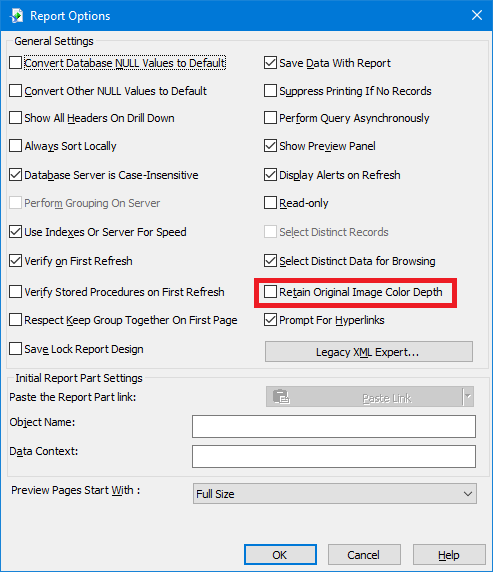
    The other thing to check is open the report in CR Designer, click File, click Report Options, make sure the "Retain Original Image Color Depth" option is enabled, click OK, and save the report.


    ------------------------------
    David Speck II
    Blytheco LLC
    ------------------------------


  • 5.  RE: Logo Disappearing on Crystal Report forms for Windows 11

    Posted 01-29-2024 10:20
    It's embedded. I'll try this setting now for within Crystal to see what I have

    Tara Schinkel, CPA,   Accounting Systems Lead & CFO


    Stewart Technologies, Inc.

    Champions for your efficiency.

    main: 410.309.9550 x 1104   

    stewarttechnologies.com   |   Follow Stewart Tech on


  • 6.  RE: Logo Disappearing on Crystal Report forms for Windows 11

    Posted 01-29-2024 10:22
    So the box is checked in Crystal reports but keep the ideas coming.

    Tara Schinkel, CPA,   Accounting Systems Lead & CFO


    Stewart Technologies, Inc.

    Champions for your efficiency.

    main: 410.309.9550 x 1104   

    stewarttechnologies.com   |   Follow Stewart Tech on


  • 7.  RE: Logo Disappearing on Crystal Report forms for Windows 11

    Posted 01-29-2024 10:37

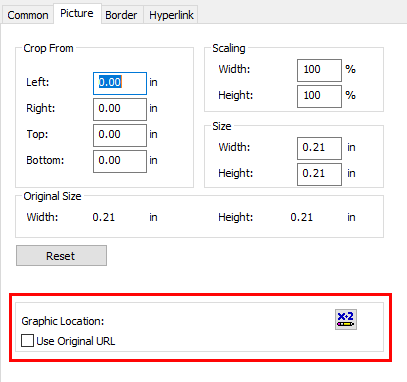
    Make sure you don't have anything enabled for the Graphic Location (image properties in the report), and it should use the embedded image. 

    (The print driver can affect things too, so be sure to try to Preview with something generic like the Microsoft PDF printer).


    ------------------------------
    Kevin Moyes
    Technical Systems Analyst
    Munjal White Consulting Co.
    Toronto ON
    ------------------------------


  • 8.  RE: Logo Disappearing on Crystal Report forms for Windows 11

    Posted 01-29-2024 11:04
    Edited by David Speck II 01-29-2024 11:05

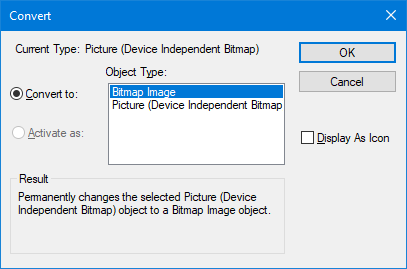
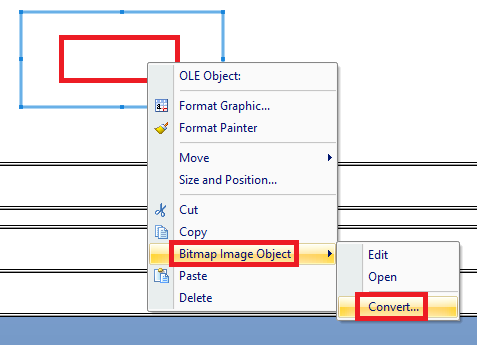
    Right-click the image and see if you get the option to "Convert Picture Object".  If you do, try converting it to a "Bitmap Image" object.  Test the report and see if it works.  If you don't see this option, go down to the next set of instructions.
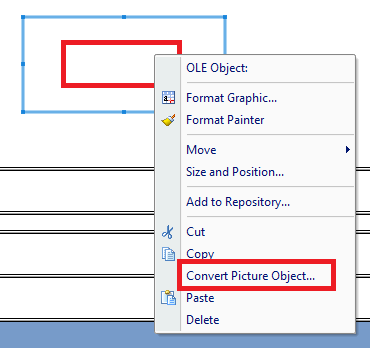
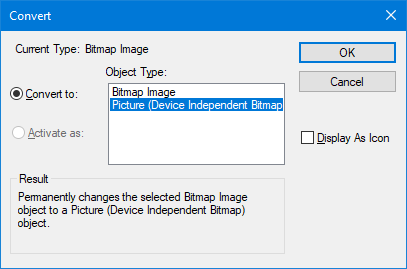
    If you get the "Bitmap Image Object" option, hover over it and click the "Convert" option.  Then try converting it to a "Picture (Device Independent Bitmap)" object.


    ------------------------------
    David Speck II
    Blytheco LLC
    ------------------------------