Yes, I got it to work for an Office 365 user. I had similar struggles and I think ultimately there was an issue with Port 587 being blocked on the server which IT had to open up. Running the diagnostic steps provided by Knowledgesynch helped quite a bit ( see below ). This is definitely not an end user friendly system though my customer's programmer type employees seem to love it.
Here's what I pulled from the message thread previously:
I have KnowledgeSync working with Office 365 as a stand-alone product at a non-Sage client. I use the following settings:Email Type: INTERNETCharacter Set: <blank>Email Account Description: Office 365 Online/AUTH/LOGIN/SSL/TLSLogin Name: account@domain.com" target="_blank" rel="noopener noreferrer">
account@domain.comPassword: <password> (Make sure this is configured not to expire)Postoffice: <blank>SMTP/POP Internet Email Information:Outgoing mail server: smtp.office365.comSMTP From Name: Real Name <account@domain.com" target="_blank" rel="noopener noreferrer">
account@domain.com>SMTP Port: 587Incoming mail server: smtp.office365.comPOP Port: 995
My customer site that is working:
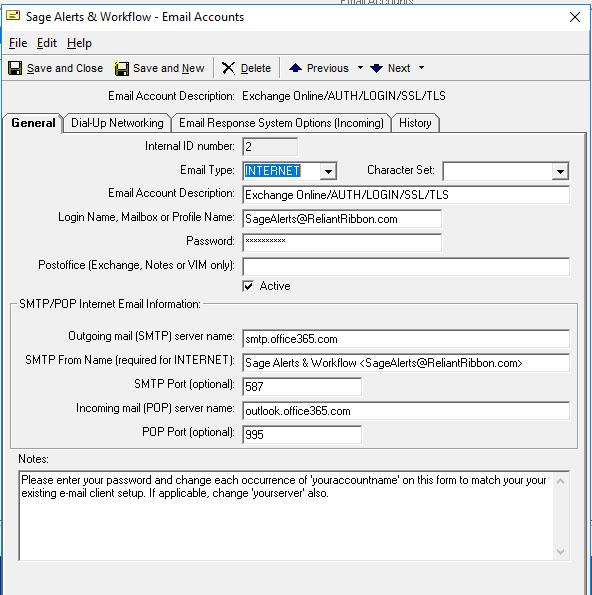
Prior to getting this working Knowledgesync had me run in debug mode to capture any error messages.
Here is what they advised:
Please run through the following steps and forward the resulting text files to us-
Stop the Sage Alerts and Workflow Windows Service.
Note: I had to use the following REGEDIT address instead of the Vineyardsoft Coporation\ noted below
HKEY_LOCAL_MACHINE\SOFTWARE\WOW5432Node\Sage Software\Sage Alerts & Workflow\General
Run
Regedit
(32 Bit Server)
HKEY_LOCAL_MACHINE\SOFTWARE\Vineyardsoft Corporation\KnowledgeSync 2000\General
(64 Bit Server)
HKEY_LOCAL_MACHINE\SOFTWARE\Wow6432Node\Vineyardsoft Corporation\KnowledgeSync 2000\General
Change "Diagnostics" to:
"4" - (4 is Email Server in Diagnostic Mode.)
Go to:
*:\Sage Software\Alerts and Workflow\Data
See if any KS_Diagnostics* files exist
If they exist, delete them
Start the Sage Alerts and Workflow Windows Service.
Submit your Email and an Event
If the Email errors:
Go to:
*\Sage Software\Alerts and Workflow\Data
Rename KS_Diagnostics.txt to KS_Diagnostics_SERV.txt
Rename KS_Diagnostics_Authentication.txt to KS_Diagnostics_Authentication_SERV.txt . .
Send those files to
support@vineyardsoft.com.
IMPORTANT:
Stop the Sage Alerts and Workflow Windows Service.
Reset the Diagnostics
REGEDIT
(32 Bit Server)
HKEY_LOCAL_MACHINE\SOFTWARE\Vineyardsoft Corporation\KnowledgeSync 2000\General
(64 Bit Server)
HKEY_LOCAL_MACHINE\SOFTWARE\Wow6432Node\Vineyardsoft Corporation\KnowledgeSync 2000\General
Change "Diagnostics" to:
"0" - (0 is No Servers in Diagnostic Mode.)
Start the Sage Alerts and Workflow Windows Service.
------------------------------
Wayne Schulz - Schulz Consulting - 860-516-8990
------------------------------