Sage 100

 View Only
Expand all | Collapse all

Knowledge Sync version 10

  • 1.  Knowledge Sync version 10

    Posted 01-27-2021 13:24
    Have a client where the database grew so large that it blew up the server. So I worked with the IT group to restore the best backup that we had for knowledge sync from 12/2020. I have not been able to find directions on how to restore the SQL database to knowledge sync v10 online. Does anyone have these instructions or could explain in simplistic way? I'm going to be doing this myself and do not have allot of experience in SQL.


    ------------------------------
    Shannon Stanley
    Sage 100 Consultant
    Ardent Consulting LLC
    704-839-6697
    ------------------------------


  • 2.  RE: Knowledge Sync version 10

    Posted 01-27-2021 13:36
    I can't talk about KS specifics, but for SQL it depends on the backup method.  If you just have the MDF/LDF, it's different than a BAK file.  Google will tell you how, depending on what you have available.

    Whoever set it up probably didn't change the database recovery method from Full to Simple, and the LDF grew unbounded.
    *eyeroll*

    ------------------------------
    Kevin Moyes
    Technical Systems Analyst
    Munjal White Consulting Co.
    Toronto ON
    ------------------------------


  • 3.  RE: Knowledge Sync version 10

    Posted 01-27-2021 14:05
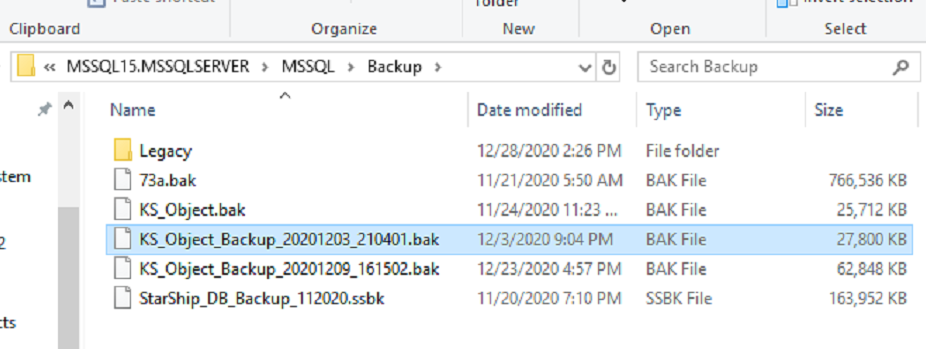
    Here is the file and it does have the .bak extension. 


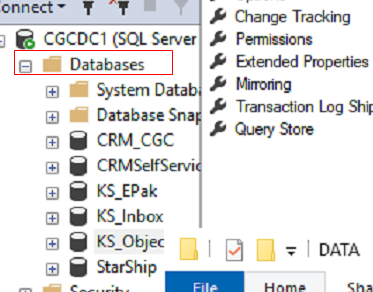
    I'm not sure which database of KS to use and how to I go about connecting this backup to the correct KS database. Attached screenshot of the KS databases.


    ------------------------------
    Shannon Stanley
    Sage 100 Consultant
    Ardent Consulting LLC
    704-839-6697
    ------------------------------


  • 4.  RE: Knowledge Sync version 10

    Posted 01-27-2021 14:30
    Each BAK file can have multiple database backups, and potential multiple copies each.
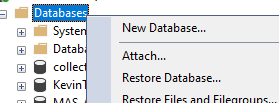
    When choosing your Device (bak file) you can view the contents right from that screen.

    When you get to the restore step (after choosing your BAK file), you can even rename the destination database name (in case you just want to check it's contents).  If you do that (or are restoring a backup from another machine) be sure to check the restore as file names / paths on the Files screen.  When there are multiple backups sets for the chosen database to restore, choose the one you want.
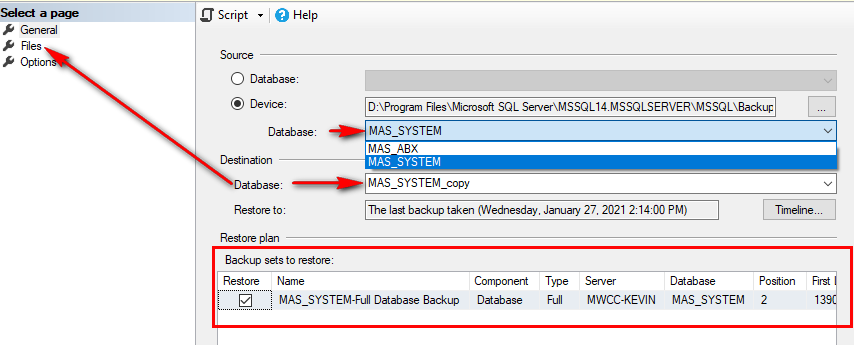
    For your first try you might want to restore to a copy first, then do it for real.


    ------------------------------
    Kevin Moyes
    Technical Systems Analyst
    Munjal White Consulting Co.
    Toronto ON
    ------------------------------


  • 5.  RE: Knowledge Sync version 10

    Posted 01-27-2021 15:58
    Kevin,

    Thank you so much for these screenshots! I have the database restore from the backup.

    ------------------------------
    Shannon Stanley
    Sage 100 Consultant
    Ardent Consulting LLC
    704-839-6697
    ------------------------------


  • 6.  RE: Knowledge Sync version 10

    Posted 01-27-2021 13:46
    Shannon,

    "blew up the server"  Do you mean that it filled up the disk?

    If so, change the recovery model (right click on the database in SQL Management Studio, choose properties, go to options) to simple.

    Click OK
    The go to the database properties again, files, and on the LOG row change the Size (MB) column to something reasonable (1000 would be a 1 GB log file) and click OK.  The log file should shrink down to this size.


    Phil

    ------------------------------
    Phil McIntosh
    President
    Friendly Systems, Inc.
    Asheville NC
    678.273.4010 ext 5
    ------------------------------


  • 7.  RE: Knowledge Sync version 10

    Posted 01-27-2021 14:08
    Yes, it maxed the disk space on the server and caused all programs to stop working. Thank you for these screenshots. I will make these changes now.

    ------------------------------
    Shannon Stanley
    Sage 100 Consultant
    Ardent Consulting LLC
    704-839-6697
    ------------------------------


  • 8.  RE: Knowledge Sync version 10

    Posted 01-28-2021 01:28

    Hi Shannon

      I just fought a several week battle with the new version of KS.  There is an issue with the report generation routine where it tries to do a file copy as well (even though it is not supposed to) and it writes an error to the log on each instance filling up the log.  In the report event uncheck the box about including it on copy operations (not looking at it right now but you will see it when you look.   Hope this helps you.  Our client was gonna throw the server though our window...


    Thank you,


    Bob Osborn

    ACI Consulting

    p 714.282.0378 ext. 402    f 714.282.0235


    Bob@ACIconsulting.com


     ACISignature1                  

    MCP_SE_Small.bmp

    This communication, including attachments, is confidential and may contain proprietary information intended only for the proposed recipient. Please notify the sender and delete this message if you believe that you have received this message in error or if you are not the proposed recipient. Unauthorized disclosure, copying, or distribution of the information is strictly prohibited.


  • 9.  RE: Knowledge Sync version 10

    Posted 01-28-2021 07:00
    Thank you Bob. I will take a look at this setting. My client is very frustrated.

    ------------------------------
    Shannon Stanley
    Sage 100 Consultant
    Ardent Consulting LLC
    704-839-6697
    ------------------------------


  • 10.  RE: Knowledge Sync version 10

    Posted 01-27-2021 14:15
    Phil,

    Should I do the same steps you provided for the KS_Epak and KS_Inbox?

    ------------------------------
    Shannon Stanley
    Sage 100 Consultant
    Ardent Consulting LLC
    704-839-6697
    ------------------------------


  • 11.  RE: Knowledge Sync version 10

    Posted 01-27-2021 14:33
    Never shrink a database file, and leave a bit of working space for the LDF... but if you aren't doing log backups (as part of the backup and recovery strategy), set all databases to Simple recovery model.

    ------------------------------
    Kevin Moyes
    Technical Systems Analyst
    Munjal White Consulting Co.
    Toronto ON
    ------------------------------


  • 12.  RE: Knowledge Sync version 10

    Posted 01-27-2021 15:00
    Shannon,

    Setting them all to simple should be fine.

    Phil

    ------------------------------
    Phil McIntosh
    President
    Friendly Systems, Inc.
    Asheville NC
    678.273.4010 ext 5
    ------------------------------


  • 13.  RE: Knowledge Sync version 10

    Posted 01-27-2021 15:20
    I changed the other two databases (KS_epak and KS_Inbox) from full to simple and didn't adjust the log file size. I adjusted the KS_object database to simple and only change the log file size to 1000 MB.

    What are the next steps to connecting the backup KS_Object_Backup.bak to the KS_Object database?

    ------------------------------
    Shannon Stanley
    Sage 100 Consultant
    Ardent Consulting LLC
    704-839-6697
    ------------------------------


  • 14.  RE: Knowledge Sync version 10

    Posted 01-27-2021 15:22
    If you now have free space you may not need to restore from backup.  I would test KS at this point.

    ------------------------------
    Phil McIntosh
    President
    Friendly Systems, Inc.
    Asheville NC
    678.273.4010 ext 5
    ------------------------------


  • 15.  RE: Knowledge Sync version 10

    Posted 01-28-2021 07:14
    Here is the next problem I'm running into that both sides are throwing it over the fence for the other party to resolve. When I go start the KS engine and KS program under windows services both are generating a Windows error 1053. The IT group rebooted the server last night and told me that it could not be an issue with the server. I have sent the error message back to KS support, but they told me they don't troubleshoot errors that are windows related. The last time the programs ran successfully was when it was installed. I did double check the administrator password and confirmed with the IT person that I had the correct one for both services. Server is Windows 2019. Do you have any suggestions? This is not my area of expertise. 


    ------------------------------
    Shannon Stanley
    Sage 100 Consultant
    Ardent Consulting LLC
    704-839-6697
    ------------------------------


  • 16.  RE: Knowledge Sync version 10

    Posted 01-28-2021 11:18

    My next step would be to pull it, clear out any registry keys that refer to KnowledgeSync or Vineyardsoft, and then re-install it, making sure to use "Run as administrator" when launching the installer. Also, make sure you are logged on to the server using an account that has local administrator rights. If all else fails, try installing using the local machine's administrator account (if you can get that password from IT).


    Raymond Westcott

    Business Software Consultant


    (818) 338.7200 Main

    (818) 338.7227 Direct Line

    (818) 338.7210 Support


    Millennium black on white background without mbsg copyright logo


    ERP Software Specialists

    IT Strategy, MSSP Services


    Subscribe to our newsletter


  • 17.  RE: Knowledge Sync version 10

    Posted 01-29-2021 15:13
    Thank you for the suggestion, I will try that and follow back up in the thread.

    ------------------------------
    Shannon Stanley
    Sage 100 Consultant
    Ardent Consulting LLC
    704-839-6697
    ------------------------------


  • 18.  RE: Knowledge Sync version 10

    Posted 02-01-2021 18:56
    I did end up reinstalling the KS software for v10 on the server to resolve the error 1053 and the software started working again. I appreciate your guidance and help on these issues. Thank you!

    ------------------------------
    Shannon Stanley
    Sage 100 Consultant
    Ardent Consulting LLC
    704-839-6697
    ------------------------------


  • 19.  RE: Knowledge Sync version 10

    Posted 01-27-2021 13:55
    In case it's not obvious, you'll also probably need to shrink the log file(s) on the KS databases.  Same thing happened to me (log file grew to fill the entire drive) and KS support confirmed that their databases inherit whatever recovery method is set on the SQL Server (Kevin's post).

    ------------------------------
    Rob Neal
    ------------------------------


  • 20.  RE: Knowledge Sync version 10

    Posted 01-28-2021 11:23

    If you're going to reinstall consider maybe installing SAW 9.x instead of 10.x?

    I've done 4-5 9.x SAW implementations and those are all running rock solid.  I've attempted one SAW 10.x install and it was a nightmare in comparison.  You can tell it wasn't a well thought out solution by the fact that you STILL HAVE TO RUN THE KLF ACCESS LINKING EVEN THOUGH SAW NOW USES A SQL backend!

    Don't really see any benefit from being on 10.x if it just adds complexity & errors.  9.x was a solid release & I don't plan to ever upgrade my 9.x SAW customers as long as I keep reading nightmare stories about SAW 10.x implementations.


    ------------------------------
    Jim Petrie
    Consultant
    DSD Business Systems
    ------------------------------