Each BAK file can have multiple database backups, and potential multiple copies each.
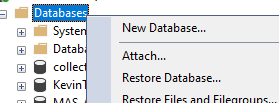
When choosing your Device (bak file) you can view the contents right from that screen.
When you get to the restore step (after choosing your BAK file), you can even rename the destination database name (in case you just want to check it's contents). If you do that (or are restoring a backup from another machine) be sure to check the restore as file names / paths on the Files screen. When there are multiple backups sets for the chosen database to restore, choose the one you want.
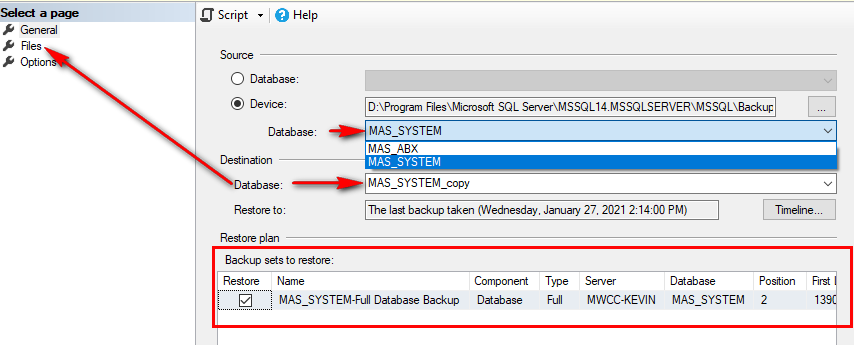
For your first try you might want to restore to a copy first, then do it for real.
------------------------------
Kevin Moyes
Technical Systems Analyst
Munjal White Consulting Co.
Toronto ON
------------------------------
Original Message:
Sent: 01-27-2021 14:05
From: Shannon Stanley
Subject: Knowledge Sync version 10
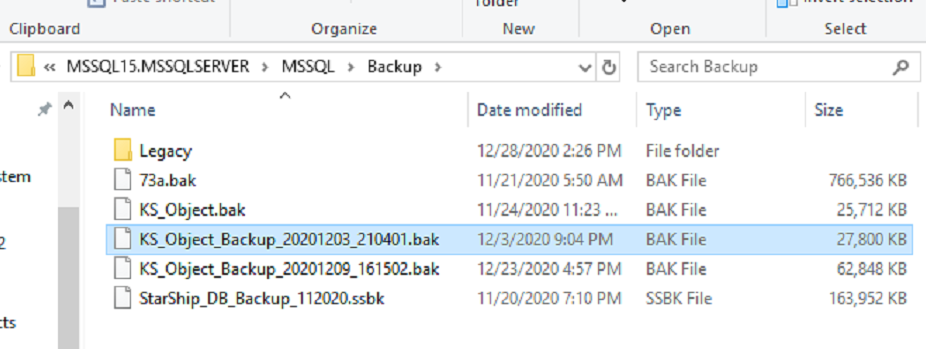
Here is the file and it does have the .bak extension.
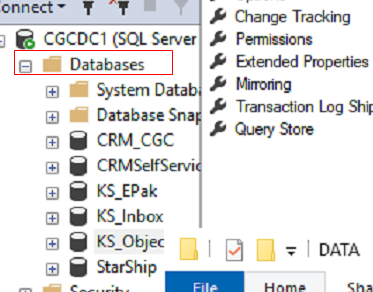
I'm not sure which database of KS to use and how to I go about connecting this backup to the correct KS database. Attached screenshot of the KS databases.
------------------------------
Shannon Stanley
Sage 100 Consultant
Ardent Consulting LLC
704-839-6697
------------------------------
Original Message:
Sent: 01-27-2021 13:36
From: Kevin Moyes
Subject: Knowledge Sync version 10
I can't talk about KS specifics, but for SQL it depends on the backup method. If you just have the MDF/LDF, it's different than a BAK file. Google will tell you how, depending on what you have available.
Whoever set it up probably didn't change the database recovery method from Full to Simple, and the LDF grew unbounded.
*eyeroll*
------------------------------
Kevin Moyes
Technical Systems Analyst
Munjal White Consulting Co.
Toronto ON