Sage 100

 View Only
  • 1.  Job Ops Phantom files - Can't copy company

    Posted 09-30-2021 16:14
    I upgraded our in house version to Sage 100 2020.  We had JobOps installed and migrated to Operations Management.  Now when trying to copy company data to a backup company the system gripes that "Data files for <co> have not been converted.  You must convert before copying."  The activated modules all show that the current data level for the source company is 6.20 but the Installed Modules Listing shows JopOps A/P, JobOps A/R, JobOps P/O, and JobOps S/O with a 4.05 level; also JobOps V/I Enhancements with a 5.1 level.

    I'm not sure that the problem is with those phantom instances but I highly suspect it.  Any ideas before I start surgically removing stuff?

    ------------------------------
    Chuck Peddy
    Smartbridge Partners
    ------------------------------


  • 2.  RE: Job Ops Phantom files - Can't copy company

    Posted 09-30-2021 16:17

    Did you reinstall Operations Management after you did the migration?  You have to always to re-install Operations Management after migration.


    Thanks

    Venessa Griffin, Senior Solution Architect

    RKL eSolutions, LLC

    phone: 717.735.9109 x3115  | mobile: 816.392.9879

    www.rklesolutions.com

    Contact us directly for Support or Sales


     image003.png@01D5363E.E96C9FA0


    Any advice or information in the body of this email is subject to, and limited by, the terms in the applicable engagement letter or statement of work, including provisions regarding tax advice.  RKL is not responsible for, and no person should rely upon, any advice or information in the body of this email unless such advice or information relates to services contemplated by an engagement letter or statement of work in effect between such person and RKL. 


    Confidential and Privileged: The information transmitted is intended only for the person or entity to which it is addressed and may contain confidential and/or privileged material. Any review, retransmission, dissemination or other use of, or taking of any action in reliance upon, this information by persons or entities other than the intended recipient is prohibited. If you are not the intended recipient, please contact the sender, destroy all copies and delete the material from any computer. RKL eSolutions and/or its employees shall not be liable for the incorrect, incomplete or delay in transmission of this e-mail.


  • 3.  RE: Job Ops Phantom files - Can't copy company

    Posted 09-30-2021 16:18
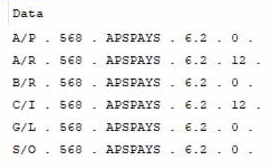
    Check CI_EnhancementActivation.  We had this issue a couple times recently with APS not updating the Build # in this table, blocking company copies.

    ------------------------------
    Kevin Moyes
    Technical Systems Analyst
    Munjal White Consulting Co.
    Toronto ON
    ------------------------------


  • 4.  RE: Job Ops Phantom files - Can't copy company

    Posted 10-01-2021 11:45
    @Kevin Moyes, our CI_EnhancementActivation file looks exactly like that.  Is that what it's supposed to look like?​

    ------------------------------
    Chuck Peddy
    Smartbridge Partners
    ------------------------------


  • 5.  RE: Job Ops Phantom files - Can't copy company

    Posted 10-01-2021 12:04
    Edited by Kevin Moyes 10-01-2021 12:07
    If they are not updated after the company conversion, edit all the mismatched #'s (final column) to be the same (i.e. change 0 to 12). 

    APS said they fixed the issue, but I'll believe that when I see it myself.

    Edit: from July.


    ------------------------------
    Kevin Moyes
    Technical Systems Analyst
    Munjal White Consulting Co.
    Toronto ON
    ------------------------------


  • 6.  RE: Job Ops Phantom files - Can't copy company

    Posted 10-01-2021 12:09
    My full note from the time:

    Query SY_EnhancementModule and see what the SubLevel is for the APS modules (it may have been incremented from 12 with a fresh installer).  Then edit the company specific APS rows in CI_EnhancementActivation to match that SubLevel value, module by module.


    ------------------------------
    Kevin Moyes
    Technical Systems Analyst
    Munjal White Consulting Co.
    Toronto ON
    ------------------------------


  • 7.  RE: Job Ops Phantom files - Can't copy company

    Posted 10-01-2021 12:45
    Thank you, @Kevin Moyes.  That did the trick!​

    ------------------------------
    Chuck Peddy
    Smartbridge Partners
    ------------------------------