My full note from the time:
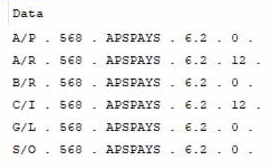
Query SY_EnhancementModule and see what the SubLevel is for the APS modules (it may have been incremented from 12 with a fresh installer). Then edit the company specific APS rows in CI_EnhancementActivation to match that SubLevel value, module by module.
------------------------------
Kevin Moyes
Technical Systems Analyst
Munjal White Consulting Co.
Toronto ON
------------------------------
Original Message:
Sent: 10-01-2021 12:04
From: Kevin Moyes
Subject: Job Ops Phantom files - Can't copy company
If they are not updated after the company conversion, edit all the mismatched #'s (final column) to be the same (i.e. change 0 to 12).
APS said they fixed the issue, but I'll believe that when I see it myself.
Edit: from July.
------------------------------
Kevin Moyes
Technical Systems Analyst
Munjal White Consulting Co.
Toronto ON
------------------------------
Original Message:
Sent: 10-01-2021 11:45
From: Chuck Peddy
Subject: Job Ops Phantom files - Can't copy company
@Kevin Moyes, our CI_EnhancementActivation file looks exactly like that. Is that what it's supposed to look like?
------------------------------
Chuck Peddy
Smartbridge Partners
Original Message:
Sent: 09-30-2021 16:18
From: Kevin Moyes
Subject: Job Ops Phantom files - Can't copy company
Check CI_EnhancementActivation. We had this issue a couple times recently with APS not updating the Build # in this table, blocking company copies.
------------------------------
Kevin Moyes
Technical Systems Analyst
Munjal White Consulting Co.
Toronto ON