Sage 100

 View Only
  • 1.  Item Sales History phantom numbers

    Posted 05-21-2025 07:04

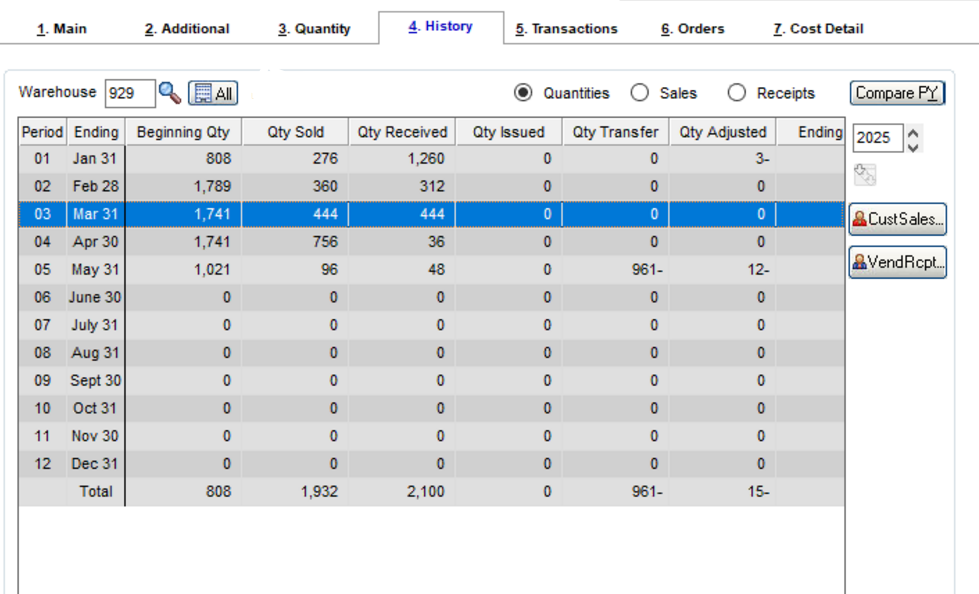
    For Sage100 version 2019 (or any version), has anyone seen where the values in the qty sold and qty received columns on the

    item history tab show numbers that do not correspond to the underlying transactions.

    As an example, In the screen shot below, the 444 sold and received, for period 3 have no transactions for period 3, and the qty sold and received for other periods might have some transactions, but they don't add up to what is on the history tab.

    I'm not looking for info on recalculating the values, rather possible known causes or when/if others have seen this.

    Any thoughts on this would be helpful - have been trying to get them to upgrade for years....

    Thanks


    JF


    ------------------------------
    Jeff Fiddelman
    DSD Business Systems
    ------------------------------


  • 2.  RE: Item Sales History phantom numbers

    Posted 05-21-2025 07:31

    Are the posting dates on the transactions in a different fiscal period than the transaction dates? I believe that would be a possible cause.


    Join us for the 2025 Intermediate Crystal Reports for Sage 100 Online Training: View the details

    **************

    David Overholt

    DWD Technology Group, Inc.

    9921 Dupont Circle Drive West, Suite 300 | Fort Wayne, IN 46825

    260.423.2414 main

    260.399.8655 Direct

    800.232.8913 toll free

    sagesupport@dwdtechgroup.com

    www.dwdtechgroup.com


    A black background with white text  Description automatically generated


  • 3.  RE: Item Sales History phantom numbers

    Posted 05-21-2025 11:12

    If they changed their fiscal year structures that could do it.  GL period data is automatically recalculated, but I believe you have to recalculate IM after that.

    Also, if you do the IM recalc, it's a good idea to reinit the IM "ByPeriod" tables, because I believe the recalc utility only updates, and doesn't remove obsolete rows.


    ------------------------------
    Kevin Moyes
    Technical Systems Analyst
    Munjal White Consulting Co.
    Toronto ON
    ------------------------------


  • 4.  RE: Item Sales History phantom numbers

    Posted 05-22-2025 08:40

    That's a great Tim @Kevin Moyes; I had not realized it worked that way.  


    ------------------------------
    Madeline Stefanou
    RKL eSolutions, LLC
    ------------------------------


  • 5.  RE: Item Sales History phantom numbers

    Posted 05-22-2025 09:11
    Edited by Wayne Schulz 05-22-2025 09:12

    Additional/supplemental info from Sage - What files are used to calculate item history when running the Recalculate Item History utility?

    What files are used to calculate item history when running the Recalculate Item History utility?

    Created on  | Last modified on 

    There are two files used to calculate the item history when running the Recalculate Item History utility in Inventory Management:

    • IM_ItemTransactionHistory.m4t
    • IM_ItemTransactionRecalc.m4t

    The files that are recalculated are:

    • IM_PeriodPostingHistory.m4t
    • IM_ItemCustomerHistoryByPeriod.m4t
    • IM_ItemVendorHistoryByPeriod.m4t
    • IM_ItemWhseHistoryByPeriod.m4t


    ------------------------------
    Wayne Schulz
    wayne@s-consult.com
    Schulz Consulting
    (860) 516-8990
    CT
    ------------------------------