Sage 100

 View Only
  • 1.  Issues with VID and Sage 100 2018 Standard

    Posted 05-08-2019 08:43
    I have a customer using Sage 100 2018 Standard and VDI for their workstations.

    We have two main  issues we have not been able to resolve:

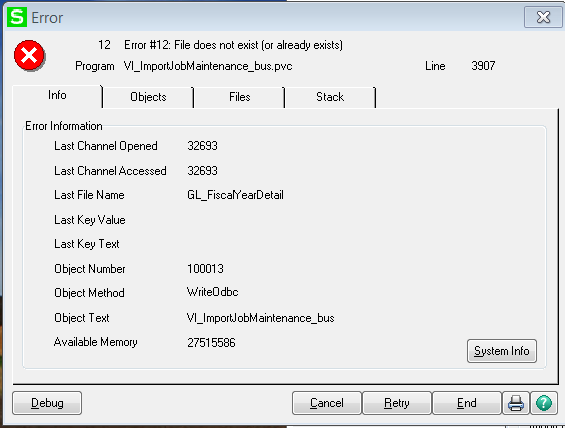
    a. When saving a VI job I get 
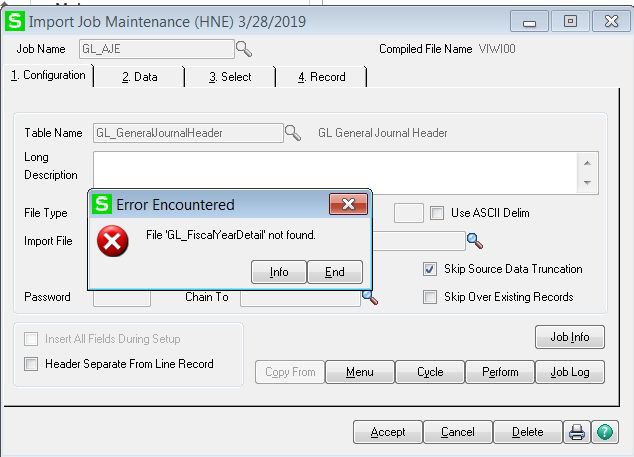


    This appears to occur only in the VDI environment and for all users - even the network admin when he attempts to log in.

    We are using unified login

    The part that has me puzzled is that all other parts of Sage are working except: 

    1. Trying to save a VI job produces a similar error to the above ( the file referenced may be different depending on the VI job ) 
    2. Trying to modify the menu and save using SY_MENU_UI
    3. Sporadically users receive "Record ' ' is missing from SY_Workstation.m4t" - it's unknown how often since they enter through and it appears to correct the issue

    When they create a desktop in a NON-VDI environment where I just log in using a conventional RDP then the issue does not persist

    This seems most likely related to their environment and more specifically anti-virus or malware or restrictive user rights.

    I don't have anywhere to point them to resolve this. Because they are in a high-security environment it's not as simple as them allowing everyone to be a local administrator and providing full rights to the network.

    I'm hoping there might be something more specific to VDI that people have run across which will be helpful in this case.

    The customer connected with Sage and ran Procmon but I have tried to keep their hopes down that someone at Sage will step up and diagnose their environment for them ....

    Any ideas? 


    ------------------------------
    Wayne Schulz - Schulz Consulting - 860-516-8990
    ------------------------------


  • 2.  RE: Issues with VID and Sage 100 2018 Standard

    Posted 05-08-2019 09:07
    I would agree with the statement "This seems most likely related to their environment and more specifically anti-virus or malware or restrictive user rights."  Seems a lot like the Webroot issues that affected payroll.

    ------------------------------
    Chris St. Amand
    Arizona Accounting & Information Systems
    ------------------------------


  • 3.  RE: Issues with VID and Sage 100 2018 Standard

    Posted 05-08-2019 09:43
    I completely agree. I think this is environmental.
    Unfortunately, what is occurring more frequently is the IT department who has tightly customized their security (a) is reluctant to ease any restrictions / raise privileges and (b) takes the stance of "tell us exactly what to change in our completely customized environment so that Sage runs".

    At that point, it's a deadlock and I think this is the point where we will start to see Sage 100cloud attrition from some of our very large strategic customers.

    ------------------------------
    Wayne Schulz - Schulz Consulting - 860-516-8990
    ------------------------------


  • 4.  RE: Issues with VID and Sage 100 2018 Standard

    Posted 05-09-2019 03:18
    Given that the network admin logged in, I'm not sure if it has to do with user rights. However, it can possibly be related to GPO maybe. 

    They should be able to create a one-off VDI Pool with one or 2 VMs in them in a separate OU, and exclude them from all policies for testing purposes (Block inheritance) This is not a solution of course, but it would at least rule out computer and user GPOs. 

    Other items to check is the path for the sage client: is it launching the same way for the Non-VDI machine which I presume since it's not an image, the Sage client may have been installed manually, vs the VDI being inherited from a golden image which may be pathed in a way that sage doesn't like. 

    For example: when publishing Sage as a remote app on an RDSH by pointing to \\server\c$\sage\client\mas90.... will cause weird and obscure errors, but pointing it to c:\sage\client\mas90 gets things working again. (Share perms vs Filesystem ACLs) 

    this probably isn't the case in a VDI scenario, but just a thought for something to look into. 


    ------------------------------
    George Khairallah
    CTO | gotomyerp, LLC
    george.k@gotomyerp.com | 877-888-5525
    http://gotomyerp.com/
    ------------------------------


  • 5.  RE: Issues with VID and Sage 100 2018 Standard

    Posted 05-09-2019 07:26
    Thank! From day one when this problem arose, I asked that they try to isolate by either creating a new image with no security/restrictions or copy all of Sage to a laptop without AV or restrictions. 

    It appears they were able to get it to work in a new VDI with fewer restrictions. 


    Thanks for the feedback - much appreciated!

    ------------------------------
    Wayne Schulz - Schulz Consulting - 860-516-8990
    ------------------------------