Sage 100

 View Only
Expand all | Collapse all

Issue with customer who upgraded 3.6 to 2021 - 1099-NEC boxes all blank

  • 1.  Issue with customer who upgraded 3.6 to 2021 - 1099-NEC boxes all blank

    Posted 01-21-2022 15:24

    I have a customer who upgraded from a very old 3.6 to 2021 during the year.
    I now find that because I skipped a few versions and went to 2021 that their 1099 boxes are not setup for 2021 and there doesn't seem  to be a way to create them

    I'm not sure Sage is going to be of much help.

    Has anyone wrestled with how to get these boxes? 

    What I've tried: 

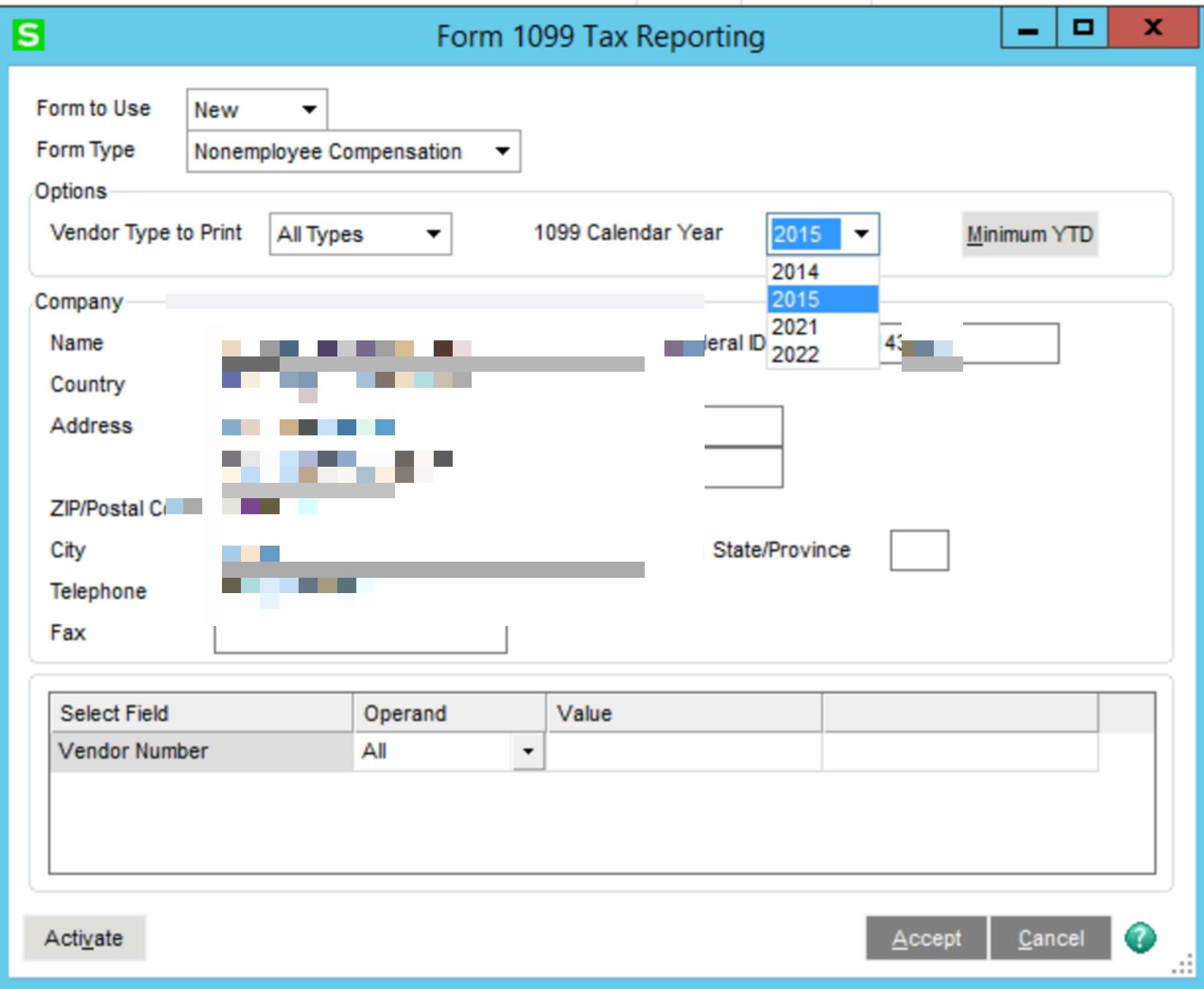
    - Tried setting 1099 year back to 2019 or 2020 - with the thought of printing the 1099 and answering "Y" to setup next year. Problem is the years don't exist.
    - Looked at maybe creating a fresh SY_1099setttings which seems to be what Sage advised in one of their KB

    The Sage KB isn't great in this area. Or at least I haven't found an article that's more than a rehash of a similar article. It's almost like the same article was re-written for different situations but the articles all seem very similar.

    Have you had to deal with this and if so - how did you resolve this? 

    I believe the customer is ok with computing the 1099 by hand and would mostly like to set up the boxes for 2022.


    ------------------------------
    Wayne Schulz
    Schulz Consulting
    860-516-8990
    ------------------------------


  • 2.  RE: Issue with customer who upgraded 3.6 to 2021 - 1099-NEC boxes all blank

    Posted 01-21-2022 15:38
    Just dealt with this the other day.  Start processing 1099's for 2020, get to the grid, then cancel out and close and answer YES to increment the year.  The boxes should then appear.
    N

    ------------------------------
    Nancy Hanson
    Blytheco LLC
    Eagan MN
    ------------------------------


  • 3.  RE: Issue with customer who upgraded 3.6 to 2021 - 1099-NEC boxes all blank

    Posted 01-21-2022 15:40
    Try this: change 1099 year to 2020 in setup options, then begin 1099 Aatrix process for 2020 but cancel after first/second screen. It should then prompt to increment the year; answer yes. Then try 2021 again via aatrix. 
    https://www.sagecity.com/us/sage100_erp/f/sage-100-core-financial-modules/180008/no-data-to-print-when-trying-to-print-1099-nec/458393#458393

    ------------------------------
    Brett Zimmerman
    Net at Work
    Greater Boston Area
    ------------------------------


  • 4.  RE: Issue with customer who upgraded 3.6 to 2021 - 1099-NEC boxes all blank


  • 5.  RE: Issue with customer who upgraded 3.6 to 2021 - 1099-NEC boxes all blank

    Posted 01-21-2022 15:46
    I have successfully copied in the SY_1099Settings at least one place.  I'd try that first.

    ------------------------------
    Beth Bowers
    Mom to Samson, Peanut, ChiChi, Canton, Cagney and Daisy (NO Oxford comma - shriek!)
    Tennessee Software Solutions
    269-445-1625
    ------------------------------


  • 6.  RE: Issue with customer who upgraded 3.6 to 2021 - 1099-NEC boxes all blank

    Posted 01-21-2022 15:54
    The problem is


    ------------------------------
    Wayne Schulz
    Schulz Consulting
    860-516-8990
    ------------------------------


  • 7.  RE: Issue with customer who upgraded 3.6 to 2021 - 1099-NEC boxes all blank

    Posted 01-21-2022 15:57
    And if I try to go back to 2015 to print thinking I'll go one year by one year and gradually get to 2021 --- nope .. 


    ------------------------------
    Wayne Schulz
    Schulz Consulting
    860-516-8990
    ------------------------------


  • 8.  RE: Issue with customer who upgraded 3.6 to 2021 - 1099-NEC boxes all blank

    Posted 01-21-2022 15:58
    Essentially I guess I need to find a way to get 2020 into the selection box to re-print 1099 throught Aatrix
    The year in the AP Options doesn't drive it

    ------------------------------
    Wayne Schulz
    Schulz Consulting
    860-516-8990
    ------------------------------


  • 9.  RE: Issue with customer who upgraded 3.6 to 2021 - 1099-NEC boxes all blank

    Posted 01-21-2022 16:31
    I think ( hope ) that I got it to work.
    I wasn't successful finding many data files other than the SY_1099Settings.
    I made a copy of that on the customers system ( MAS_SYSTEM )
    Then copied in a 2021 version from my version of Sage
    I still only saw the above older years for printing 1099s
    I think what worked was I tried to print a 1099-DIV for 2015.
    From there it appeared to create the year 2020
    I printed 1099 NEC for 2020 and it went to the grid, I cancelled then it prompted to create 2021

    Here's hoping that fixes the issue

    ------------------------------
    Wayne Schulz
    Schulz Consulting
    860-516-8990
    ------------------------------