I just started using paperless internally a few weeks back. So far, I am slapping my head for not doing it sooner. I am surprised (OK, not really) that the paperless functionality is missing from manual checks. I think we all agree that the word/concept of consistency is not used regularly at Sage.!!!!
Bottomline Software, Inc.
Original Message:
Sent: 02-19-2025 11:38
From: Kevin Moyes
Subject: Is there a way to see what "remit to" address was printed on a check that we mailed out?
I'd like to see the ability to change the default Paperless option, by form, to reduce problems related to the users simply not noticing it isn't set correctly.
------------------------------
Kevin Moyes
Technical Systems Analyst
Munjal White Consulting Co.
Toronto ON
------------------------------
Original Message:
Sent: 02-19-2025 10:37
From: Doug Higgs
Subject: Is there a way to see what "remit to" address was printed on a check that we mailed out?
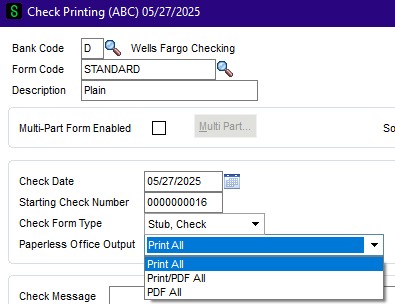
Absolutely @Wayne Schulz I would love to know the reason why a paperless office entry doesn't get created when Print is selected instead of Print/PDF All. Poor design and subject to user error.
------------------------------
Doug Higgs
Midwest Commerce Solutions, Inc
(312) 315-0960
Chauffeur, Chef, and Personal Assistant to Sprinkles
Original Message:
Sent: 02-19-2025 10:25
From: Wayne Schulz
Subject: Is there a way to see what "remit to" address was printed on a check that we mailed out?
>>on the check printing screen the Print/PDF All needs to be selected in the paperless Office Output field. If print is selected the paperless document doesn't get created.
In my opinion this is poor product design.
The business reasoning:
- If a company turns on paperless office then users should not have the ability to omit saving a document
- Journals and Registers don't require any added steps to save paperless documents
- Forms should not have a separate user-selected option either - it's fine to let the end-user select not to have a paper copy of something.
- If the standard process for a company is that they use paperless then ALL the types of documents they've indicated in setup should automatically go to paperless.
- An end-user should not be able to override that through a confusing UI option.
------------------------------
Wayne Schulz
wayne@s-consult.com
Schulz Consulting
(860) 516-8990
CT
Original Message:
Sent: 02-19-2025 10:01
From: Doug Higgs
Subject: Is there a way to see what "remit to" address was printed on a check that we mailed out?
@Jeff Schwenk You are correct... the enable electronic check box doesn't have anything to do with it. I tested it some more this morning and the issue is that on the check printing screen the Print/PDF All needs to be selected in the paperless Office Output field. If print is selected the paperless document doesn't get created. I made the rookie mistake of making two changes at the same time when testing and thought it was the check box but it wasn't.
------------------------------
Doug Higgs
Midwest Commerce Solutions, Inc
(312) 315-0960
Chauffeur, Chef, and Personal Assistant to Sprinkles
Original Message:
Sent: 02-18-2025 15:05
From: Jeff Schwenk
Subject: Is there a way to see what "remit to" address was printed on a check that we mailed out?
I don't think that is true @Doug Higgs. I just enabled AP check pdf'ing in the past week for my BLS checks (very handy). Specified a path in paperless set up but did not enable electronic delivery. I did not enable electronic delivery in the vendor set up. I did specify print/PDF during the check printing process. Running 2024 ADV
------------------------------
Jeff Schwenk
Owner
Bottomline Software, Inc.
Waynesboro VA
(540) 221-4444
Improving bottom lines for over 25 years!
Original Message:
Sent: 02-18-2025 14:13
From: Doug Higgs
Subject: Is there a way to see what "remit to" address was printed on a check that we mailed out?
I was just using quick print to speed up my testing. I really want the "regular" printing. I figured out why the pdf viewer didn't have the checks. In paperless form maintenance the "enable electronic delivery" box needs to be checked... even if you are not going to be emailing anything. That's a bit odd. Thanks for your help @Kevin Moyes !!
------------------------------
Doug Higgs
Midwest Commerce Solutions, Inc
(312) 315-0960
Chauffeur, Chef, and Personal Assistant to Sprinkles
Original Message:
Sent: 02-18-2025 14:08
From: Kevin Moyes
Subject: Is there a way to see what "remit to" address was printed on a check that we mailed out?
I don't think Paperless works with manual checks being printed... that is a different program.
------------------------------
Kevin Moyes
Technical Systems Analyst
Munjal White Consulting Co.
Toronto ON
Original Message:
Sent: 02-18-2025 14:03
From: Doug Higgs
Subject: Is there a way to see what "remit to" address was printed on a check that we mailed out?
One of the reasons it wasn't going to paperless office is because I was printing the check using quick print in manual check printing. There isn't a "paperless office output " drop down in manual check quick print. I must have something set up incorrectly because I see the "paperless office output " drop down in the "regular" check and electronic payment processing but when I print check and update the check register I don't see the check copy in the paperless viewer. Quite odd. I must be missing something simple.
------------------------------
Doug Higgs
Midwest Commerce Solutions, Inc
(312) 315-0960
Chauffeur, Chef, and Personal Assistant to Sprinkles
Original Message:
Sent: 02-18-2025 13:42
From: Kevin Moyes
Subject: Is there a way to see what "remit to" address was printed on a check that we mailed out?
AFAIK remit details don't get copied into payment history (unless you set up something for a UDF data flow).
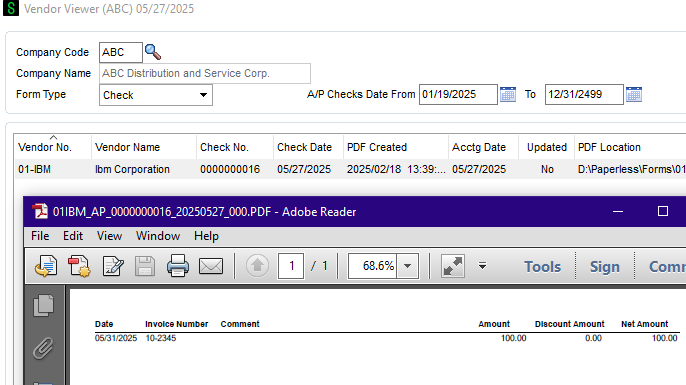
Check your Paperless settings... when enabled for the form, Paperless options are showing as an option for me in my test v2024.
------------------------------
Kevin Moyes
Technical Systems Analyst
Munjal White Consulting Co.
Toronto ON