Sage 100

 View Only
  • 1.  InvokeChange for a checkbox?

    Posted 11-08-2022 18:30
    Customer has asked for the checkboxes in the IM Copy From dialog to default off, but I can't get the script to work... not even as a button script.
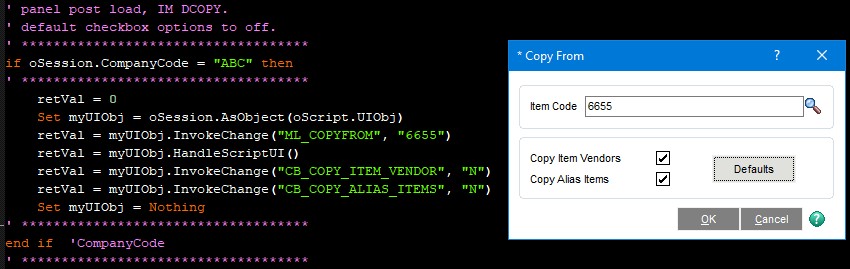
    I know the script is running because I can change the Item Code field, but nothing I try affects the checkboxes.
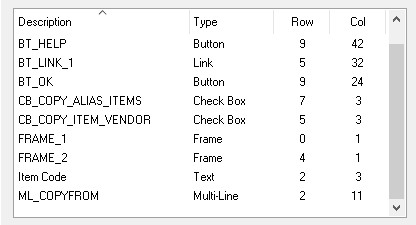
    And I am certain I have the panel field names correct... unless there is some kind of special syntax for checkboxes?

    ------------------------------
    Kevin Moyes
    Technical Systems Analyst
    Munjal White Consulting Co.
    ------------------------------


  • 2.  RE: InvokeChange for a checkbox?

    Posted 11-09-2022 01:50
    You are assuming that the checkboxes are Y|N, but in this situation they are numeric 0|1. Just change your InvokeChange's to SetVar's and your "N" to a 0.

    If oSession.CompanyCode = "ABC" Then
    	retVal = 0
    	Set myUIObj = oSession.AsObject(oScript.UIObj)
    	retVal = myUIObj.InvokeChange("ML_COPYFROM","6655")
    	retVal = myUIObj.HandleScriptUI()
    	retVal = myUIObj.SetVar("CB_COPY_ALIAS_ITEMS",0)
    	retVal = myUIObj.SetVar("CB_COPY_ITEM_VENDOR",0)
    	Set myUIObj = Nothing
    End If​


    ------------------------------
    Dan Burleson
    Software Consultant
    Connex Software
    ------------------------------


  • 3.  RE: InvokeChange for a checkbox?

    Posted 11-09-2022 10:38
    Thanks @Dan Burleson
    I tried 0, FALSE... but nothing worked with InvokeChange.  SetVar is new to me and that did the trick!


    ------------------------------
    Kevin Moyes
    Technical Systems Analyst
    Munjal White Consulting Co.
    ------------------------------