Sage 100

 View Only
  • 1.  Installing the Avalara DLL on Workstations.

    Posted 05-31-2019 11:22
    New client stepping up the plate with Avalara.  Sage 100 ADV v2017. 

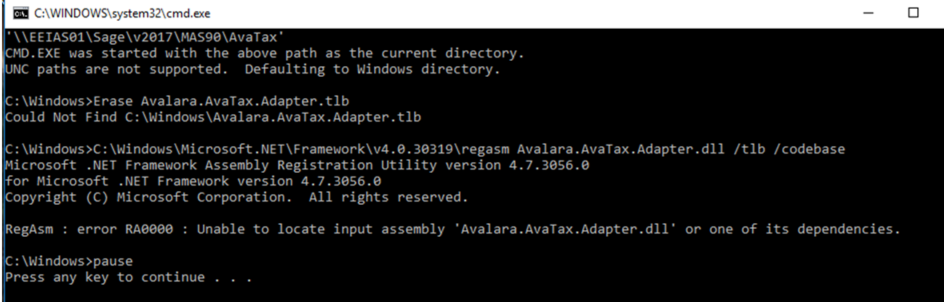
    Half of the workstations installed the DLL without issue, the other half are getting this message when running the BAT file.

    Has anyone else been challenged with this install issue and if so, how did you resolve it.  Client is logged onto the workstation as System Admin.  The Avatax folder from under the MAS90 folder has been copied to the workstation's root directory.  Not sure of the OS of the belligerent workstations.

    Who does support for this?  I am assuming Avalara.

    TIA


    ------------------------------
    Jeff Schwenk
    FORMER 90M Board Member
    Bottomline Software, Inc.
    Waynesboro VA
    540-221-4444
    ------------------------------


  • 2.  RE: Installing the Avalara DLL on Workstations.

    Posted 05-31-2019 11:32
    They seem to be running it from the server path, not the copy on the C, and it is defaulting to run in c:\windows not c:\avatax

    we have found that if you copy it to the C and run it from C:\avatax, it works....  we sometimes put a pause command into the batch file at the end so we can see exactly what is happening.

    Jeff

    ------------------------------
    Jeff Fiddelman
    Exeplex, LLC
    ------------------------------


  • 3.  RE: Installing the Avalara DLL on Workstations.

    Posted 05-31-2019 11:53
    No.  I noted above that they had copied the avatax folder to the root drive and ran it from there.  I also put the pause it (not sure why Avarala didn't).  Otherwise, you never know if it is successful. As a thought, maybe I will add a cd\ the beginning of the file.

    Thanks for the response

    ------------------------------
    Jeff Schwenk
    FORMER 90M Board Member
    Bottomline Software, Inc.
    Waynesboro VA
    540-221-4444
    ------------------------------


  • 4.  RE: Installing the Avalara DLL on Workstations.

    Posted 05-31-2019 13:10
    Edited by Jeff Schwenk 05-31-2019 13:14
    Even when the Avatax folder was at the root level, the batch file was not able to locate the DLL.  So I modified the batch file line to specify the path to the DLL file (below).  That seems to have worked (cannot test however).  I wonder why some WS could find the DLL and others could not.


    ------------------------------
    Jeff Schwenk
    FORMER 90M Board Member
    Bottomline Software, Inc.
    Waynesboro VA
    540-221-4444
    ------------------------------