That's great. Glad it's working as you intended it to.
------------------------------
Doug Higgs
Midwest Commerce Solutions, Inc
(312) 315-0960
Chauffeur, Chef, and Personal Assistant to Sprinkles
------------------------------
Original Message:
Sent: 12-22-2023 16:20
From: Tina Meacham
Subject: Import Customer Number
Hi Doug,
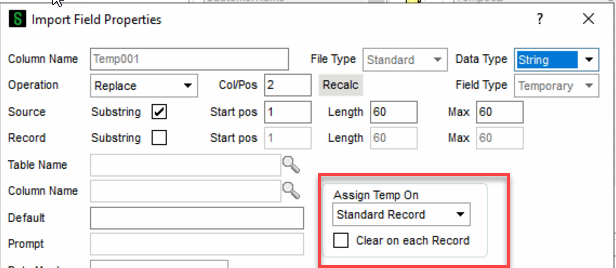
Thank you for the import! I'm working on premium 2023 and for some reason my assign on temp will not stick when I selected Key Records. I'm thinking that might have been the issue? I had to create a new one, copy yours and it worked. Thank you!
------------------------------
Tina Meacham
RKL eSolutions, LLC
------------------------------
Original Message:
Sent: 12-22-2023 13:37
From: Doug Higgs
Subject: Import Customer Number
Make sure on your TEMP field you set the "Assign Temp On" to "Key Assigns Only".
------------------------------
Doug Higgs
Midwest Commerce Solutions, Inc
(312) 315-0960
Chauffeur, Chef, and Personal Assistant to Sprinkles
Original Message:
Sent: 12-22-2023 13:06
From: Tina Meacham
Subject: Import Customer Number
They didn't want to lose masking length so we just substituted another character that Sage would like, but it doesn't work.
------------------------------
Tina Meacham
RKL eSolutions, LLC
Original Message:
Sent: 12-22-2023 12:48
From: Doug Higgs
Subject: Import Customer Number
What's the purpose of the "^" in the formula SUB(Temp001$,"-","^")? If you want to remove the hyphens I believe you can substitute with "" not "^" like SUB(Temp001$,"-",""). If you want spaces where the hyphens are then SUB(Temp001$,"-"," ")
------------------------------
Doug Higgs
Midwest Commerce Solutions, Inc
(312) 315-0960
Chauffeur, Chef, and Personal Assistant to Sprinkles
Original Message:
Sent: 12-22-2023 10:25
From: Tina Meacham
Subject: Import Customer Number
Maybe you cannot use a calculated field on customer number?
Steps
- Create a temp field & place at the top (I've also placed between Division and Customer No)
- For CustomerNo, use Calculated for operation and put in Temp field.
Questions
- The hyphens are not in the same spot on each customer number.
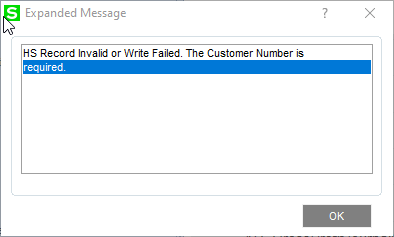
- When I got to import, the Customer No record fails and says "The customer number is required". (see below screenshot)
- The import fails on the customer number, division works fine.
- I'd call it a day if it was a one off, but this will be a 3 part import (AR Customer, AR Invoice and AR Cash Receipts) referencing the customer number in each source file and ran daily.
------------------------------
Tina Meacham
RKL eSolutions, LLC
Original Message:
Sent: 12-22-2023 09:07
From: David Overholt
Subject: Import Customer Number
What is failing exactly? can you attach a screen shot of the log records and what shows if you double click on one of the failed lines ?
------------------------------
David Overholt
DWD Technology Group
Original Message:
Sent: 12-22-2023 08:11
From: Doug Higgs
Subject: Import Customer Number
Are the hyphens consistently in the same position in the source file customer number?
------------------------------
Doug Higgs
Midwest Commerce Solutions, Inc
(312) 315-0960
Chauffeur, Chef, and Personal Assistant to Sprinkles