Sage 100

 View Only
Expand all | Collapse all

I'm staring at ""Please wait while Sage 100 enables

Wayne Schulz

Wayne Schulz01-26-2016 08:17

Kelsey Leerkes

Kelsey Leerkes01-26-2016 11:05

  • 1.  I'm staring at ""Please wait while Sage 100 enables

    Posted 01-26-2016 07:29
      |   view attached
    I'm staring at ""Please wait while Sage 100 enables the Microsoft .NET Framework 3.5 feature. This may take several minutes. "" Problem is that I was 20 minutes into the same screen. Anyone experience?


  • 2.  RE: I'm staring at ""Please wait while Sage 100 enables

    Posted 01-26-2016 07:34
    Did you try ""autorun"" via ""run as administrator""? Did you try running the .msi directly? Have you rebooted the computer? You can try installing the pre-req's directly first.


  • 3.  RE: I'm staring at ""Please wait while Sage 100 enables

    Posted 01-26-2016 07:35
    Appears to be a whole Sage KB on manually installing .NET to server 2008. Naturally Sages 1974 ERA installer does not test, warn or catch this.


  • 4.  RE: I'm staring at ""Please wait while Sage 100 enables

    Posted 01-26-2016 07:40
    I know in some cases (e.g., Server 2008) you have to install .NET via Server Manager > Add Roles/Features, but usually a related message appears on-screen. Is there a message behind?


  • 5.  RE: I'm staring at ""Please wait while Sage 100 enables

    Posted 01-26-2016 07:40
    .Net install/enabling is a really annoying requirement. It is somewhat different on every server version. Now that it is apparently used in 2016, we might consider a simple tutorial for the members.


  • 6.  RE: I'm staring at ""Please wait while Sage 100 enables

    Posted 01-26-2016 07:46
    No message at all. This is server 2008 R2. My top suggestion for all upgrades is insist that the server be staged with the latest Sage 100 before scheduling an on-site.


  • 7.  RE: I'm staring at ""Please wait while Sage 100 enables

    Posted 01-26-2016 07:52
    Requires a reboot of server. Was not promoted during Sage install. It just sat at the above image.


  • 8.  RE: I'm staring at ""Please wait while Sage 100 enables

    Posted 01-26-2016 07:57
    Once waited 45 mn for this to complete. Had to kill it and reboot and it was then enabled. I never install it as part of the install process, always have IT enable/install it along with other prerequisites prior to upgrade. Part of the work smarter, not harder thought process and avoids the reboot during the day issue.


  • 9.  RE: I'm staring at ""Please wait while Sage 100 enables

    Posted 01-26-2016 08:17
    Sorry server 2012 R2


  • 10.  RE: I'm staring at ""Please wait while Sage 100 enables

    Posted 01-26-2016 10:22
    @NancyHanson I also delegate .NET installation to IT.


  • 11.  RE: I'm staring at ""Please wait while Sage 100 enables

    Posted 01-26-2016 11:05
    I ran into this and DEP was on preventing it.


  • 12.  RE: I'm staring at ""Please wait while Sage 100 enables

    Posted 01-26-2016 13:04
    @NancyHanson Great in theory. In practice, it's usually a different set of pre-requisites on each level. I usually will load a Dropbox then install the newest version. That way I couldn't care if it runs for 8 hours. In this case the customer never got back to me to do this. I'll be amending my scheduling policy so that I'll make a time only after I stage Sage 100 to their server.


  • 13.  RE: I'm staring at ""Please wait while Sage 100 enables

    Posted 01-26-2016 13:18
    I've seen as many as six prerequisites. Is there a document that exists somewhere which lists by version what MSFT prerequisites are required? I've always just run the install routine to find out. I'd love to have a complete list to provide IT but have been unsuccessful at finding such an animal.


  • 14.  RE: I'm staring at ""Please wait while Sage 100 enables

    Posted 01-26-2016 13:55
    Our Statement of Works indicate: Enable/Install .Net3.5, Install .Net4.0 or higher, Install Windows Installer 4.50 or higher and disable UAC, reboot server. The other prerequisites (C++, etc.) don't cause reboots so we just install those at time of install.


  • 15.  RE: I'm staring at ""Please wait while Sage 100 enables

    Posted 01-26-2016 14:10
    While I like giving the list, I like setting these servers up remotely a lot better I can manage waiting time much better than I can if I get on-site and the IT person hasn't followed direction (barely ever happens .. but it could ...... ). - Install Dropbox and let it sync overnight - Install unattended to server (where allowed) - Login to server and begin Sage 100 server installation - Let pre-requisites install and do other things while the server is updating and/or rebooting My issue here is the customer wasn't ready and I went out anyhow. I think for me it's a much better option to insist that before I schedule an on-site for an upgrade that I have the server already staged and Sage 100 installed.


  • 16.  RE: I'm staring at ""Please wait while Sage 100 enables

    Posted 01-26-2016 15:11
    We usually do the installation remotely then go on-site for the face to face stuff


  • 17.  RE: I'm staring at ""Please wait while Sage 100 enables

    Posted 07-12-2021 15:31
    Just ran into this. In short, stuck Windows Updates in progress caused the Sage installer to hang when it tried to install the .NET prerequisites.

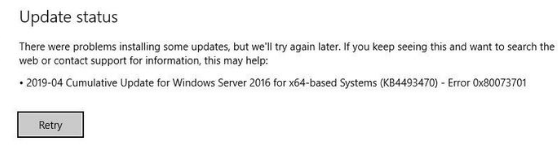
    I ran into the stuck message "please wait ... now installing prerequisites ". This was installing 2020.2 on Server 2016 running in a Hyper-V VM. The IT guy clicked on Start / settings button / Updates and saw Windows Updates being installed, in progress. Then while trying to click around looking for a way to pause them, he landed on this Retry message below. As soon as he did that, the Sage installer continued and immediately got pass the .NET prereqs !!


    ------------------------------
    Alnoor Cassim

    Email: alnoor@asifocus.com
    Ph: 949-689-9887
    Orange County, CA
    ------------------------------