Sage 100

 View Only
Expand all | Collapse all

How to modify a field label on Library Master Panel

  • 1.  How to modify a field label on Library Master Panel

    Posted 04-29-2022 17:57
    I am re-purposing the Freight field on invoices and need to be able to modify that field label on the Tax Detail panel out of AR Invoice Data Entry. I found the label for the Batch A/R IDE in SY_BatchManger.M4T, but am unable to find it for the Tax Detail panel.  I thought I had found it in SY_SalesTaxCalculation.M4L, but as one can see in the attached image, this isn't the correct place b/c this file shows a hyphen in the spelling of Non-Taxable whereas the screen shows NonTaxable (without the hyphen). If this isn't possible and only a UI script can do this, can someone tell me the UI Control that could set or where to look? TIA

    This image shows where the Tax Detail labels are NOT stored!


    ------------------------------
    Dan Burleson
    Software Consultant
    Connex Software
    ------------------------------


  • 2.  RE: How to modify a field label on Library Master Panel

    Posted 04-29-2022 18:06
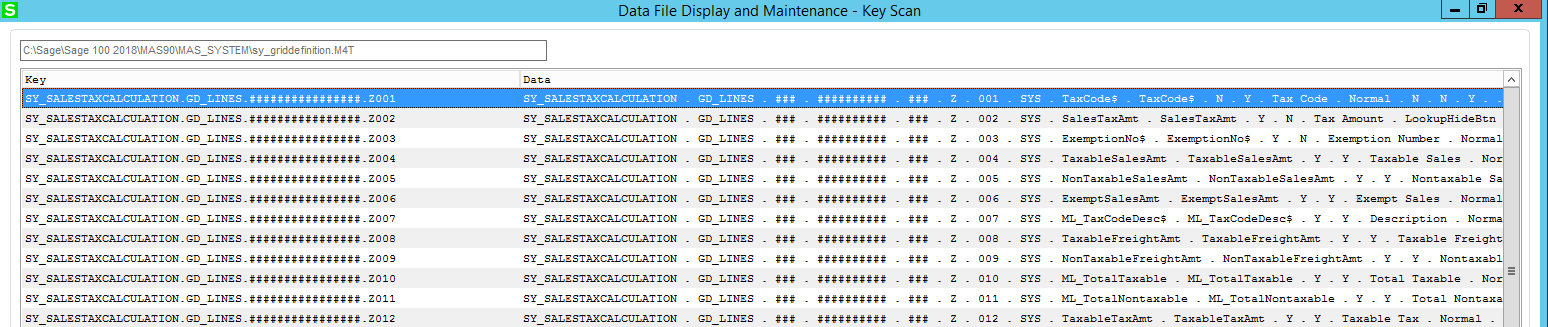
    Probably SY_GridDefinition.

    ------------------------------
    Kevin Moyes
    Technical Systems Analyst
    Munjal White Consulting Co.
    ------------------------------


  • 3.  RE: How to modify a field label on Library Master Panel

    Posted 04-29-2022 18:35
    Edited by Dan Burleson 04-29-2022 18:36
    I suspect you are correct and that this dialog is created in a very reusable fashion so that a program supplies the column names. This likely puts an end to that search, Thank You. A variable dump shows the cMainGridPropVals$ variable contains the sub string "Nontaxable Freight" maybe I'll try to replace the label there.


    ------------------------------
    Dan Burleson
    Software Consultant
    Connex Software
    ------------------------------


  • 4.  RE: How to modify a field label on Library Master Panel

    Posted 04-29-2022 19:58
    Keep us posted!

    ------------------------------
    Jeff Schwenk
    Bottomline Software, Inc.
    ------------------------------


  • 5.  RE: How to modify a field label on Library Master Panel

    Posted 04-30-2022 14:06
    Edited by David Speck II 04-30-2022 14:11
    SY_GridDefinition is the file.  However, i don't think you are looking at the correct record.  Getting the library and panel name while having the panel up resulted in the following.
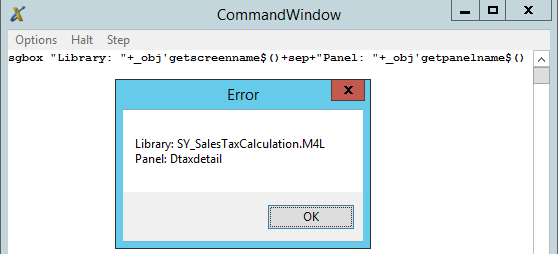

    As for the Level$ field, Z appears to be stock Sage 100, X or Y appears to be for third party enhancements, I think B is for grid customizations made using Customizer, and A is grid customizations made by a user, like when they reorder columns, move columns between grids, resize columns, or hide columns.

    You could probably get away with modifying the ColDesc$ field for the correct record in SY_GridDefinition and call it a day but I don't know how well that will survive upgrades, you may want to include an asterisk as a prefix like how customizer adds the asterisk to a task's title bar to indicate it has been customized.  This would let anyone know that it isn't stock.

    You could also use a UI post load script to change the column description and this should survive upgrades.  Something like the following should work.
    sGD_Lines_Fmt = "" : oUIObj.GetControlProperty "GD_Lines", "Fmt$", sGD_Lines_Fmt
    oScript.DebugPrint "sGD_Lines_Fmt: " & sGD_Lines_Fmt
    If sGD_Lines_Fmt <> "" Then
    	If InStr(UCase(sGD_Lines_Fmt), UCase("[* Repurposed 1]")) = 0 Then
    		sGD_Lines_Fmt = Replace(Replace(sGD_Lines_Fmt, "[Taxable Freight]", "[* Repurposed 1]"), "[Nontaxable Freight]", "[* Repurposed 2]")
    		oUIObj.SetControlProperty "GD_Lines", "Fmt$", sGD_Lines_Fmt
    	End If
    End If
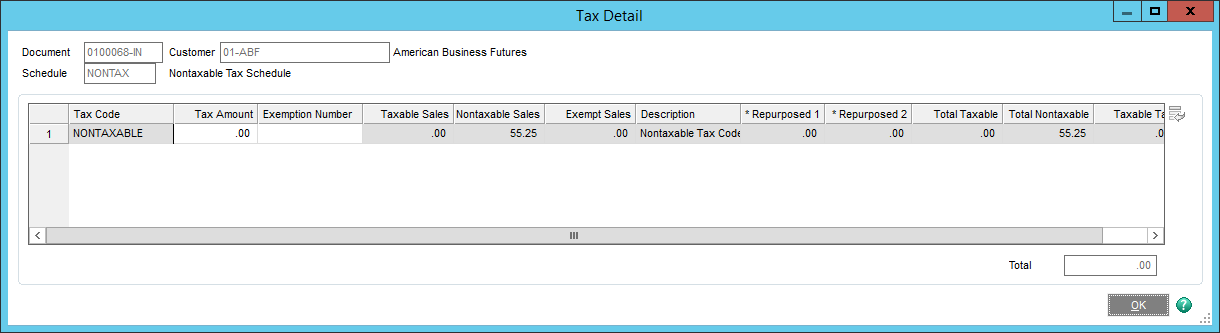
    ​


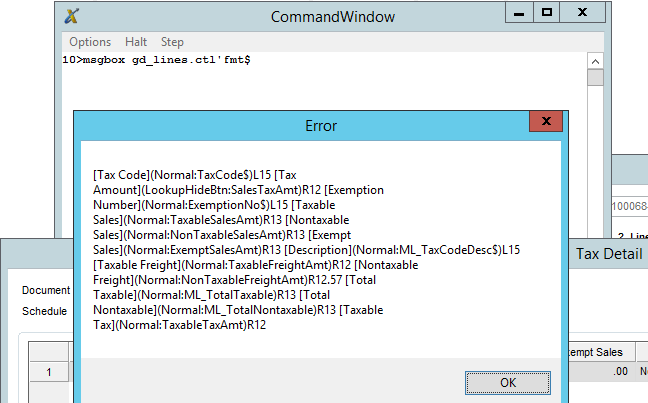
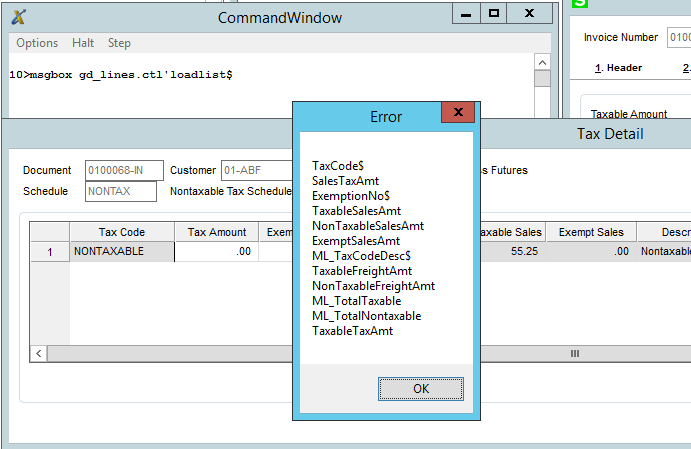
    If you use msgbox gd_lines.ctl'fmt$ from the command window, you can see what the property looks like.
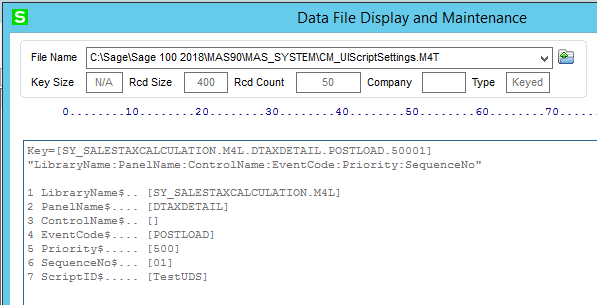
    You will need to assign your script to another temporary library panel to act as a placeholder to create the record in CM_UIScriptSettings so you can DFDM it and modify it.  The record's library and panel should look like this.  Make sure you compile UI scripts afterwards.
    The other way to change a column description would be to set the grid control's row property to -1, then set the column property to either the column number or the IOLVar value (this is equivalent to the field name, not the column description) , then set the value property to whatever description you want.  You should first save the current row and column property values so you restore them after making your change.

    The LoadList$ property can be used to find out what fields/columns are loaded in the grid.


    ------------------------------
    David Speck II
    Tennessee Software Solutions
    ------------------------------


  • 6.  RE: How to modify a field label on Library Master Panel

    Posted 05-01-2022 03:07
    This looks like another award winning post. Thank you David. I hadn't thought to look for the panel as a "SY" prefix. It's right there! It's good to know about the Level$ field also.

    Regarding surviving an upgrade, I am wondering whether assigning a script to an unlisted (in Customizer Selection) library panel via another listed library panel (temporarily) in CM_UIScriptSettings (which works - I've done it) is likely to be replaced by a Sage upgrade.

    ------------------------------
    Dan Burleson
    Software Consultant
    Connex Software
    ------------------------------


  • 7.  RE: How to modify a field label on Library Master Panel

    Posted 05-03-2022 22:18
    Dan, to date, I haven't had issue with scripts assigned to unlisted panels during upgrades.  Seems like once the record is in there, it is only removed if removed through the proper task (customizer selection and removing the script from a panel event).  The bigger issue is whether or not the target panel has the code built in to trigger the UI script events.  It was a couple versions back that I encountered an unlisted panel that did not trigger the UI event, don't remember what it was though.  With almost everything being at the framework level in the most recent versions, it is unlikely but possible to encounter an unlisted panel for a framework level task that won't trigger the UI events but you should always test first to confirm they trigger before assuming they will.

    ------------------------------
    David Speck II
    Tennessee Software Solutions
    ------------------------------


  • 8.  RE: How to modify a field label on Library Master Panel

    Posted 05-04-2022 02:15
    Thanks David for the followup. As @Doug Higgs points out there could be lots of derivative versions of the panel records especially so for popular panels. This would make manually editing this file a pain unless one deletes everyone's derivative panel per company/user/workstation which would be disruptive. This makes your script THE way to go as it works for any and all derivatives.

    ------------------------------
    Dan Burleson
    Software Consultant
    Connex Software
    ------------------------------


  • 9.  RE: How to modify a field label on Library Master Panel

    Posted 05-04-2022 02:20
    I'm a big fan of UI scripts used this way because there aren't any modification made to actual tables/records/files that matter, it is all done on the fly so they are much easier to disable/uninstall/revert.

    ------------------------------
    David Speck II
    Tennessee Software Solutions
    ------------------------------


  • 10.  RE: How to modify a field label on Library Master Panel

    Posted 05-01-2022 10:53
    @David Speck II  I believe you are correct on the level$ field in SY_GridDefinition.  I had an issue a couple of years ago and made the following notes: 

    SY_GridDefinition maintains grid preferences for each company, user, and workstation combination in addition to the levels.

    • Z is standard sage 100, factory settings.
    • Y is master developer added.
    • B is records created in the custom office module.
    • A is a company, user, and workstation specific.
    The moment you add a UDF for the first time, it should create a Z level record.  Once users get into the task and start rearranging the grid or changing column widths, an A level record is created.​

    ------------------------------
    Doug Higgs
    Midwest Commerce Solutions, Inc
    (312) 315-0960
    Chauffeur, Chef, and Personal Assistant to Sprinkles
    ------------------------------


  • 11.  RE: How to modify a field label on Library Master Panel

    Posted 05-01-2022 10:56
    I also have these notes, if they are pertinent:

    Sy_Personalize is supposed to hold:

    • F records for screen position, size, and maximized state of the screen
    • K records for reports and forms where the Print or Preview checkbox has been set that allows you to keep the report / form open after print/preview


    ------------------------------
    Doug Higgs
    Midwest Commerce Solutions, Inc
    (312) 315-0960
    Chauffeur, Chef, and Personal Assistant to Sprinkles
    ------------------------------