Sage 100

 View Only
  • 1.  How to delete a favorite?

    Posted 12-22-2020 14:49

    In the Standard desktop, how does one delete a favorite?  I tried editing c:\users\username\documents\Sage100\favorites.json, but it keeps coming back...

    2020.1 standard


    ------------------------------
    Phil McIntosh
    President
    Friendly Systems, Inc.
    Asheville NC
    678.273.4010 ext 5
    ------------------------------


  • 2.  RE: How to delete a favorite?

    Posted 12-22-2020 14:52
    Edited by Michelle Taylor 12-22-2020 14:53

    On the Favorite item/task, right-click and choose Delete from the pop-up menu.

    Is this what you are looking for?


    ------------------------------
    Michelle Taylor
    ERP Consulting Manager, CS3 Technology
    918-388-9772
    ------------------------------


  • 3.  RE: How to delete a favorite?

    Posted 12-22-2020 16:02
    Have Favorites active.
    Right-click on the item.
    Select Delete (it only deletes from favorites).


    --

    Friendly Systems, Inc.

    Sage 100 (Mas90/200), Sage 300 (Accpac), SageCRM, xTupleERP
    Visit us on the web at www.friendlysystems.com
    Office:?? 678.273.4010 ext 4
    Mobile: 404.202.9065
    Fax:?????????? ??678.273.4012
    See our blog at www.friendlysystems.com/blog


  • 4.  RE: How to delete a favorite?

    Posted 12-22-2020 17:59

    Is there a permission for that?  Customer is not seeing delete in the right-click menu.


    ------------------------------
    Phil McIntosh
    President
    Friendly Systems, Inc.
    Asheville NC
    678.273.4010 ext 5
    ------------------------------


  • 5.  RE: How to delete a favorite?

    Posted 12-23-2020 06:56

    Be sure they have the Favorites tab activated.  Cannot delete if Modules tab is active.


    ------------------------------
    Lee Graham
    Friendly Systems, Inc.
    ------------------------------


  • 6.  RE: How to delete a favorite?

    Posted 12-23-2020 10:28
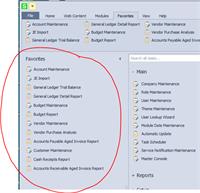
      |   view attached

    It appears to be the active tab


    ------------------------------
    Phil McIntosh
    President
    Friendly Systems, Inc.
    Asheville NC
    678.273.4010 ext 5
    ------------------------------


  • 7.  RE: How to delete a favorite?

    Posted 12-23-2020 10:38

    The user will have to view the other Launcher panel in order to see the menu option to delete.


    ------------------------------
    Michelle Taylor
    ERP Consulting Manager, CS3 Technology
    918-388-9772
    ------------------------------


  • 8.  RE: How to delete a favorite?

    Posted 12-23-2020 10:50

    Ahh - that's it!

    Thanks  @Michelle Taylor


    ------------------------------
    Phil McIntosh
    President
    Friendly Systems, Inc.
    Asheville NC
    678.273.4010 ext 5
    ------------------------------