Sage 100

 View Only
Expand all | Collapse all

Hiding average cost in sales order entry

  • 1.  Hiding average cost in sales order entry

    Posted 05-16-2022 14:26
    I have a project for a client that hides the average cost information in sales order entry and inventory management for users with a certain role.  Essentially I'm using a custom script to accomplish it based on membership in a role.   I've got it all working great but someone just noticed that in sales order entry if you put the focus on the unit price  field , down below you will see the average cost displayed (see the picture).   

    Anyone have an idea how to modify that so it doesn't display?   Best guess I have at this point, is to hide that box when the unit price field has focus via a script, but I'm not really sure of the details of that yet..  #2 alternative would be to hide that box entirely, but there is other info that is nice to see that appears there as well.
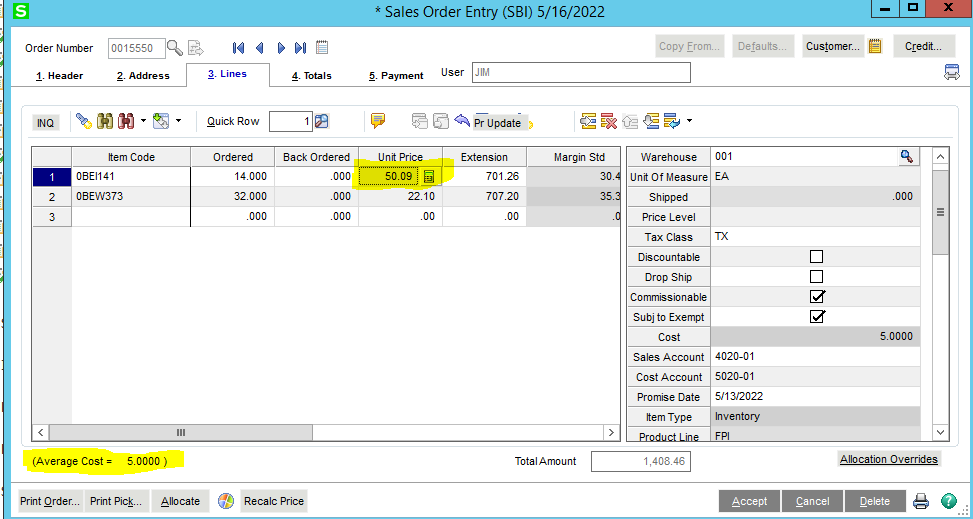


    ------------------------------
    Thomas Rogers (TomTarget)
    Target System Technology, Inc.
    ------------------------------


  • 2.  RE: Hiding average cost in sales order entry

    Posted 05-16-2022 14:54

    Do you have to need that to show for some users? The cost and profit margin can be turned off completely in Sales Order Setup options on the line Entry tab. Turn off Display Unit Cost and Display Profit Margin Percent.


    Don't miss out on the 2022 Intermediate Crystal Reports for Sage 100 online Training: View the details


    David Overholt

    DWD Technology Group, Inc.

    9921 Dupont Circle Drive West, Suite 300 | Fort Wayne, IN 46825

    260.423.2414 main

    800.232.8913 toll free

    sagesupport@dwdtechgroup.com

    www.dwdtechgroup.com


  • 3.  RE: Hiding average cost in sales order entry

    Posted 05-16-2022 18:12
    Thank you David!

    I was just about positive there was a setting for that, but I was hunting through the security rights.

    ------------------------------
    Thomas Rogers (TomTarget)
    Target System Technology, Inc.
    ------------------------------


  • 4.  RE: Hiding average cost in sales order entry

    Posted 05-16-2022 19:07
    Best laid plans...

    Turning off that option turns of the display of  the average cost, but it also ends up disallowing entering a cost for a /miscellaneous item.

    Tried hiding the the ML_STATUS field, resizing it, etc and apparently the program unhides and resizes it.  Tried to place an object over the top of it and unfortunately the object go to the bottom.

    ------------------------------
    Thomas Rogers (TomTarget)
    Target System Technology, Inc.
    ------------------------------


  • 5.  RE: Hiding average cost in sales order entry

    Posted 05-16-2022 19:14
    Turn it off, then add a UDF (with script copy) to set your misc item costs?

    ------------------------------
    Kevin Moyes
    Technical Systems Analyst
    Munjal White Consulting Co.
    ------------------------------


  • 6.  RE: Hiding average cost in sales order entry

    Posted 05-16-2022 19:15
    Aha!

    In custom office, you can drag the field upward so that it hides under the data entry grid.

    ------------------------------
    Thomas Rogers (TomTarget)
    Target System Technology, Inc.
    ------------------------------


  • 7.  RE: Hiding average cost in sales order entry

    Posted 05-16-2022 20:53
    That ML_STATUS field is also used to hold quantity on hand information and UOM conversion information.  Probably the best way to display regular info and be able to hide the average cost for specific users would be to have a master developer create an override class that detects which cell (column) focus is in and if it is in the unit price column, then override the value in the ML_STATUS field to a blank value.  It may be possible with a post load script on the lines that appends additional logic to the _FCS_TBL[] array to perform ProvideX in a text file but it may be iffy.  It would need to detect the current column that has focus and react accordingly.

    ------------------------------
    David Speck II
    Tennessee Software Solutions
    ------------------------------


  • 8.  RE: Hiding average cost in sales order entry

    Posted 05-17-2022 12:13
    David,

    Thanks for the reply.   That was one of my thoughts as well, but wasn't really sure how to determine which column had focus. 

    Until someone complains that the net available quantity is not displaying, we will work with my trick of hiding the ML_STATUS field under the frid.

    ------------------------------
    Thomas Rogers (TomTarget)
    Target System Technology, Inc.
    ------------------------------


  • 9.  RE: Hiding average cost in sales order entry

    Posted 05-17-2022 12:18
    If they complain, the right-click menu has quick access to Item Quantity Inquiry.

    ------------------------------
    Kevin Moyes
    Technical Systems Analyst
    Munjal White Consulting Co.
    ------------------------------


  • 10.  RE: Hiding average cost in sales order entry

    Posted 05-18-2022 18:02
    The funny thing about that is I had to create a button on the sales order entry so they could access inquiry with a single click instead of a right click and then a click on the menu.  ;)

    ------------------------------
    Thomas Rogers (TomTarget)
    Target System Technology, Inc.
    ------------------------------


  • 11.  RE: Hiding average cost in sales order entry

    Posted 05-18-2022 18:21
    I hope you charged a good "lazy user fee" on that script.
    :-)

    ------------------------------
    Kevin Moyes
    Technical Systems Analyst
    Munjal White Consulting Co.
    ------------------------------


  • 12.  RE: Hiding average cost in sales order entry

    Posted 05-19-2022 14:14
    Pretty simple script,  but I probably did not charge enough.  :)

    ------------------------------
    Thomas Rogers (TomTarget)
    Target System Technology, Inc.
    ------------------------------