Sage 100

 View Only
Expand all | Collapse all

Heads up. V2018.2 Time Track. Time Track is the

Wayne Schulz

Wayne Schulz12-28-2018 05:39

  • 1.  Heads up. V2018.2 Time Track. Time Track is the

    Posted 05-31-2018 10:48
    Heads up. V2018.2 Time Track. Time Track is the replacement for Time Card in the new framework. For some reason, when you go to enter a new entry, Time Track insists on loading every time card ever entered for the employee before you can make a new entry. This makes entering new time cards virtually impossible once you have significant history. Also, there is no way to purge time card entries in the new version. Reported to Sage. WAD.


  • 2.  RE: Heads up. V2018.2 Time Track. Time Track is the

    Posted 05-31-2018 10:51
    The upgrade instructions tell you to purge Timecard history before doing the migration.


  • 3.  RE: Heads up. V2018.2 Time Track. Time Track is the

    Posted 05-31-2018 10:54
    We missed this on the first upgrade. Keep in mind the employees are all serialized so merging the data is not going to be easily accomplished. We ended up upgrading the data again for the entire company. Luckily it was caught early.


  • 4.  RE: Heads up. V2018.2 Time Track. Time Track is the

    Posted 05-31-2018 10:55
    First, purging history is not an acceptable solution. Second, time card history will just start building up again anyway - making it eventually unusable. My client will not upgrade until this is resolved.


  • 5.  RE: Heads up. V2018.2 Time Track. Time Track is the

    Posted 05-31-2018 10:57
    The is an entry file and a history file. A utility exists to move it to history prior to upgrade but post upgrade, transferring to payroll moves to the history file and for some reason there is not other form of moving to history in the new version.


  • 6.  RE: Heads up. V2018.2 Time Track. Time Track is the

    Posted 06-01-2018 06:31
    My .02 - this is a bug. There's no reason that a standard Sage upgrade shouldn't prompt about creating history for PO and there's no prompt here or or for PR perpetual.


  • 7.  RE: Heads up. V2018.2 Time Track. Time Track is the

    Posted 07-02-2018 14:04
    Any further updates on this topic? We are at .03 now. I still don't see anything


  • 8.  RE: Heads up. V2018.2 Time Track. Time Track is the

    Posted 07-03-2018 12:12
    Update: We are at PU 3. I found that the time card entries are removed from time card entry when both the job cost and payroll entries are transferred and updated. It moves the data to history.


  • 9.  RE: Heads up. V2018.2 Time Track. Time Track is the

    Posted 12-12-2018 07:04
    I've just run into this on a go live. What's the downside to re-initializing PR_TimeTrack other than those records not being in history?


  • 10.  RE: Heads up. V2018.2 Time Track. Time Track is the

    Posted 12-12-2018 07:31
    In Legacy Time Card module, transactions could be purged to history using Period End menu, Purge/Transfer to History. This function is not available in Time Track. In Time Track, if the PR and JC status are both set to Updated, Time Track records are moved to Time Track History. Time Track History records are purged during the normal Payroll year-end processing based on the Years to Retain Payroll History setup in Payroll Options.


  • 11.  RE: Heads up. V2018.2 Time Track. Time Track is the

    Posted 12-12-2018 07:31
    https://support.na.sage.com/selfservice/viewdocument.do?noCount=true&externalId=91440&sliceId=1&isLoadPublishedVer=&docType=kc&docTypeID=DT_Article&stateId=3996&cmd=displayKC&dialogID=141847&ViewedDocsListHelper=com.kanisa.apps.common.BaseViewedDocsListHelperImpl&openedFromSearchResults=true


  • 12.  RE: Heads up. V2018.2 Time Track. Time Track is the

    Posted 12-12-2018 07:35
    I am pretty sure that we encountered the same problem but did move time entries to history prior to migration and conversion


  • 13.  RE: Heads up. V2018.2 Time Track. Time Track is the

    Posted 12-12-2018 07:49
    That article does not solve the problem that the records are treated as entry records needing to be transferred to payroll or job cost if you don't recall to move those transactions to history prior to the upgrade. At least that is the way I am reading it.


  • 14.  RE: Heads up. V2018.2 Time Track. Time Track is the

    Posted 12-12-2018 08:01
    I agree. I'm not quite sure how I'm going to work around this Sage product defect (yes it does say to purge before transfer but there's no reason I can see that the user shouldn't have the same purge option in 2018)


  • 15.  RE: Heads up. V2018.2 Time Track. Time Track is the

    Posted 12-12-2018 13:51
    @CooperBlack - do you know what triggers the move to history? IOW, could I VI into the 49,000 records this customer has and flag them as having been updated in both PR and JC and then post 1 new record and pull that into JC? Would that trigger Sage to look at the entire Time Track file and move any of the records showing they were updated to both PR/JC into history?


  • 16.  RE: Heads up. V2018.2 Time Track. Time Track is the

    Posted 12-12-2018 14:06
    @WayneSchulz I am not 100% sure but I remember a flag in Time Track showing updated or not


  • 17.  RE: Heads up. V2018.2 Time Track. Time Track is the

    Posted 12-12-2018 14:07
    There's two fields - I think one shows status for PR and one for JC. It would be nice if I could VI into the older records and flag both as updated. Then just create and post 1 JC entry for .01 and have Sage Time Track go through all the records and purge the ones indicated as PR and JC having been updated. I doubt it will be that easy though.


  • 18.  RE: Heads up. V2018.2 Time Track. Time Track is the

    Posted 12-17-2018 17:09
    Update: Spoke to Sage today on this. They are considering adding a hidden option and/or utility. They took the menu option move data to history in an effort to remove menu complexity.


  • 19.  RE: Heads up. V2018.2 Time Track. Time Track is the

    Posted 12-18-2018 08:36
    Let's make the UI more simple by removing useful utilities"". Brilliant! :-/


  • 20.  RE: Heads up. V2018.2 Time Track. Time Track is the

    Posted 12-28-2018 05:35
    Update: I went into this customer data and made a TST company. Within the TST company I turned off the integration between Payroll and Time Track (which they don't pass data between) and was immediately prompted ""When you click Accept, all Time Track entries that either have a job cost status of updated or do not have a job number will be transferred to Time Track History"" then it asks if I want to continue. I answer yes and the system appears to transfer the very old data to history. In this specific user case they were NOT sending data to payroll and only sent the data to job cost. So there was never a flag set showing that payroll data was transferred. I think without turning off payroll integration that this old data may have stayed around and not transferred to history. Note: The new 2018 Time Track apparently only copies data to history as part of the posting process and only when any integrated modules (JC / PR) indicate that the data was transferred. This is in contract to the prior Timecard where there was a manual utility to perform this move to history. Ultimately, the business issue is that when a Sage 100 2018 user of Timecard does NOT transfer timecard data to history BEFORE migrating to 2018 then there is no separate menu option to do so. This can mean that entering time is potentially be very slow (depending upon the amount of history) as Sage goes through all the old data prior to displaying the Time Track data entry screen for a specific user.


  • 21.  RE: Heads up. V2018.2 Time Track. Time Track is the

    Posted 12-28-2018 05:39
      |   view attached


  • 22.  RE: Heads up. V2018.2 Time Track. Time Track is the

    Posted 10-16-2020 15:52
    How to Purge Time Track Entries in Payroll Version 2.19.x.x and above
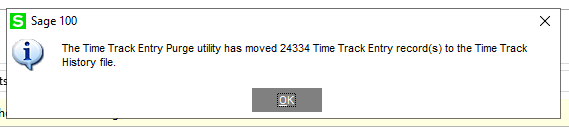
    A Utility is available to move Time Track Entry records to Time Track history that were not purged (i.e. sent to history) prior to Migration.
    File > Run: *utl - Time Track Entry Purge (runs for all companies)

    However, the Utility seems limited because in addition to only being able to run it for all companies, it didn't move a ton of records; it only moves any Time Track Entry records that were 'updated' but not purged before the Payroll data was migrated - at least that's what happened on the v2019.2 system I'm testing.  Whereas, [temporarily] unchecking the 'Enable Time Track for Time Card' setting in P/R will move all Time Track entries to history that either have a Job Cost status of 'Updated' or do not have a job number - which for me took care of pretty-much all records.

    Upon clicking OK on the prompt to proceed, nothing happened (it just sat there), but then after 20sec or so I got the below message.


    ------------------------------
    Brett Zimmerman
    Net at Work
    Greater Boston Area
    ------------------------------