Sage 100

 View Only
  • 1.  For 3 minutes and two seconds I wondered aloud why I never used this utility

    Posted 06-21-2022 09:06

    Then I remembered what a half-baked mess it is


    ------------------------------
    Wayne Schulz
    wayne@s-consult.com
    Schulz Consulting
    (860) 516-8990
    Moodus, CT
    ------------------------------


  • 2.  RE: For 3 minutes and two seconds I wondered aloud why I never used this utility

    Posted 06-21-2022 09:18
    And if I use Lookup Wizard it just appears to apply a filter - it doesn't create a separate view -  there is no drop down to select multiple views
    Also leaves me wondering if this change might be also filtering records behind the scenes in other modules that share the lookup

    x-ref to Sage KB article on this confusing mess


    ------------------------------
    Wayne Schulz
    wayne@s-consult.com
    Schulz Consulting
    (860) 516-8990
    Moodus, CT
    ------------------------------


  • 3.  RE: For 3 minutes and two seconds I wondered aloud why I never used this utility

    Posted 06-21-2022 11:39
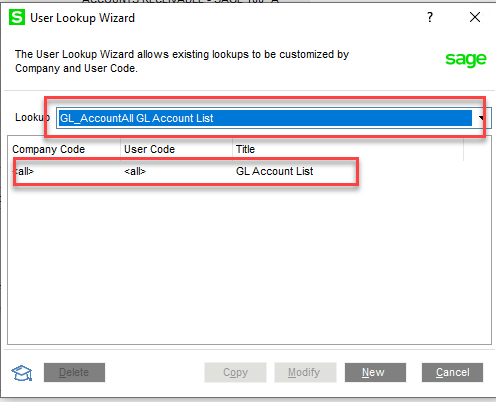
    I jumped for joy when the user Lookup Wizard (at the bottom of the ALE) was introduced several years ago.  Prior to that, you had to open the ALE, click on the custom button to determine the name of the ALE   (@Alnoor Cassim tip)     to modify via the utility (from hell).  Now you can open the ALE in question, then click on the Lookup Wizard button, you have the option ALL or Some.  You will get a warning if a view has been set up previously as the new one will overwrite the existing one.

    I tend to set up global ALE's (ALL Co's/All Users) when I do the initial install so they are more user friendly from the beginning (Customer name Contains).


    ------------------------------
    Jeff Schwenk
    Bottomline Software, Inc.
    ------------------------------


  • 4.  RE: For 3 minutes and two seconds I wondered aloud why I never used this utility

    Posted 06-21-2022 11:47
    With either method it doesn't appear I can create several named ALE views - as I could with the Custom button? So I need to completely overwrite the default ALE for that screen rather than create several different ALE lookups ( which I believe I could only do by logging in as the user and then using the CUSTOM button ).

    If true - and it's possible that I've overlooked something really obvious - that seems quaint. It brings me back to the days when customers could pick and choose if they bought an upgrade and many of our customers were very small companies with maybe one or two people in Sage ( max ).

    Fast forward to today's world -- one which Sage has barely awoken from their years' long slumber -- and the typical Sage 100 customer has multiple users- scattered through a warehouse or working remotely. Which makes going workstation to workstations to set individual ALE lookup configurations a somewhat outdated concept.

    ------------------------------
    Wayne Schulz
    wayne@s-consult.com
    Schulz Consulting
    (860) 516-8990
    Moodus, CT
    ------------------------------


  • 5.  RE: For 3 minutes and two seconds I wondered aloud why I never used this utility

    Posted 06-21-2022 12:06
    Interesting.  I almost think it is a "bug" or as Sage would say a "WAD".   It appears that you can create multiple ALE's (first screen shot), but only ONE ALE will appear (second screen shot).  The is no drop down alerting you to multiple options on a global basis.  Time for a webinar on how to set it up????  Honestly, I set one global default and show them how to customize their own.  I have never viewed it though your lenses.  MOD squad???


    ------------------------------
    Jeff Schwenk
    Bottomline Software, Inc.
    ------------------------------