Original Message:
Sent: 12-07-2023 07:28
From: Steve Iwanowski
Subject: Finding out the Installed PU version
On recent versions, you can get the Major version by pulling mascrcw.exe's versioninfo, but it won't give you the Product Update.
PS C:\Users\choppy> $file = 'F:\Work\Sage 100 2023\MAS90\Home\mascrcw.exe'
PS C:\Users\choppy> (get-item $file).versioninfo
ProductVersion FileVersion FileName
-------------- ----------- --------
7.2.0.0 7.2.0.0 F:\Work\Sage 100 2023\MAS90\Home\mascrcw.exe
------------------------------
Steve Iwanowski, NextStep Technology Advisors, aka DSD Lancaster PA ¯\_(ツ)_/¯
------------------------------
Original Message:
Sent: 12-06-2023 18:17
From: George Khairallah
Subject: Finding out the Installed PU version
Thanks Thomas.
Our goal is to be able to collect this info programmatically and send it to our central asset management system, so we can report on who has what PUs/Payroll version, etc... installed. We have hundreds of Sage installations that we're trying to report on. So while your suggestion is good from the GUI, it wouldn't work for what we're trying to achieve.
Cheers!
------------------------------
George Khairallah
CTO / Co-Founder | gotomyerp, LLC
george.k@gotomyerp.com | 877-888-5525
https://gotomyerp.com
Original Message:
Sent: 12-06-2023 18:12
From: Thomas Rogers
Subject: Finding out the Installed PU version
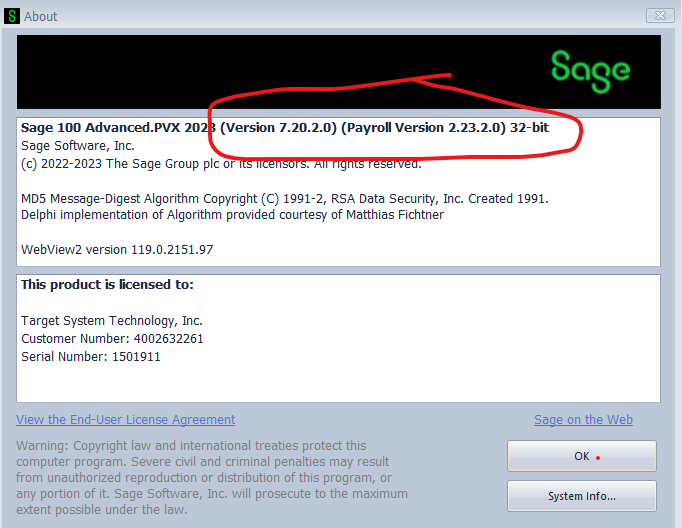
How about from the menu screen. Help | Sage 100 About?
------------------------------
Thomas Rogers (TomTarget)
Target System Technology, Inc.
Original Message:
Sent: 12-06-2023 18:09
From: George Khairallah
Subject: Finding out the Installed PU version
Thanks Kevin. That points me in the right direction!
------------------------------
George Khairallah
CTO / Co-Founder | gotomyerp, LLC
george.k@gotomyerp.com | 877-888-5525
https://gotomyerp.com
Original Message:
Sent: 12-06-2023 18:07
From: Kevin Moyes
Subject: Finding out the Installed PU version
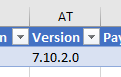
ODBC query of SY_System should work too.
------------------------------
Kevin Moyes
Technical Systems Analyst
Munjal White Consulting Co.
Toronto ON
Original Message:
Sent: 12-06-2023 18:03
From: Kevin Moyes
Subject: Finding out the Installed PU version
I'm guessing you have people on hand who can do BOI scripting... and use this:
oSession.GetParameter("SYS ", "Version$",Sage100Version) | Returns full version string including product update into the 3rd parameter. Ex: 5.10.4.0 |
------------------------------
Kevin Moyes
Technical Systems Analyst
Munjal White Consulting Co.
Toronto ON
Original Message:
Sent: 12-06-2023 17:55
From: George Khairallah
Subject: Finding out the Installed PU version
Thanks Doug.
I'm looking for a more programmatic way from a Windows system level to report back to our Asset Management tools for reporting purposes.
We typically use Powershell, .NET to do such queries, anything else on the system level that may exist?
Alternatively: Is there some ad-hoc tool we can use externally to Powershell to read the ISYS key in sy0ctl.soa ?
------------------------------
George Khairallah
CTO / Co-Founder | gotomyerp, LLC
george.k@gotomyerp.com | 877-888-5525
https://gotomyerp.com
Original Message:
Sent: 12-06-2023 17:30
From: Doug Higgs
Subject: Finding out the Installed PU version
Read the data field in the lSYS key in mas90\soa sy0ctl.soa.
------------------------------
Doug Higgs
Midwest Commerce Solutions, Inc
(312) 315-0960
Chauffeur, Chef, and Personal Assistant to Sprinkles