Sage 100

 View Only
Expand all | Collapse all

File not found error re Crystal on RD/TS servers

  • 1.  File not found error re Crystal on RD/TS servers

    Posted 01-22-2025 11:10

    Am I the only one who repeatedly has customers (different systems, not always the same) getting an error about not being able to find the copy of a Crystal report stored in the ProgramData file by an Adv install?

    I can browse there and see the dang file, I can see that the user has full rights to the file, but can't run it.  If I switch to my user in Sage (but still their user on the RD server) and browse to the folder and try to open it, I can SEE IT AND CLICK ON IT, and then it up and tells me it can't find it.

    Only 1 user having this issue, just started one day.  Have rebooted the server, have deleted the folder.  Sage's KBs on this error are not helpful, as they would only be applicable if it was happening to everyone. (Not enough disk space, reinstall workstation, rights of user running service.)

    I feel like half the time a reboot takes care of the issue and sometimes deleting the folder does, and sometimes making sure the user logs out properly and back in does, but in this particular case the user does not login to a desktop - RD goes directly to running Sage, so not many options.  Very frustrated over it because it seems like a crap shoot each time.

    Does anyone else ever see this, or am I just blessed?


    ------------------------------
    Beth Bowers
    (269) 358-0989
    ------------------------------


  • 2.  RE: File not found error re Crystal on RD/TS servers

    Posted 01-22-2025 11:21

    I'm not hearing about this --- is using this file location something Sage uses natively? 

    an error about not being able to find the copy of a Crystal report stored in the ProgramData file by an Adv install?


    ------------------------------
    Wayne Schulz
    wayne@s-consult.com
    Schulz Consulting
    (860) 516-8990
    CT
    ------------------------------


  • 3.  RE: File not found error re Crystal on RD/TS servers

    Posted 01-22-2025 11:27

    Yes @Wayne Schulz, I think it's C:\ProgramData\SageSoftware\Cache\Reports. I don't know if it's only when it's a TS/RD server, or whether it's on local machines, as well.  I don't have a local machine I can login to check at the moment.


    ------------------------------
    Beth Bowers
    (269) 358-0989
    ------------------------------


  • 4.  RE: File not found error re Crystal on RD/TS servers

    Posted 01-22-2025 13:01
    Edited by Dan Burleson 01-22-2025 13:21

    Have you tried moving the report file into a more friendly area? Which file are you talking about and are you trying to open it in the Cache subfolder? Why there and not the permanent location?


    ------------------------------
    Dan Burleson
    Software Consultant
    Connex Software
    Corvallis OR
    541-829-1054
    ------------------------------


  • 5.  RE: File not found error re Crystal on RD/TS servers

    Posted 01-22-2025 13:37

    Since Sage is the one that creates this folder, I am assuming it's as friendly as it's going to get.  ALL of the reports folks run show up out there (if I delete it, they just come back as people run them).


    ------------------------------
    Beth Bowers
    (269) 358-0989
    ------------------------------


  • 6.  RE: File not found error re Crystal on RD/TS servers

    Posted 01-22-2025 13:44

    You mention a Sage KB but not the article itself. I'm pretty sure this is probably the one you are referencing -Error: "Report file C:\ProgramData\Sage Software\Cache\MAS 200\report name.rpt is not found or does not exist. Load Report Fails"


    ------------------------------
    Wayne Schulz
    wayne@s-consult.com
    Schulz Consulting
    (860) 516-8990
    CT
    ------------------------------


  • 7.  RE: File not found error re Crystal on RD/TS servers

    Posted 01-22-2025 16:13

    Yes, that's one of them


    ------------------------------
    Beth Bowers
    (269) 358-0989
    ------------------------------


  • 8.  RE: File not found error re Crystal on RD/TS servers

    Posted 01-23-2025 07:14

    Beth,

    You mentioned rebooting that server, but you didn't say if you have rerun workstation setup. I would try that if you haven't already. It might be that a prerequisite needs to be installed, maybe a windows update killed the Microsoft Visual C++ version that Crystal requires.


    David Overholt

    DWD Technology Group, Inc.

    9921 Dupont Circle Drive West, Suite 300 | Fort Wayne, IN 46825

    260.423.2414 main

    260.399.8655 Direct

    800.232.8913 toll free

    sagesupport@dwdtechgroup.com

    www.dwdtechgroup.com


    A black background with white text  Description automatically generated


  • 9.  RE: File not found error re Crystal on RD/TS servers

    Posted 02-11-2025 19:50

    Second verse,. same as the first......

    What a timely topic!!!

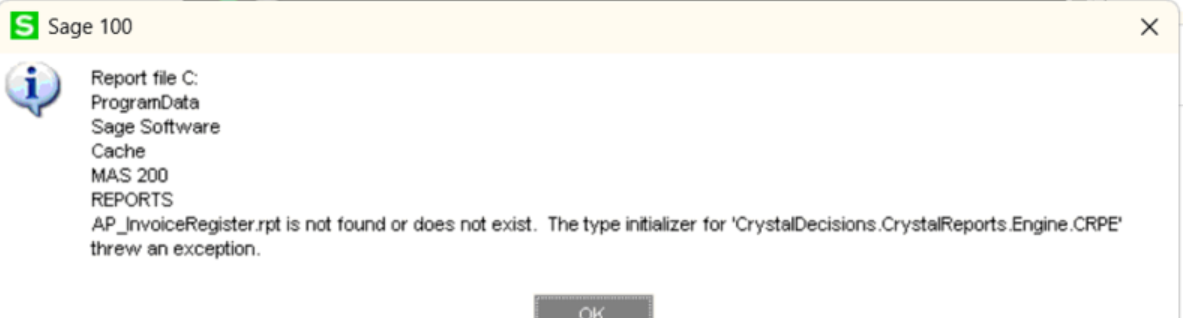
    The client is replacing workstations with WIN 11.  I installed the v2022 client last week on one without issue.  Today, I have two that keep throwing the error discussed in this thread..  @David Overholt, when I look at programs and features in the control panel, I only see the 64-bit Crystal runtime, but no 32-bit.  I do I force an install of the 32 runtime?


    ------------------------------
    Jeff Schwenk
    Owner
    Bottomline Software, Inc.
    Waynesboro VA
    (540) 221-4444

    Improving bottom lines for over 25 years!
    ------------------------------


  • 10.  RE: File not found error re Crystal on RD/TS servers

    Posted 02-11-2025 21:01

    Jeff - just had a client who said she fixed this by manually uninstalling the 32 and 64 bit Crystal and then rerunning Wksetup


    ------------------------------
    Beth Bowers
    (269) 358-0989
    ------------------------------


  • 11.  RE: File not found error re Crystal on RD/TS servers

    Posted 02-11-2025 21:27
    Edited by Jeff Schwenk 02-11-2025 21:28

     That is how it ended for me as well.  I tried to download the v2024 install programs, but Sage website was not cooperating with clients browser.  So I transferred the 2024 wksetup folder from my laptop.  Ran the autorun to get the 32/64 runtime to install.  Ended the installation process after that.  Worked like a great hack!

    Sage should modify their KB to include the possibility that the 32/64 Crystal runtimes did not install properly.


    ------------------------------
    Jeff Schwenk
    Owner
    Bottomline Software, Inc.
    Waynesboro VA
    (540) 221-4444

    Improving bottom lines for over 25 years!
    ------------------------------


  • 12.  RE: File not found error re Crystal on RD/TS servers

    Posted 02-12-2025 06:57

    Brilliant Idea on using 2024 install program. I'm not sure I would have thought of that, but I'm going to keep that in my repertoire. 


    ------------------------------
    David Overholt
    DWD Technology Group
    ------------------------------