General Consultant Discussion

 View Only
  • 1.  Excel query editing error

    Posted 08-10-2022 20:43
    Edited by Shannon Stanley 08-10-2022 20:44
    I have a client that needs to edit tables in his existing query. When I go into edit the query and add the system table to his current query I get the follow message after I save "the select permission was denied on the object SY_User database MAS_System schema dbo. I check his permissions in Sage and he has full access. I also verified the "allow external connection" was checked. Then when I cancel out of the query, I get the follow message "the query wizard cannot continue because it can not join the tables in your query. You must manually in Microsoft query by dragging the fields to join between tables. What am I missing?

    Currently running excel version 365 and sage premium version 2021. Attached screenshots of my error message.

    ------------------------------
    Shannon Stanley
    Sage 100 Consultant
    Ardent Consulting LLC
    ------------------------------


  • 2.  RE: Excel query editing error

    Posted 08-10-2022 21:23

    I never edit an existing query with the MS Query wizard. When you initially edit the query from the Connection Properties, immediately cancel the wizard and reply "Yes" to the prompt "Do you want to continue editing this query in Microsoft query?" Once you're in MS Query use the Table menu and the Add Tables... command to lookup SY_User and add it with the Add button and link it to PO_PurchaseOrderHeader by the desired UserCreated or UserUpdated key with a inner join by dragging the key field to SY_UserKey. Then click the Return Data button to go back to Excel.


    ------------------------------
    Dan Burleson
    Software Consultant
    Connex Software
    ------------------------------


  • 3.  RE: Excel query editing error

    Posted 08-11-2022 08:28
    I will try this. Thank you @Dan Burleson!​

    ------------------------------
    Shannon Stanley
    Sage 100 Consultant
    Ardent Consulting LLC
    ------------------------------


  • 4.  RE: Excel query editing error

    Posted 08-11-2022 10:39
    Check SQL permissions for the user.  Often only the MAS_### permission is enabled (ready only) but if you want to query system tables too, they need read-only access to MAS_System.
    Note: SQL permissions are not managed from within Sage 100.  Use SQL tools for that.

    ------------------------------
    Kevin Moyes
    Technical Systems Analyst
    Munjal White Consulting Co.
    ------------------------------


  • 5.  RE: Excel query editing error

    Posted 08-11-2022 11:41
    Also, the System Tables are presented as views in the company databases.

    ------------------------------
    Phil McIntosh
    President
    Friendly Systems, Inc.
    ------------------------------


  • 6.  RE: Excel query editing error

    Posted 08-11-2022 11:49
    Yes, but only as pointers.  If the permission to MAS_System is missing, for ODBC queries, there will be an authentication error.

    ------------------------------
    Kevin Moyes
    Technical Systems Analyst
    Munjal White Consulting Co.
    ------------------------------


  • 7.  RE: Excel query editing error

    Posted 08-11-2022 15:25
      |   view attached
    The error that the user is getting now, would this be related to his accessto what you were talking about @Kevin Moyes ?​

    ------------------------------
    Shannon Stanley
    Sage 100 Consultant
    Ardent Consulting LLC
    ------------------------------


  • 8.  RE: Excel query editing error

    Posted 08-11-2022 15:43
    Yes, that looks like the error I'd expect to see.  Add db_datareader permission to the user, in SQL.
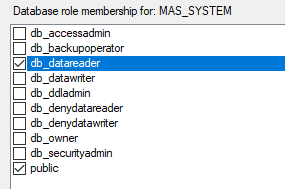
    Of course, you can do table by table (and column by column!) permissions in SQL, but that's more complexity than most people need.

    ------------------------------
    Kevin Moyes
    Technical Systems Analyst
    Munjal White Consulting Co.
    ------------------------------


  • 9.  RE: Excel query editing error

    Posted 08-16-2022 08:39
    Thank you for the screenshot @Kevin Moyes! I appreciate your help. ​

    ------------------------------
    Shannon Stanley
    Sage 100 Consultant
    Ardent Consulting LLC
    ------------------------------