Scripting

  • 1.  Error on Script when using the Write()

    Posted 02-23-2024 14:43

    I am receiving the below error when the write function is part of the script.  Below is the script so any ideas would be greatly appreciated as to why I am getting the error.
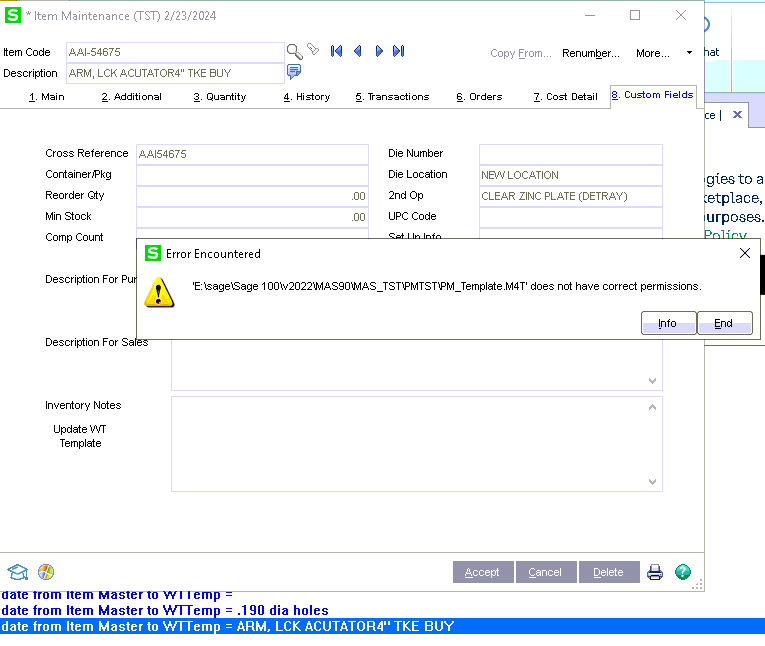
    'int var
    Template = ""
    WTemplate = Template
    Rev = "000"
    Step = "000000"
    dieno = ""
    dieloc=""
    op=""
    container=""
    setup=""
    descso=""
    descpo=""
    retval = 0
    oWTTemp = 0

    retval = oBusObj.GetValue("ItemCode$", Template): r=oScript.DebugPrint("Got Value from Item  = " & Template)


    set oWTTemp = oSession.AsObject(oSession.GetObject("PM_Template_bus"))
    retval = oWTTemp.SetKeyValue("TemplateNo$", Template): r=oScript.DebugPrint("Set Value from Item Code = " & Template)
    retval = oWTTemp.SetKeyValue("RevisionNo$", Rev): r=oScript.DebugPrint("Set Value from WT Template = " & Rev)
    retval = oWTTemp.SetKeyValue("StepNo$", Step): r=oScript.DebugPrint("Set Value from WT Template = " & Step)
    retval = oWTTemp.Find()

    retval = oBusObj.GetValue("UDF_DIE_NUMBER$", dieno): r=oScript.DebugPrint("Got value from Item Master = " & dieno)
    retval = oBusObj.GetValue("UDF_DIE_LOCATION$", dieloc): r=oScript.DebugPrint("Got value from Item Master = " & dieloc)
    retval = oBusObj.GetValue("UDF_2ND_OP$", op): r=oScript.DebugPrint("Got value from Item Master = " & op)
    retval = oBusObj.GetValue("UDF_SET_UP_INFO$", setup): r=oScript.DebugPrint("Got value from Item Master = " & setup)
    retval = oBusObj.GetValue("UDF_CONTAINER_PKG$", container): r=oScript.DebugPrint("Got value from Item Master = " & container)
    retval = oBusObj.GetValue("UDF_DESCRIPTION_FOR_PURCHASE$", descpo): r=oScript.DebugPrint("Got value from Item Master = " & descpo)
    retval = oBusObj.GetValue("UDF_DESCRIPTION_FOR_SALES$", descso): r=oScript.DebugPrint("Got value from Item Master = " & descso)

    retval = oWTTemp.SetValue("UDF_DIE_NUMBER$", dieno): r=oScript.DebugPrint("Update from Item Master to WTTemp = " & dieno)
    retval = oWTTemp.SetValue("UDF_DIE_LOCATION$", dieloc): r=oScript.DebugPrint("Update from Item Master to WTTemp  = " & dieloc)
    retval = oWTTemp.SetValue("UDF_2ND_OP$", op): r=oScript.DebugPrint("Update from Item Master to WTTemp = " & op)
    retval = oWTTemp.SetValue("UDF_SET_UP_INFO$", setup): r=oScript.DebugPrint("Update from Item Master to WTTemp  = " & setup)
    retval = oWTTemp.SetValue("UDF_CONTAINER_PKG$", container): r=oScript.DebugPrint("Update from Item Master to WTTemp = " & container)
    retval = oWTTemp.SetValue("UDF_DESC_FOR_PURCHASE$", descpo): r=oScript.DebugPrint("Update from Item Master to WTTemp = " & descpo)
    retval = oWTTemp.SetValue("UDF_DESC_FOR_SALES$", descso): r=oScript.DebugPrint("Update from Item Master to WTTemp = " & descso)

    rw = oWTTemp.Write() 


    ------------------------------
    Venessa Griffin
    Forvis
    ------------------------------


  • 2.  RE: Error on Script when using the Write()

    Posted 02-23-2024 14:55

    Try SetKey() instead of Find()

    retval = oWTTemp.Find()


    ------------------------------
    Kevin Moyes
    Technical Systems Analyst
    Munjal White Consulting Co.
    Toronto ON
    ------------------------------


  • 3.  RE: Error on Script when using the Write()

    Posted 02-23-2024 15:47

    The SetKey() was the answer.  Thank you so much Kevin


    Thanks

    Venessa Griffin
    Lead Consultant /  Technology Consulting

    D: 417.520.5326
    M: 816.392.9879

    Venessa.Griffin@forvis.com

    linkedin.com/in/venessagriffin


    866.832.4253 Sage Support

    Sagesupport@Forvis.com


    You are receiving this email from my new FORVIS email address.  While our legacy email addresses will continue to be active for a period of time, please save my new email address to prevent disruption in our communications. 


    ****** FORVIS Email Confidentiality Notice ****** This e-mail is intended only for the addressee named above. It contains information that is privileged, confidential or otherwise protected from use and disclosure. If you are not the intended recipient, you are hereby notified that any review, disclosure, copying, or dissemination of this transmission, or taking of any action in reliance on its contents, or other use is strictly prohibited. If you have received this transmission in error, please reply to the sender listed above immediately and permanently delete this message from your inbox. Thank you for your cooperation.

    Opinions, conclusions, and other information expressed in this message are not given or endorsed by my firm or employer unless otherwise indicated by an authorized representative independent of this message.

    FORVIS Private Client services may include investment advisory services provided by FORVIS Wealth Advisors, LLC, an SEC-registered investment adviser, and/or accounting, tax, and related solutions provided by FORVIS, LLP.


  • 4.  RE: Error on Script when using the Write()

    Posted 02-23-2024 15:50

    Find() is good if you just want to read data. 

    SetKey() is needed to put the record in an editable state.


    ------------------------------
    Kevin Moyes
    Technical Systems Analyst
    Munjal White Consulting Co.
    Toronto ON
    ------------------------------