What I was trying to say in my last response was that in my first attempt to run that utility I used the "run" command; the second attempt I used "call" and was successful.
Original Message:
Sent: 12-20-2021 15:33
From: Randy Marion
Subject: Error adding UDF To AR_InvoiceHistoryHeader sourced. Error 65 CMWUD2 line 9040
That is interesting ... I thought you needed to CALL providex scripts ... you can RUN them now?
--
Randy Marion * Software Systems Engineer *
Original Message:
Sent: 12/20/2021 2:08:00 PM
From: Jane Scanlan
Subject: RE: Error adding UDF To AR_InvoiceHistoryHeader sourced. Error 65 CMWUD2 line 9040
David,
I used SYZCON but used "run" instead of "call" before; now I have successfully run that utility and said yes to make the corrections. Genius!! Thank you so much for this!
------------------------------
Jane Scanlan
Partner
Next Level Manufacturing Consulting Group
Chanhassen MN
952-210-7758
------------------------------
Original Message:
Sent: 12-20-2021 13:55
From: David Speck II
Subject: Error adding UDF To AR_InvoiceHistoryHeader sourced. Error 65 CMWUD2 line 9040
Sounds like the pcxcom.exe executable isn't registered.
Did you try to run it on a workstation with the Sage 100 workstation installed?
If yes, the other way to run it is to place it somewhere either under the MAS90 directory so you can call it with a relative path or place it somewhere like C:\ so you can call it without having to type a long path. Once you have it in its destination, i.e. in MAS90\CM\Script, use File > Run and then type SYZCON and click OK. At the command prompt, type CALL "..\CM\Script\CheckForMissingTableRecords.pvs".
You can specify a absolute path too by just including the full path, like CALL "C:\CheckForMissingTableRecords.pvs".
------------------------------
David Speck II
Tennessee Software Solutions
Original Message:
Sent: 12-20-2021 13:46
From: Jane Scanlan
Subject: Error adding UDF To AR_InvoiceHistoryHeader sourced. Error 65 CMWUD2 line 9040
Hi David,
Thank you for this utility. I downloaded it and tried to run it but cannot as I get a windows script host error:
Windows script Host
X
Can't find script engine 'PvxScript for script
'C:\Sage2021\v2021\MAS90\SOA\CheckForMissingTableRecords.pvs'.
------------------------------
Jane Scanlan
Partner
Next Level Manufacturing Consulting Group
Chanhassen MN
952-210-7758
Original Message:
Sent: 12-20-2021 13:33
From: David Speck II
Subject: Error adding UDF To AR_InvoiceHistoryHeader sourced. Error 65 CMWUD2 line 9040
I wrote the attached utility to locate and correct the missing blank table records. I was communicating with Elliot earlier this year regarding this issue. He still requested the following information so they can try to pinpoint what might be the underlying cause. He also said they would look into modifying one of the core programs so it doesn't cause this error in the future when a missing blank record is encountered. Below is some of the communication.
There isn't too many places that this would get changed. Possibly Customizer when updating the dictionary? (maybe) Although, I have done a lot of tests on this. Maybe some merge utilities or update pieces used by development partners? I don't know yet.
If you happen to run into this issue again on one of the files that isn't in that 2021 list. Let me know anything that may have transpired, such as new update, 3rd party add-on, or possibly recent custom office UDF's? So far your hunches have been pretty bang-on. In the meantime, I'll correct what I can, and look into these areas as well.
The utility can be called from SYZCON or executed via Windows Explorer if on a system with the Sage 100 workstation installed. It uses the directory from the last install to update the registration of the pvxcom.exe process since it goes through the BOI. When you run it, you should screenshot the list of tables that were found missing the header record. If you click Yes to the prompt, it will make backups of the providex.dde and providex.ddf files and then write the missing records. The message should look similar to this.
------------------------------
David Speck II
Tennessee Software Solutions
Original Message:
Sent: 12-20-2021 12:20
From: Tara Schinkel
Subject: Error adding UDF To AR_InvoiceHistoryHeader sourced. Error 65 CMWUD2 line 9040
You have to open a ticket with sage on this and submit two files. They hack the providex.ddf file (I believe) and send it back. Jane asked me about this today for which 4 files are involved in the hack. I'm in meetings all day but I will try to look up later when I can but I do know Sage has fixed this for anyone who has opened a ticket.
Tara Morgan Schinkel, CPA
Sage 100 Consultant
Act! and Sage CRM Consultant
Phone: 410-309-9550 x1104
www.stewarttechnologies.com
Original Message:
Sent: 12/20/2021 12:15:00 PM
From: Jeff Schwenk
Subject: RE: Error adding UDF To AR_InvoiceHistoryHeader sourced. Error 65 CMWUD2 line 9040
I just moved my client to v2021 PU 2 and I don't think it is fixed yet. Good topic for the MOTM webinar.
------------------------------
Jeff Schwenk
FORMER 90M Board Member -140,000,000 is a TERRIBLE thing to waste!!!
Bottomline Software, Inc.
Waynesboro VA
540-221-4444
Original Message:
Sent: 12-20-2021 09:50
From: Jane Scanlan
Subject: Error adding UDF To AR_InvoiceHistoryHeader sourced. Error 65 CMWUD2 line 9040
Does anyone have a detailed list of the missing records in this dde file? This is a hassle to have to send a file to Sage (in my opinion).
------------------------------
Jane Scanlan
Partner
Next Level Manufacturing Consulting Group
Chanhassen MN
952-210-7758
Original Message:
Sent: 07-12-2021 10:52
From: Jeff Schwenk
Subject: Error adding UDF To AR_InvoiceHistoryHeader sourced. Error 65 CMWUD2 line 9040
Wow, that a super way to fix things. Send in the file and we will fix. How about they create a utility so we can fix it our selves AND include it in the next PU? Do you have a KB or support ticket reference?
------------------------------
Jeff Schwenk
FORMER 90M Board Member140,000,000 is a TERRIBLE thing to waste!!!
Bottomline Software, Inc.
Waynesboro VA
540-221-4444
Original Message:
Sent: 07-08-2021 12:12
From: Tara Schinkel
Subject: Error adding UDF To AR_InvoiceHistoryHeader sourced. Error 65 CMWUD2 line 9040
Open a ticket with Sage. They have to hack the providex.dde file to fix this. There are 4 records missing in the file related to the AR_TransactionPosting file. It's a documented issue with Sage now. You send the files in, they fix it and then they send it back.
Original Message:
Sent: 7/8/2021 11:13:00 AM
From: Brett Zimmerman
Subject: RE: Error adding UDF To AR_InvoiceHistoryHeader sourced. Error 65 CMWUD2 line 9040
My v2020.1 client is experiencing this also. They have DSD (SO-1073 and custom programming) and StarShip Link, although renaming the Links folder still generated the error.
------------------------------
Brett Zimmerman
Net at Work
Greater Boston Area
Original Message:
Sent: 06-24-2021 17:26
From: Robert White
Subject: Error adding UDF To AR_InvoiceHistoryHeader sourced. Error 65 CMWUD2 line 9040
That was how it was ... I gave them the file and they returned it; I didn't look at it. One of our team added it to the client system and confirmed we could add a UDF to AR_InvoiceHistoryHeader sourced from invoicing
Robert White, CPA, CA
Munjal White Consulting Corp
Tel – 416 703-3458 x286
For support or general inquiry questions, please email to WebSupport@MunjalWhite.com
Have you seen our latest newsletter? Click here
Original Message:
Sent: 6/24/2021 5:22:00 PM
From: David Speck II
Subject: RE: Error adding UDF To AR_InvoiceHistoryHeader sourced. Error 65 CMWUD2 line 9040
So I assume they took your providex.dde file, corrected it, and then gave it back to you?
I attempted to write the record into one of the systems I'm dealing with and it appeared to look identical to the record in a system that is not affected but the error continues to occur.
I also have a case with Sage but I haven't heard from them since 5/10 so I pinged them today but no response yet.
------------------------------
David Speck II
Tennessee Software Solutions
Original Message:
Sent: 06-24-2021 17:02
From: Robert White
Subject: Error adding UDF To AR_InvoiceHistoryHeader sourced. Error 65 CMWUD2 line 9040
The replacement file from Sage worked for the first client; we'll try the second client tonight.
I assume all that was changed was that one record
Robert White, CPA, CA
Munjal White Consulting Corp
Tel – 416 703-3458 x286
For support or general inquiry questions, please email to WebSupport@MunjalWhite.com
Have you seen our latest newsletter? Click here
Original Message:
Sent: 6/24/2021 3:13:00 PM
From: David Speck II
Subject: RE: Error adding UDF To AR_InvoiceHistoryHeader sourced. Error 65 CMWUD2 line 9040
The 000597 record was missing from an affected system that I checked today. I wrote the record in so it looks identical to the record seen on a known working system but the error continues to occur when trying to add the UDF.
Were you able to confirm that whatever Sage did resolved the error in your case?
------------------------------
David Speck II
Tennessee Software Solutions
Original Message:
Sent: 06-22-2021 10:43
From: Robert White
Subject: Error adding UDF To AR_InvoiceHistoryHeader sourced. Error 65 CMWUD2 line 9040
FYI, Brian Reddeman at Sage asked me to send him the providex.dde file from both clients. This is his feedback
Record 000597 was missing from both files. We are not sure why but it's related to a mod. Based on the other cases it appears a developer did a dictionary merge that accidentally removed that record.
We're adding to the client system tonight and will test it out.
------------------------------
Robert White
Munjal White Consulting Co.
Toronto ON
Original Message:
Sent: 04-29-2021 20:25
From: Tara Schinkel
Subject: Error adding UDF To AR_InvoiceHistoryHeader sourced. Error 65 CMWUD2 line 9040
And I actually had DSD look at this because of the enhancements and they could not see anything in regards to what is causing it to break - FYI. Whole thing is so frustrating.
Sent from my iPhone
Original Message:
Sent: 4/29/2021 8:22:00 PM
From: Robert White
Subject: RE: Error adding UDF To AR_InvoiceHistoryHeader sourced. Error 65 CMWUD2 line 9040
I spoke with Dan in support a week or so ago and it's in the hands of engineering since it could be duplicated.
My own solution is to create the UDF and flow through on a local test system and then export from local and import to the client and it worked ok. Not the best solution but at least I could create the required UDFs.
FYI, I have the issue at 2 clients. One has APS for credit cards. The other doesn't. Both have DSD enhancements. We also have DSD enhancements internally and it works on our internal system. Can't find any pattern yet except for some third party installed.
------------------------------
Robert White
Munjal White Consulting Co.
Toronto ON
Original Message:
Sent: 04-29-2021 15:34
From: Tara Schinkel
Subject: Error adding UDF To AR_InvoiceHistoryHeader sourced. Error 65 CMWUD2 line 9040
We experienced the same (links folder was a bust).
Sage is looking at our data now. We sort of ruled Scanco out because of renaming the links folder.
I am trying to remember who else in the group had this issue. I would be curious to know if they had credit card turned on. This has been a huge hassle for us so I would love to get it fixed.
Original Message:
Sent: 4/29/2021 3:24:00 PM
From: David Speck II
Subject: RE: Error adding UDF To AR_InvoiceHistoryHeader sourced. Error 65 CMWUD2 line 9040
I set the option to None and also unchecked the option to allow credit card / ACH payments in AR Options but the error persists. I did compare date modified and size of the AR_SalesJournal_Upd and SO_SalesJournal_Upd programs across all three installs and they were identical. I don't deal with credit card / ACH stuff much in sage 100 at all so i'm not sure if i'm missing any other settings that might need to be disabled. Since the error occurs even with the Links folder renamed, it has to be something else somewhere but i'm still suspecting it is related to credit card / ACH payments.
------------------------------
David Speck II
Tennessee Software Solutions
Original Message:
Sent: 04-29-2021 14:37
From: Tara Schinkel
Subject: Error adding UDF To AR_InvoiceHistoryHeader sourced. Error 65 CMWUD2 line 9040
I know for a fact mine has several companies where payments is turned on. Can you try turning it off in yours to see? It is hard to do in mine because there are 70 plus people in it all the time so if you could confirm, that would be great.
Original Message:
Sent: 4/29/2021 2:27:00 PM
From: David Speck II
Subject: RE: Error adding UDF To AR_InvoiceHistoryHeader sourced. Error 65 CMWUD2 line 9040
I'm starting to suspect this is actually related to accepting credit card, ACH, or both forms of payments.
Can you confirm whether or not any of your installs have at least one company where "Enable Payments" option on the Payment tab in Company Maintenance is set to something other than "None"?
In both of my installs where the error is occurring, there is at least one company with the option set to "Both Credit Cards and ACH".
------------------------------
David Speck II
Tennessee Software Solutions
Original Message:
Sent: 04-29-2021 14:05
From: Tara Schinkel
Subject: Error adding UDF To AR_InvoiceHistoryHeader sourced. Error 65 CMWUD2 line 9040
Yeah – this is right in line with what we are seeing to. You should report to Sage. Note – someone in the group was able to replicate this in a system without Scanco installed but I think that was on Sage 2020 without PU1.
Tara Schinkel
Sage 100 Consultant
Act! Certified Consultant
Stewart Technologies
410 – 309 -9550 x 1104
Original Message:
Sent: 4/29/2021 1:55:00 PM
From: David Speck II
Subject: RE: Error adding UDF To AR_InvoiceHistoryHeader sourced. Error 65 CMWUD2 line 9040
End user first reported the error when they attempted to add a sourced UDF to AR_InvoiceHistoryHeader and once on the data sources tab, they selected either SO_SalesJournal_upd or AR_SalesJournal_upd and then the error occurs once AR_TransactionPosting is displayed in the Data Source column.
I was also able to duplicate the error when trying to add a sourced UDF to AR_Customer by selecting either SO_SalesJournal_upd or AR_SalesJournal_upd.
So it seems to trigger the error whenever it attempts to read AR_TransactionPosting.
I did observe that on my stock 2020.1 system, when you first click to edit fields for AR_Customer, i get the following message yet i have not seen this message on the client systems where the error occurs.
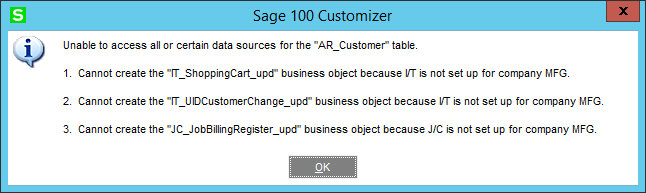
I tested another one of my 2020.1 systems that has ScanForce MB and i do not get the error and i do get this message.
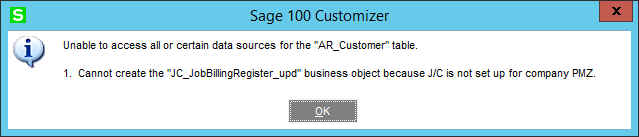
------------------------------
David Speck II
Tennessee Software Solutions
Original Message:
Sent: 04-29-2021 12:43
From: Tara Schinkel
Subject: Error adding UDF To AR_InvoiceHistoryHeader sourced. Error 65 CMWUD2 line 9040
We are having the same issue on Sage 2020 (no PU1) also with Scanco MB. Note – we are on Sage Premium 2020. We have a reported case open with Sage on this (There are two or three other resellers that have mentioned having this issue). I'm assuming your error is occurring when linking to the AR_Transaction table?
Tara Schinkel
Sage 100 Consultant
Act! Certified Consultant
Stewart Technologies
410 – 309 -9550 x 1104
Original Message:
Sent: 4/29/2021 12:39:00 PM
From: David Speck II
Subject: RE: Error adding UDF To AR_InvoiceHistoryHeader sourced. Error 65 CMWUD2 line 9040
Seeing this on a Standard 2020.1 with Scanco MB as well as a Advanced 2020.1 with Scanco MB and several other third party solutions. Only thing common is the Scanco MB. Unable to duplicate on a stock 2020.1 system.
------------------------------
David Speck II
Tennessee Software Solutions
Original Message:
Sent: 04-03-2021 03:25
From: Tara Schinkel
Subject: Error adding UDF To AR_InvoiceHistoryHeader sourced. Error 65 CMWUD2 line 9040
We are having this same exact thing in Sage 2020 premium as well. For info sharing, we do NOT have product update 1 but we do have Job Ops and Scanco Multibin - had anyone come across with a fix for this?
Sent from my iPhone