Sage 100

 View Only
  • 1.  Error 5 Data Error on device or file

    Posted 12-11-2023 16:26

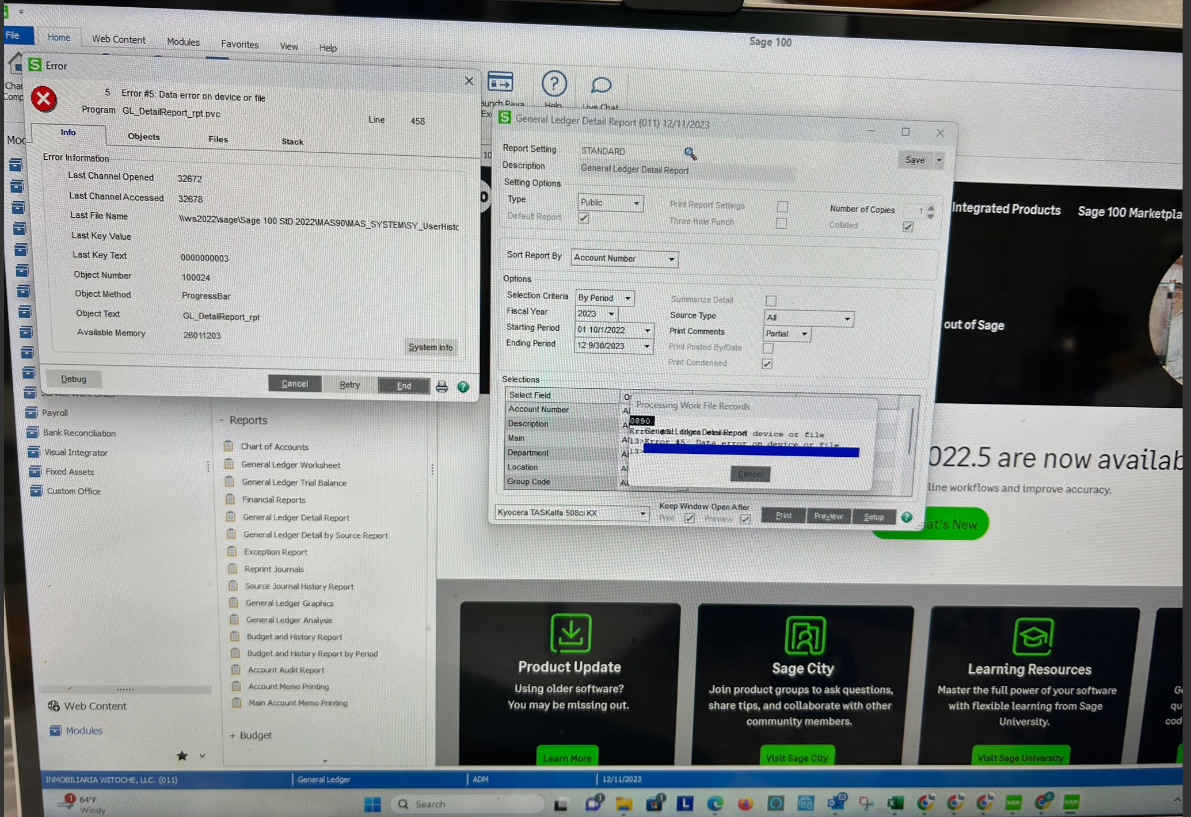
    Customer on Sage 100 v2022 and getting this error sporadically when printing GL Detail Report.  No Error 5 found in the knowledgebase.  Any clues???


    ------------------------------
    Lourdes Sobrino
    LU² DSD Puerto Rico
    Guaynabo Puerto Rico
    787.485.9638
    ------------------------------


  • 2.  RE: Error 5 Data Error on device or file

    Posted 12-11-2023 17:24
      |   view attached

    @Lourdes Sobrino  The attached Sage KB looks promising for potential issues with SY_UserHistory.M4T.


    ------------------------------
    Doug Higgs
    Midwest Commerce Solutions, Inc
    (312) 315-0960
    Chauffeur, Chef, and Personal Assistant to Sprinkles
    ------------------------------


  • 3.  RE: Error 5 Data Error on device or file

    Posted 12-17-2023 19:02
    Error 5 is a denied access based on what I am seeing it appears the SY_User and SY_UserHistory are out of sync.  It is looking for records that do not match as expected.  For example it is looking for the original creator or last user who updated and it matches the User Key in both tables.  If they dont match or some are missing your going to have issue with reporting functions


    Carmen Cruz
    Sage Consultant
    carmen.cruz@compudata.com
    215-969-1000 Ext. 279
    www.compudata.com
    Work Smarter... Together 

    CompuData, Inc. • 325 Chestnut St, Ste 700 • Philadelphia • PA • 19106


  • 4.  RE: Error 5 Data Error on device or file

    Posted 12-17-2023 19:06
    I actually had this happen during an upgrade.  When I do an upgrade Parallel Migration is ran once.  When we go live, I refresh datasets not System files.  Now if the user continues to add users to production during test pilot that knocks the Security files out of sync.  When that user is recreated in new version after the fact DFDM must be used to be sure the UserKey matches what it was in source production.  If it doesn't match anymore, you will get Error 5.  There is a way to fix this mess but it is a pain and you have to work with more than one table at a time to get it to assign correctly.  If you want to call 215-287-7322

    Hope this all made sense.  

    Carmen Cruz
    Sage Consultant
    carmen.cruz@compudata.com
    215-969-1000 Ext. 279
    www.compudata.com
    Work Smarter... Together 

    CompuData, Inc. • 325 Chestnut St, Ste 700 • Philadelphia • PA • 19106