FYI. From an upgrade last month... posting here in case it helps someone else.
"Error Number : 0x80040e14 Description: Cannot open backup device E:\Program Files\Microsoft SQL Server\.....\MAS_SYSTEM.bak. Operating system error 2(The system cannot find the file specified). Setup will now terminate."
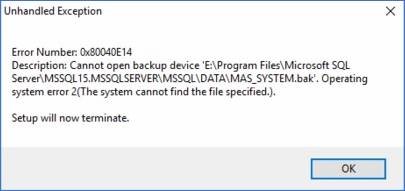
Scenario:
- Server 1 has source Sage (2018 Premium) and source SQL.
- Server 1 is also new Sage (2021 Premium) server.
- Server 2 is new SQL server.
- Plenty of disk space on both servers.
SQL service (source and destination) is running using a domain login SageAdmin account, which is a local admin to both servers.
I can backup from SSMS on source system authenticated using "sa" account, directly to the \\server2\e$\Program Files\Microsoft SQL Server\MSSQL15.MSSQLSERVER\MSSQL\DATA\MAS_SYSTEM.bak file, no errors, so I know the service account permissions are correct, but the migration's copy / restore fails.
The backup does not get copied by the migration program for some reason. (Not even Run As Admin helps). Very odd.
Easy fix… do the backups manually (from source SQL to destination system's DATA folder) before starting the migration.
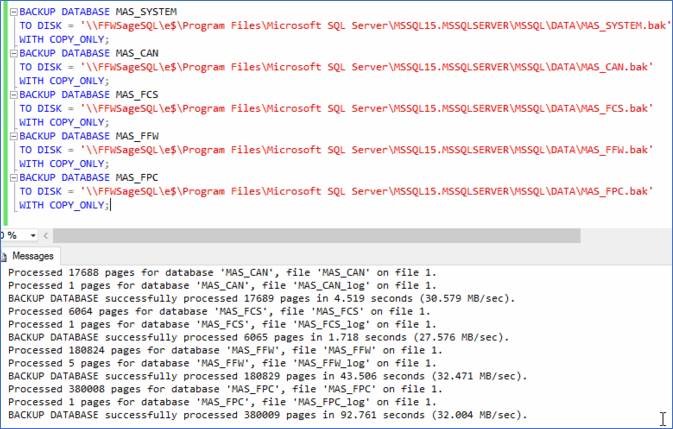
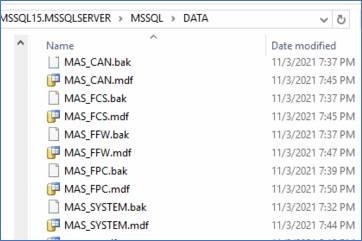
When done be sure to clean up the manually created .bak files in the destination data folder… the migration tool does not.
------------------------------
Kevin Moyes
Technical Systems Analyst
Munjal White Consulting Co.
Toronto ON
------------------------------