Sage 100

 View Only
Expand all | Collapse all

DTR and Windows 11

  • 1.  DTR and Windows 11

    Posted 12-20-2023 11:39

    Hello

    I have a company where the DTR in at least AP and SO is getting stuck with green processing bar and they eventually have to end task, then go back in and update.  I think it happens no matter what when updating from the GL.

    I am told this is a windows 11 issue.

    Any one have any feedback or point me to similar posts?


    ------------------------------
    Douglas Luchansky
    ACI Consulting
    ------------------------------


  • 2.  RE: DTR and Windows 11

    Posted 12-20-2023 11:44

    Try switching them to 64-Bit Sage 100.

    BRUCE KERN
    TEAM LEAD ‑ SAGE 100
      2300 SE Beta Street | Suite A | Portland | OR 97222
      p 
    503-496-5378 x1015
      f
    503-496-5378
      bruce.kern@swktech.com
      www.swktech.com
     
    Web
    Facebook
    LinkedIn
    Twitter
    YouTube
    This message contains confidential information and is intended only for the intended recipients. If you are not an intended recipient you should not disseminate, distribute or copy this e-mail. Please notify the sender immediately by e-mail if you have received this e-mail by mistake and delete this e-mail from your system. E-mail transmission cannot be guaranteed to be secure or error-free as information could be intercepted, corrupted, lost, destroyed, arrive late or incomplete, or contain viruses. The sender therefore does not accept liability for any errors or omissions in the contents of this message, which arise as a result of e-mail transmission. If verification is required please request a hard-copy version.


  • 3.  RE: DTR and Windows 11

    Posted 12-20-2023 12:03
    Thank you Bruce 

    Thank you,

    Douglas Luchansky
    ACI Consulting
    O 714.282.0378
    D 714.694.4194

    Sent from my iPhone


  • 4.  RE: DTR and Windows 11

    Posted 12-27-2023 11:06
    If this is on a user station, not the cloud, if you install the correct drivers that go to the actual printer you're trying to install instead of letting Windows choose the driver for you It WILL work in 32 bit. I have already tested this number of times. It does not like the new driver that windows has come up with. Get the real drivers for your printers and install them correctly and the DTR will do its job. Why the DTR cares..... no idea

    Carmen Cruz
    Sage Consultant
    carmen.cruz@compudata.com
    215-969-1000 Ext. 279
    www.compudata.com
    Work Smarter... Together 

    CompuData, Inc. • 325 Chestnut St, Ste 700 • Philadelphia • PA • 19106


  • 5.  RE: DTR and Windows 11

    Posted 12-27-2023 11:18
    Thanks a bunch!

    Thank you,
    Douglas Luchansky (from my phone)

    ACI Consulting
    O 714.282.0378
    D 714.694.4194


  • 6.  RE: DTR and Windows 11

    Posted 12-27-2023 15:22
    Let me know if you have any issues with this.  Be happy to help.  ��

    Carmen Cruz
    Sage Consultant
    carmen.cruz@compudata.com
    215-969-1000 Ext. 279
    www.compudata.com
    Work Smarter... Together 

    CompuData, Inc. • 325 Chestnut St, Ste 700 • Philadelphia • PA • 19106


  • 7.  RE: DTR and Windows 11

    Posted 12-28-2023 10:41

    Interesting observation @Carmen Cruz - Thank you for sharing!!

    Happy New Year!


    ------------------------------
    Jeff Schwenk
    Bottomline Software, Inc.
    (540) 221-4444
    ------------------------------


  • 8.  RE: DTR and Windows 11

    Posted 12-29-2023 09:33
    You betcha.  Yeah, I didn't like Sage's suggestion to go to 64 bit period. So I was determined to find out what was really wrong since they didn't have a clue. Happy New Year's to you too!! 

    Carmen Cruz
    Sage Consultant
    carmen.cruz@compudata.com
    215-969-1000 Ext. 279
    www.compudata.com
    Work Smarter... Together 

    CompuData, Inc. • 325 Chestnut St, Ste 700 • Philadelphia • PA • 19106


  • 9.  RE: DTR and Windows 11

    Posted 12-29-2023 07:50
    This worked for us on a customer yesterday! Thanks for the tip Carmen. Truly appreciate it. 

    Tara Morgan Schinkel, CPA

    Stewart Technologies, Inc.

    Sage Intacct Certified Implementor

    Sage 100 Certified Consultant

    Act!/Sage CRM Certified Consultant

    785 Elkridge Landing Road, Suite 150

    Linthicum, MD 21090

    410 – 309 – 9550 x1104

    www.stewarttechnologies.com


  • 10.  RE: DTR and Windows 11

    Posted 12-29-2023 09:31
    Awesome!!!  Anytime!!!  Happy new years!!!

    Carmen Cruz
    Sage Consultant
    carmen.cruz@compudata.com
    215-969-1000 Ext. 279
    www.compudata.com
    Work Smarter... Together 

    CompuData, Inc. • 325 Chestnut St, Ste 700 • Philadelphia • PA • 19106


  • 11.  RE: DTR and Windows 11

    Posted 12-20-2023 11:46

    Reference link with more:

    https://communityhub.sage.com/us/sage100/f/unique-business-challenges/204944/windows-11-compatibility/512956


    ------------------------------
    Kevin Moyes
    Technical Systems Analyst
    Munjal White Consulting Co.
    Toronto ON
    ------------------------------


  • 12.  RE: DTR and Windows 11

    Posted 12-20-2023 12:03
    Thank you Kevin 

    Thank you,

    Douglas Luchansky
    ACI Consulting
    O 714.282.0378
    D 714.694.4194

    Sent from my iPhone


  • 13.  RE: DTR and Windows 11

    Posted 12-20-2023 12:02

    If you're using Adobe Acrobat, have you tried changing Adobe settings: deselecting 'Enable Protected Mode at Startup' and selecting 'Enable Enhanced Security' in Adobe's Security (Enhanced) preferences? Also, in General Settings turn off 'Show messages when I launch Adobe Acrobat'. 


    ------------------------------
    Dan Burleson
    Software Consultant
    Connex Software
    Corvallis OR
    541-224-6642
    ------------------------------


  • 14.  RE: DTR and Windows 11

    Posted 12-20-2023 12:03
    Good idea and thank you Dan

    Thank you,

    Douglas Luchansky
    ACI Consulting
    O 714.282.0378
    D 714.694.4194

    Sent from my iPhone


  • 15.  RE: DTR and Windows 11

    Posted 12-29-2023 10:16

    I am blown away, actually flabbergasted.  Are you telling me Sage couldn't figure out that solution this entire time this has been an issue?!  Unbelievable!  No, instead they ridiculously say we need to go with 64-bit. For this issue to have impacted SO MANY clients over a long period of time, Sage completely mishandled this. I'm now thinking this was an intentional ploy by Sage to try and get folks to 64-bit. BS!!


    ------------------------------
    Brett Zimmerman
    Net at Work
    Greater Boston Area
    ------------------------------


  • 16.  RE: DTR and Windows 11

    Posted 12-29-2023 10:19

    @Carmen Cruz for the win! Again. 


    ------------------------------
    Eric Lunceford
    First Mate Business Solutions
    Oklahoma City, OK
    877-880-8960
    ------------------------------


  • 17.  RE: DTR and Windows 11

    Posted 12-29-2023 10:39

    I am pretty sure installing the OEM driver did not work for my one client with this issue. I will reinstall the printers on her machine and report back.


    ------------------------------
    Greg Stiles
    S & W Microsystems
    ------------------------------


  • 18.  RE: DTR and Windows 11

    Posted 12-29-2023 11:01

    Cough (bs) Cough (bs).  Right on @Brett Zimmerman.  I share your thought.  I do believe they are using it as a reason to move everyone up to 64 bit.  What better way to force the issue and place the monkey on someone else's back?  But it is not surprising.  I am sure it is a standard ploy for any software publisher.  


    ------------------------------
    Jeff Schwenk
    Bottomline Software, Inc.
    (540) 221-4444
    ------------------------------


  • 19.  RE: DTR and Windows 11

    Posted 12-30-2023 00:18
    Hi Greg,

    If installing default driver does not work what kind of printer is this that you are working on?  Is this change being done directly on a user's computer?  Let me know.  Talk to you soon. ;)

    Carmen Cruz
    Sage Consultant
    carmen.cruz@compudata.com
    215-969-1000 Ext. 279
    www.compudata.com
    Work Smarter... Together 

    CompuData, Inc. • 325 Chestnut St, Ste 700 • Philadelphia • PA • 19106


  • 20.  RE: DTR and Windows 11

    Posted 12-30-2023 00:59

    @Carmen Cruz, the printer driver changes are on a user workstation. It is using the manufacturer's driver. The location field is blank. It is a Brother HL-2550 connected via USB.

    I should add this is the default printer, BUT, there are other printers on the system, but they are not used by Sage.


    ------------------------------
    Greg Stiles
    S & W Microsystems
    ------------------------------


  • 21.  RE: DTR and Windows 11

    Posted 12-31-2023 06:35
    Hi Greg,
    OK my next question will be do they have a computer that doesn't have 1000 printers on it so you can test to see if it works if these other printers were not there? Another headache of Sage is it looks at every stupid printer on it users computer, even if it isn't using them which is so lame but they've never fixed it. What if this printer was hardwired or is that even a possibility? Mine is wireless I'm not a fan of printers on USB they seem to have issues. One more thing to try what if you tried a different printer and set it as the default even though it's not the real one?  Just temporarily then install real drivers.  Change windows default printer. Then sign on into Sage and try print process again. Also, what version of Sage are these guys on?

    Let me know and I'll talk to you soon. Happy New Year's.

    Carmen Cruz
    Sage Consultant
    carmen.cruz@compudata.com
    215-969-1000 Ext. 279
    www.compudata.com
    Work Smarter... Together 

    CompuData, Inc. • 325 Chestnut St, Ste 700 • Philadelphia • PA • 19106


  • 22.  RE: DTR and Windows 11

    Posted 12-30-2023 00:23
    Thank you everyone.  Yeah, when Sage said you had to go 64-bit I was like BS.  Let me find the real issue and I tested with many own Windows 11 until things started working.      

    @Greg 
    I just thought of something.  Look at the settings of the printer.  Make sure the location field is blank on tab one of settings.  If it has some kind of url data cut and paste that to the comments field instead.  It confuses Sage when it is in the location field on the first tab and gives the DTR the printing issue. 

    Happy New Years
    Kind Regards,

    Carmen Cruz
    Sage Consultant
    carmen.cruz@compudata.com
    215-969-1000 Ext. 279
    www.compudata.com
    Work Smarter... Together 

    CompuData, Inc. • 325 Chestnut St, Ste 700 • Philadelphia • PA • 19106


  • 23.  RE: DTR and Windows 11

    Posted 01-03-2024 17:31

    @Carmen Cruz I am seeing this user tomorrow and will get a report if the problem still exists and report back.


    ------------------------------
    Greg Stiles
    S & W Microsystems
    ------------------------------


  • 24.  RE: DTR and Windows 11

    Posted 01-03-2024 19:34
    Sounds like a plan.  Cross my fingers for success. ��  Happy New Years!!!

    Carmen Cruz
    Sage Consultant
    carmen.cruz@compudata.com
    215-969-1000 Ext. 279
    www.compudata.com
    Work Smarter... Together 

    CompuData, Inc. • 325 Chestnut St, Ste 700 • Philadelphia • PA • 19106


  • 25.  RE: DTR and Windows 11

    Posted 01-16-2024 14:35

    @Carmen Cruz, wanted to follow up and report my results. I was NOT able to get it to work for this client and another that just got a new Win 11 PC. All installed drivers came from the printer vendors and both are still getting the hanging DTR.

    Thanks for your help, but I am giving up on this. They both know to just say no, and run from the menu. Waiting for Sage to figure this one out (not holding my breath)


    ------------------------------
    Greg Stiles
    S & W Microsystems
    ------------------------------


  • 26.  RE: DTR and Windows 11

    Posted 01-16-2024 14:42

    I just ran into this situation today with new Win 11 machines for a client. They had WIFI turned on but are not using WIFI to connect to anything.  Turned it off and the issue with the DTR hanging went away.  Tested by turning WIFI back on and tried updating again and the DTR hung.  It was definitely the WIFI setting.  May want to look at that.


    ------------------------------
    Dawn Kulbacki
    Capitol Computer Systems, Inc.
    ------------------------------


  • 27.  RE: DTR and Windows 11

    Posted 01-16-2024 20:00
    Wow cool find.  My systems were hardwired when I was testing. 

    Carmen Cruz
    Sage Consultant
    carmen.cruz@compudata.com
    215-969-1000 Ext. 279
    www.compudata.com
    Work Smarter... Together 

    CompuData, Inc. • 325 Chestnut St, Ste 700 • Philadelphia • PA • 19106


  • 28.  RE: DTR and Windows 11

    Posted 02-15-2024 13:21

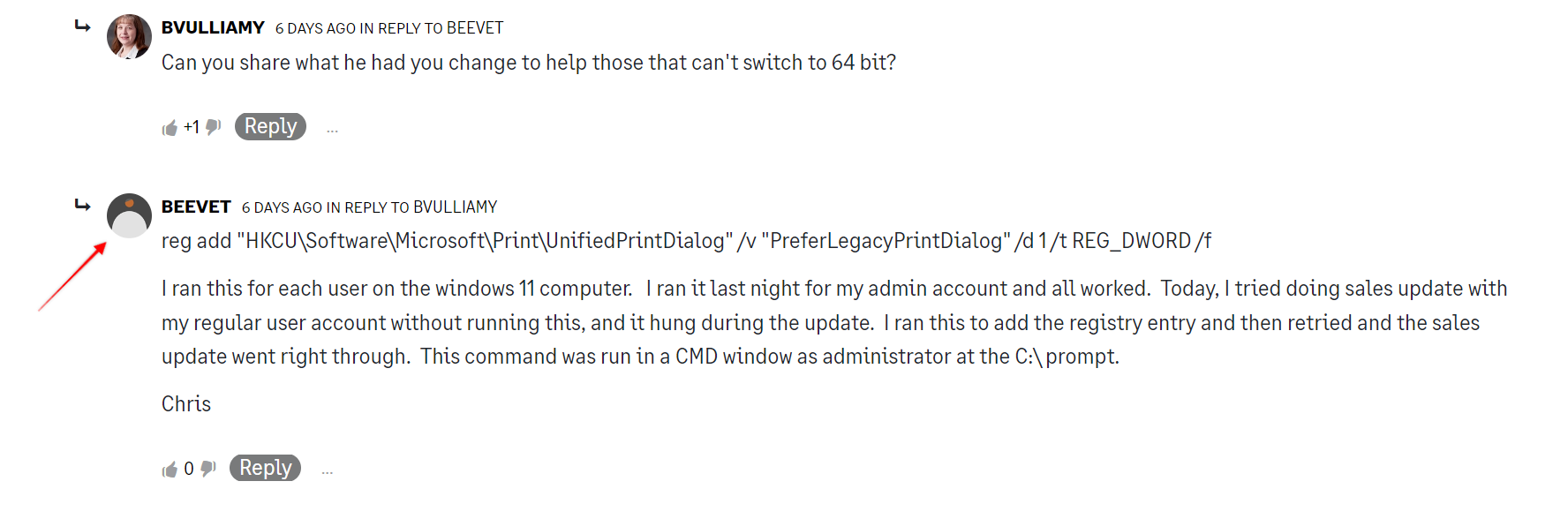
    I just noticed that someone in Sage Community ( formerly Sage City) posted the following update which they say involves a registry change that then resolved any conflict between 32-bit Sage 100 , Windows 100 and updating of DTR

    reg add "HKCU\Software\Microsoft\Print\UnifiedPrintDialog" /v "PreferLegacyPrintDialog" /d 1 /t REG_DWORD /f

    I ran this for each user on the windows 11 computer.   I ran it last night for my admin account and all worked.  Today, I tried doing sales update with my regular user account without running this, and it hung during the update.  I ran this to add the registry entry and then retried and the sales update went right through.  This command was run in a CMD window as administrator at the C:\ prompt.  


    ------------------------------
    Wayne Schulz
    wayne@s-consult.com
    Schulz Consulting
    (860) 516-8990
    Moodus, CT
    ------------------------------


  • 29.  RE: DTR and Windows 11

    Posted 02-16-2024 00:00

    @Wayne Schulz, I saw your post while onsite at a client's office that has this problem happening on both of their Sage computers and this did not work for them. 


    ------------------------------
    Greg Stiles
    S & W Microsystems
    ------------------------------


  • 30.  RE: DTR and Windows 11

    Posted 02-16-2024 11:18

    I haven't been able to verify it. There seemed to be one or two additional people in Sage Community indicating that it worked for them. Perhaps there are other issues at hand and this one be a universal fix ?


    ------------------------------
    Wayne Schulz
    wayne@s-consult.com
    Schulz Consulting
    (860) 516-8990
    Moodus, CT
    ------------------------------


  • 31.  RE: DTR and Windows 11

    Posted 02-21-2024 16:44

    Just tried the registry fix on my computer. 

    Since the problem seems to be happening randomly, conclusions are pending.


    ------------------------------
    Thomas Rogers (TomTarget)
    Target System Technology, Inc.
    ------------------------------


  • 32.  RE: DTR and Windows 11

    Posted 02-23-2024 12:57

    Looks like registry patch did not work on my workstation.  I've got a hang this morning.

    Maybe the registry patch needs to be at the server as well (Advanced)?


    ------------------------------
    Thomas Rogers (TomTarget)
    Target System Technology, Inc.
    ------------------------------


  • 33.  RE: DTR and Windows 11

    Posted 03-05-2024 18:57

    HI All,  So with this same client I have done the following:

    • Set a default printer
    • Made sure all printers had the "real" drivers installed
    • Made sure all printers are valid
    • The version of Acrobat they are running does not have the Security setting that has been mentioned as a possible fix.
    • Did the registry update
    • They are not on WiFi
    • Note that the printer they are using is a Xerox & I have had bad experiences with them a number of times.

    With all of this, they are still having the issue.   There is one accounting user that is the one getting the issue, there are two other users that very occasionally to DTR updates. They sometimes get the issue as well  but they generally just retry.   I suggested the scheduled update but they want to do it "on demand" (I have suggested an update every 15 minutes..)  

      What I am wondering in this is if there is a problem with the DTR report file.  Seems odd but this whole thing is odd.  Maybe rewriting the report from "scratch".??  I tend to think it is program related but with this still grasping at straws.  


    •  


    ------------------------------
    Bob Osborn
    Consultant
    ACI Consulting
    ------------------------------


  • 34.  RE: DTR and Windows 11

    Posted 03-05-2024 19:10

    Did you see this post on Sage City today?


    ------------------------------
    Kevin Moyes
    Technical Systems Analyst
    Munjal White Consulting Co.
    Toronto ON
    ------------------------------


  • 35.  RE: DTR and Windows 11

    Posted 03-05-2024 19:31

    Hi Kevin

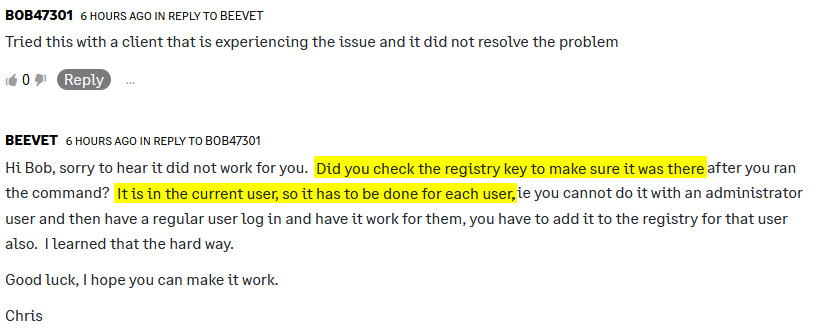
      Yes I did.  I checked first to make sure the user was an admin and I checked to make sure it was in the registry. 


    Thank you,


    Bob Osborn

    ACI Consulting

    p 714.282.0378     f 714.282.0235


    Bob@ACIconsulting.com

     

     ACISignature1                  

    This communication, including attachments, is confidential and may contain proprietary information intended only for the proposed recipient. Please notify the sender and delete this message if you believe that you have received this message in error or if you are not the proposed recipient. Unauthorized disclosure, copying, or distribution of the information is strictly prohibited.


  • 36.  RE: DTR and Windows 11

    Posted 03-06-2024 02:52

    Announcement of sorts: At MOTM in the Top Support Issues sessions done primarily by @Beth Bowers and less so by me, I talked in my slides about all the known but not always successful workarounds for the Windows 11 DTR hanging issue. Also mentioned the same occurs after printing the P/R Data Entry Audit Report where it hangs on the chained report Employer Expense Summary. Also the problem occurs with Windows 10 in some cases too. In all cases, the underlying o/s issue revolves around the failure of the Windows WOW64 thunking mechanism for a 32-bit app (Sage) printing reports in a chain.

    ** John Nichols of Sage was in the audience and took an interest, especially when he heard how just everyone in the audience had clients / customers with the issue. I then spoke with him at length afterwards. The short of it is they are already in the process of trying to fix it in Sage by dropping all the object and printers connections after the journal/register prints before the DTR is chained into and then re-establishing those. He has also been paying close attention to the HKCU registry edit and other ideas discussed on that Sage City / Sage Community Hub post.

    Once ready he will send the Sage fix to Beth and me for testing either later this week or next. At this point I don't know how it will play out but I will definitely keep everyone apprised here.


    ------------------------------
    Alnoor Cassim
    Accounting Systems, Inc. (ASI)
    ------------------------------


  • 37.  RE: DTR and Windows 11

    Posted 03-06-2024 10:07

    I haven't ran into this personally because I have been staying on 32-bit for now but since the topic of printers have come up, has anyone tried going into the crystal report for the DTR and forced these options?  I know most of the time you open a stock Sage report in Crystal, it displays the message about an invalid printer being selected.  Wonder if that is causing conflicts in the chained report.  Also, you may need to play with the margins, these are just what came up as default for the MS Print to PDF printer it decided to load as the default prior to checking the No Printer option.


    ------------------------------
    David Speck II
    Blytheco LLC
    ------------------------------


  • 38.  RE: DTR and Windows 11

    Posted 03-07-2024 11:45

    Thanks for the update @Alnoor Cassim

    That was a great session & happy to hear he is looking into it further. I would agree on the chained report issue; PR is one of the first places we saw it with Windows11 as well. To add to the fun, one of our clients had it resolved until the workstation was rebooted. 


    ------------------------------
    Dana Young
    Lehman Wesley & Associates
    Lansing, MI
    ------------------------------


  • 39.  RE: DTR and Windows 11

    Posted 03-07-2024 21:50

    Glad you liked the session @Dana Young
    ( ... now tell me where to send the Venmo to shh ...  :-) 


    ------------------------------
    Alnoor Cassim
    Accounting Systems, Inc. (ASI)
    ------------------------------


  • 40.  RE: DTR and Windows 11

    Posted 03-07-2024 21:52

    Update from John at Sage: He said the fix is undergoing further testing and that he'll reach out to me once it's complete which is expected to be end of next week..


    ------------------------------
    Alnoor Cassim
    Accounting Systems, Inc. (ASI)
    ------------------------------


  • 41.  RE: DTR and Windows 11

    Posted 03-07-2024 16:21

    Updated Sage KB 3/7/24 - Daily Transaction Register hangs on "Processing Daily Transaction Register"


    ------------------------------
    Wayne Schulz
    wayne@s-consult.com
    Schulz Consulting
    (860) 516-8990
    Moodus, CT
    ------------------------------