Sage 100

 View Only
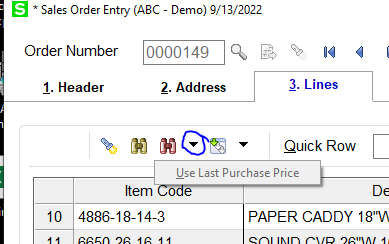
  • 1.  Does anyone know what this is supposed to do in Sales Order

    Posted 09-13-2022 10:09

    The red binoculars list the Last Purchase History correctly, but this "Use Last Purchase Price" is grayed out and I can't find anything in the doc about it.  I tried using a ALT-U and it moved it up a line, like that was the shortcut for the Up arrow (which it probably is).  Had a client ask about it and found it grayed on my demo, as well.

    ------------------------------
    Beth Bowers
    (269) 358-0989
    ------------------------------


  • 2.  RE: Does anyone know what this is supposed to do in Sales Order

    Posted 09-13-2022 11:12
    Edited by Brett Zimmerman 09-13-2022 11:16
    It appears it's WAD but it seems misleading that you should be able to simply enter an item and then click 'Use Last Purch Price' to simply pull in the 'last price' without having to first select a record from Last Purch lookup.  It becomes un-grayed-out once you select a record via the red binoculars, but it doesn't appear to change the line unit price unless for example you first change it and then click 'Use Last Purch Price'.  

    Use the Last Purchase Price on an Order:

    Overview

    You can enter the last price a customer paid for inventory items and miscellaneous items in sales orders and invoices.


    Before You Begin

    • You can only view and use the last customer price if you are tracking customer purchase history. 


    To use the last purchase price on an order

    1. Select Sales Order Main menu > Sales Order Entry or Invoice Data Entry.

    2. Enter a sales order or invoice. Enter the appropriate fields on the Header and Address tabs.

    3. Click the Lines tab. Select the Item Code field and then click the Customer Last Purchase History button on the button bar.

    4. In the Customer/Item Last Purchase History List, select the item to add to the order, and click Select.

    5. In the Sales Order Entry or S/O Invoice Data Entry window, at the Customer Last Purchase History button on the button bar, click the drop-down arrow and select Use Last Purchase Price.

    The last purchase price for the customer appears in the Unit Price field.


    ------------------------------
    Brett Zimmerman
    Net at Work
    Greater Boston Area
    ------------------------------


  • 3.  RE: Does anyone know what this is supposed to do in Sales Order

    Posted 09-13-2022 11:19
    THANK YOU!  Now I not only suck at KB searching, I can't even search Help.  How many more years to retirement????

    ------------------------------
    Beth Bowers
    (269) 358-0989
    ------------------------------


  • 4.  RE: Does anyone know what this is supposed to do in Sales Order

    Posted 09-13-2022 11:34
    @Beth Bowers - I think the retirement question is a valid point.  There seems to be a lot of 90Minders that are fast approaching that decision point.​.... or blown past it.

    @Brett Zimmerman - Thanks for the clarification.


    ------------------------------
    Jeff Schwenk
    Bottomline Software, Inc.
    (540) 221-4444
    ------------------------------