Good catch. The script does give the correct information. Make that a 2nd AI mistake inconsequential as it is. My question becomes how does the GetValue("RemitToCode$", sRemitToCode) get a successful return code since, as you rightfully point out, it clearly doesn't exist. Since sRemitToCode is empty then appending it to the key has no effect thus addressing the AP_VendorRemit table succeeds.
AI is helpful even though it makes stupid mistakes and now we know that verifying the results doesn't always find them all.
Original Message:
Sent: 05-05-2026 17:22
From: Jane Scanlan
Subject: Display of Vendor Remit to Address using Custom Office
Dan,
This code looks impressive, but I don't know how you got this to work in Sage since there is no such thing as a Vendor Remit Code. The key to the vendor remit file in Sage is vendor division + vendor code.
------------------------------
Jane Scanlan
Partner
Next Level Manufacturing Consulting Group
------------------------------
Original Message:
Sent: 05-03-2026 02:24
From: Dan Burleson
Subject: Display of Vendor Remit to Address using Custom Office
I put this to ChatGPT and we both made a small mistake. ChatGPT initially went with my assertion of the existence of a read-only AP_VendorRemit object, but in fact only the read-write object (AP_VendorRemit_bus) is available. ChatGPT's mistake was to reference the MessageBox incorrectly as oScript.UIObj.MessageBox(...) instead of the correct oSession.AsObject(oSession.UI).MessageBox(...). Aside from these two minor issues, the solution was accurate. The script below and sample message box reflects those corrections.
My prompt to ChatGPT:
"Write a Sage 100 button script that would be triggered on the AP Invoice Data Entry header panel and link to the AP_VendorRemit business object in read-only mode and retrieve the Vendor RemitToAddressLine1, RemitToAddressLine2, RemitToAddressLine3, RemitToCity, RemitToState, RemitToZipCode, and RemitToCountryCode displaying them with a MessageBox function."
' AP Invoice Data Entry Header Button Script' Retrieve Vendor Remit-To address from AP_VendorRemit in read-write modeDim sAPDivisionNoDim sVendorNoDim sRemitToCodeDim oVendorRemitDim sAddr1, sAddr2, sAddr3Dim sCity, sState, sZip, sCountryDim sMsgDim retValsAPDivisionNo = ""sVendorNo = ""sRemitToCode = ""retVal = oBusObj.GetValue("APDivisionNo$", sAPDivisionNo)retVal = oBusObj.GetValue("VendorNo$", sVendorNo)retVal = oBusObj.GetValue("RemitToCode$", sRemitToCode)If Trim(sVendorNo) = "" Then retVal = oSession.AsObject(oSession.UI).MessageBox("", "No vendor is currently selected.") oScript.DeactivateProcedureEnd If' Use the service object for read-write accessSet oVendorRemit = oSession.AsObject(oSession.GetObject("AP_VendorRemit_bus"))' AP_VendorRemit key is normally:' APDivisionNo + VendorNo + RemitToCoderetVal = oVendorRemit.SetKey(sAPDivisionNo & sVendorNo & sRemitToCode)If retVal = 0 Then sMsg = "Vendor remit-to record was not found." & vbCrLf & vbCrLf & _ "AP Division: " & sAPDivisionNo & vbCrLf & _ "Vendor No: " & sVendorNo & vbCrLf & _ "Remit-To Code: " & sRemitToCode retVal = oSession.AsObject(oSession.UI).MessageBox("", sMsg) oScript.DeactivateProcedureEnd IfsAddr1 = ""sAddr2 = ""sAddr3 = ""sCity = ""sState = ""sZip = ""sCountry = ""retVal = oVendorRemit.GetValue("RemitToAddressLine1$", sAddr1)retVal = oVendorRemit.GetValue("RemitToAddressLine2$", sAddr2)retVal = oVendorRemit.GetValue("RemitToAddressLine3$", sAddr3)retVal = oVendorRemit.GetValue("RemitToCity$", sCity)retVal = oVendorRemit.GetValue("RemitToState$", sState)retVal = oVendorRemit.GetValue("RemitToZipCode$", sZip)retVal = oVendorRemit.GetValue("RemitToCountryCode$", sCountry)sMsg = "Vendor Remit-To Address" & vbCrLf & vbCrLf & _ sAddr1 & vbCrLf & _ sAddr2 & vbCrLf & _ sAddr3 & vbCrLf & _ sCity & ", " & sState & " " & sZip & vbCrLf & _ sCountryretVal = oSession.AsObject(oSession.UI).MessageBox("", sMsg)Set oVendorRemit = Nothing
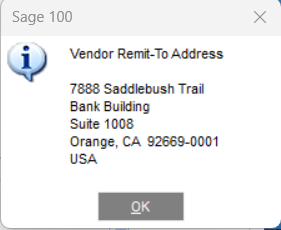
------------------------------
Dan Burleson
Software Consultant
Connex Software
Corvallis OR
541-829-1054
Original Message:
Sent: 05-01-2026 09:12
From: Jane Scanlan
Subject: Display of Vendor Remit to Address using Custom Office
That's what I'm going to try to do @Kevin Moyes.
------------------------------
Jane Scanlan
Partner
Next Level Manufacturing Consulting Group
Original Message:
Sent: 04-30-2026 14:09
From: Kevin Moyes
Subject: Display of Vendor Remit to Address using Custom Office
A button script could open the vendor remit record, read the fields you want to display, then pop-up a messagebox with the values (as a block of text). Not too complicated at all (as long as the user has permission to open the AP_VendorRemit_bus object).
------------------------------
Kevin Moyes
Technical Systems Analyst
Munjal White Consulting Co.
Toronto ON