Sage 100

 View Only
Expand all | Collapse all

Deleting GL Accounts

  • 1.  Deleting GL Accounts

    Posted 03-13-2025 18:09

    I have found some previous posts on this issue, but no good resolution.  Have a client on V2024 Premium (SQL) who has created over 110,000 unneeded GL Accounts.  This is causing reporting issues.  I have marked all of them as DELETED and closed the year.  None of these accounts have any activity whatsoever, but they do not get deleted!   I'm stumped as to how to get these GONE.


    ------------------------------
    Jon Parkinson
    Timac Business Systems
    ------------------------------


  • 2.  RE: Deleting GL Accounts

    Posted 03-14-2025 00:50

    You need to use the GL Utility to Delete Accounts.  Extract the GL accounts in Excel, narrow the file down to accounts to delete.  Create a VI job for GL_Accounts into the delete utility.  Postings in all modules must be done in advance.  Make a backup of the company data before deleting.  KB ID:  223924250030927


    ------------------------------
    [Michele] [Herzog] [CPA,CITP, CGMA]
    [Overland Park] [KS]
    [816-520-1365]
    ------------------------------


  • 3.  RE: Deleting GL Accounts

    Posted 03-14-2025 11:46

    Thank you for replying Michelle.  However, this is what I have been trying to do all along.  The accounts are marked with status "Deleted" but are NOT DELETED.  Again, these accounts have never been posted to.  Fiscal year end just leaves them all as is.


    ------------------------------
    Jon Parkinson
    Timac Business Systems
    ------------------------------


  • 4.  RE: Deleting GL Accounts

    Posted 03-14-2025 12:11

    What happens when you click the Proceed button?


    ------------------------------
    Doug Higgs
    Midwest Commerce Solutions, Inc
    (312) 315-0960
    Chauffeur, Chef, and Personal Assistant to Sprinkles
    ------------------------------


  • 5.  RE: Deleting GL Accounts

    Posted 03-14-2025 13:09

    Maybe rebuild key and sort files will work.


    ------------------------------
    [Michele] [Herzog] [CPA,CITP, CGMA]
    [Overland Park] [KS]
    [816-520-1365]
    ------------------------------


  • 6.  RE: Deleting GL Accounts

    Posted 03-14-2025 13:36

    That's what I am doing.  I get the Delete Accounts Log showing the accounts with status changed to Deleted, but the accounts are NEVER deleted.


    ------------------------------
    Jon Parkinson
    Timac Business Systems
    ------------------------------


  • 7.  RE: Deleting GL Accounts

    Posted 03-14-2025 13:57

    Then you do a general ledger year end processing and the accounts are still there?


    ------------------------------
    Doug Higgs
    Midwest Commerce Solutions, Inc
    (312) 315-0960
    Chauffeur, Chef, and Personal Assistant to Sprinkles
    ------------------------------


  • 8.  RE: Deleting GL Accounts

    Posted 03-14-2025 14:11

    Doug - Yes, exactly.


    ------------------------------
    Jon Parkinson
    Timac Business Systems
    ------------------------------


  • 9.  RE: Deleting GL Accounts

    Posted 03-14-2025 14:51

    Any budget data for those accounts?


    ------------------------------
    Kevin Moyes
    Technical Systems Analyst
    Munjal White Consulting Co.
    Toronto ON
    ------------------------------


  • 10.  RE: Deleting GL Accounts

    Posted 03-14-2025 15:03

    Kevin -  No budget, no anything!


    ------------------------------
    Jon Parkinson
    Timac Business Systems
    ------------------------------


  • 11.  RE: Deleting GL Accounts

    Posted 03-14-2025 15:18

    As a test or workaround try merging them into one account.  If that works then try to delete the remaining account.


    ------------------------------
    Doug Higgs
    Midwest Commerce Solutions, Inc
    (312) 315-0960
    Chauffeur, Chef, and Personal Assistant to Sprinkles
    ------------------------------


  • 12.  RE: Deleting GL Accounts

    Posted 03-14-2025 16:03

    Doug - I have tried that approach.  I imported the first 1000 accounts to merge (out of 110,000) and the utility ran for hours and never completed.  When I go back in to see, nothing has changed.


    ------------------------------
    Jon Parkinson
    Timac Business Systems
    ------------------------------


  • 13.  RE: Deleting GL Accounts

    Posted 03-15-2025 11:30

    Instead of trying to merge 1000, try merging 1 or 2 accounts into another account.  If a merge with such a small number of accounts doesn't work, then I think you can rule out history or budgets being the issue because the merge doesn't depend on no history or budgets.  Since there is no history, the merge shouldn't take so long.


    ------------------------------
    Doug Higgs
    Midwest Commerce Solutions, Inc
    (312) 315-0960
    Chauffeur, Chef, and Personal Assistant to Sprinkles
    ------------------------------


  • 14.  RE: Deleting GL Accounts

    Posted 03-14-2025 16:05

    Hmm... Within SQL, try searching all tables for some of the AccountKey values, to see if there is something hard-to-find that might be blocking the delete?  (Google provided this query years ago, and it has proven handy...).
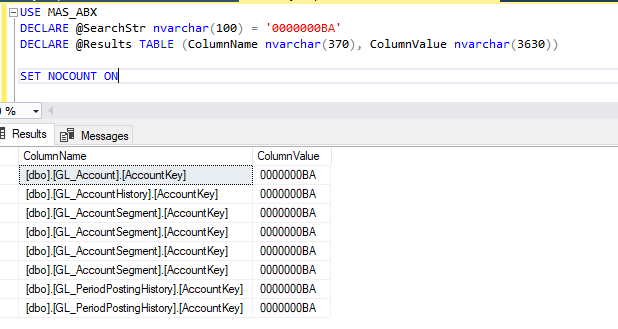
    USE MAS_TST

    DECLARE @SearchStr nvarchar(100) = 'SEARCH VALUE'

    DECLARE @Results TABLE (ColumnName nvarchar(370), ColumnValue nvarchar(3630))


    SET NOCOUNT ON


    DECLARE @TableName nvarchar(256), @ColumnName nvarchar(128), @SearchStr2 nvarchar(110)

    SET  @TableName = ''

    SET @SearchStr2 = QUOTENAME('%' + @SearchStr + '%','''')


    WHILE @TableName IS NOT NULL


    BEGIN

        SET @ColumnName = ''

        SET @TableName =

        (

            SELECT MIN(QUOTENAME(TABLE_SCHEMA) + '.' + QUOTENAME(TABLE_NAME))

            FROM     INFORMATION_SCHEMA.TABLES

            WHERE         TABLE_TYPE = 'BASE TABLE'

                AND    QUOTENAME(TABLE_SCHEMA) + '.' + QUOTENAME(TABLE_NAME) > @TableName

                AND    OBJECTPROPERTY(

                        OBJECT_ID(

                            QUOTENAME(TABLE_SCHEMA) + '.' + QUOTENAME(TABLE_NAME)

                             ), 'IsMSShipped'

                               ) = 0

        )


        WHILE (@TableName IS NOT NULL) AND (@ColumnName IS NOT NULL)


        BEGIN

            SET @ColumnName =

            (

                SELECT MIN(QUOTENAME(COLUMN_NAME))

                FROM     INFORMATION_SCHEMA.COLUMNS

                WHERE         TABLE_SCHEMA    = PARSENAME(@TableName, 2)

                    AND    TABLE_NAME    = PARSENAME(@TableName, 1)

                    AND    DATA_TYPE IN ('char', 'varchar', 'nchar', 'nvarchar', 'int', 'decimal')

                    AND    QUOTENAME(COLUMN_NAME) > @ColumnName

            )


            IF @ColumnName IS NOT NULL


            BEGIN

                INSERT INTO @Results

                EXEC

                (

                    'SELECT ''' + @TableName + '.' + @ColumnName + ''', LEFT(' + @ColumnName + ', 3630)

                    FROM ' + @TableName + ' (NOLOCK) ' +

                    ' WHERE ' + @ColumnName + ' LIKE ' + @SearchStr2

                )

            END

        END   

    END


    SELECT ColumnName, ColumnValue FROM @Results


    ------------------------------
    Kevin Moyes
    Technical Systems Analyst
    Munjal White Consulting Co.
    Toronto ON
    ------------------------------


  • 15.  RE: Deleting GL Accounts

    Posted 03-14-2025 16:09

    Oh, and if the system has enhancements, try removing the Links folder contents (except default.pvc) to see if that helps?


    ------------------------------
    Kevin Moyes
    Technical Systems Analyst
    Munjal White Consulting Co.
    Toronto ON
    ------------------------------
