True. The PRINT is optional but it tells us it worked by returning a value of 1. Glad the problem is solved now.
------------------------------
Alnoor Cassim
Accounting Systems, Inc. (ASI)
------------------------------
Original Message:
Sent: 06-27-2024 12:59
From: Lourdes Sobrino
Subject: DELETED server on Application Server Configuration
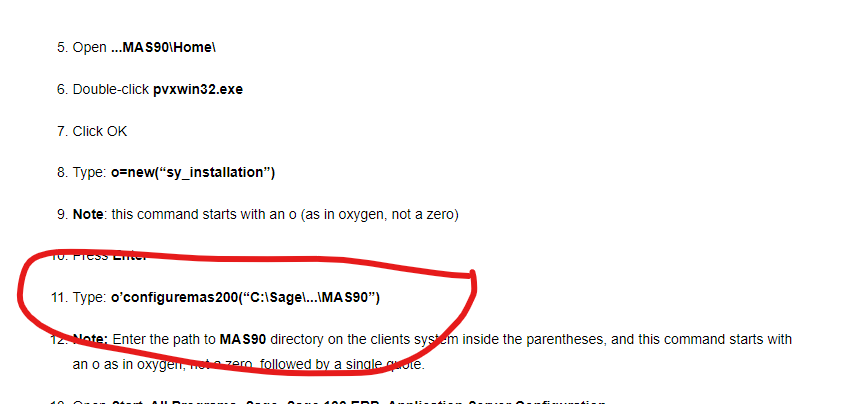
thanks...by the way, the command is different on the KB article..it does not have the PRINT
------------------------------
Lourdes Sobrino
LU² DSD Puerto Rico
Guaynabo Puerto Rico
787.485.9638
------------------------------
Original Message:
Sent: 06-27-2024 12:53
From: Lourdes Sobrino
Subject: DELETED server on Application Server Configuration
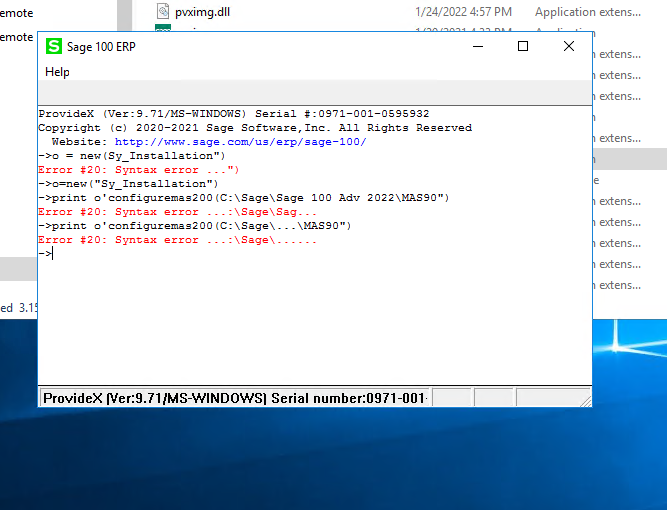
I tried that already from KB article..but I get an error
------------------------------
Lourdes Sobrino
LU² DSD Puerto Rico
Guaynabo Puerto Rico
787.485.9638
Original Message:
Sent: 06-27-2024 12:48
From: Alnoor Cassim
Subject: DELETED server on Application Server Configuration
Here is 1 way:
- Close out of App Server Config
- In File Explorer, at server, browse to \Home folder. E.g. D:\Apps\Sage\Mas90\Home
- Run pvxwin32 and click OK at the message
- At the prompt type the following (not the path here goes up to the \mas90 folder)
- The last command should return a 1 at the prompt. If it does type BYE to close the prompt window.
- Open App Server Config and the SAGE server entry should be back.
------------------------------
Alnoor Cassim
Accounting Systems, Inc. (ASI)