I spent more time on this, and what I should have immediately done is rename the LINKS folder because once I did that and tried DELETE/CHANGE, the issue was resolved.
This may have to do with the REPAY integration ( credit cards and Click2Pay ), as there is a whole boatload of program files in the LINK folder, and REPAY is our only enhancement.
Before testing, I updated Sage 100 Advanced 2022 to the latest PU and the latest Repay integration.
FYI - I think this is going to be a Repay issue. If I find anything different I'll update this post.
------------------------------
Wayne Schulz
wayne@s-consult.comSchulz Consulting
(860) 516-8990
Moodus, CT
------------------------------
Original Message:
Sent: 01-17-2024 06:57
From: Jeff Schwenk
Subject: Delete/Change AR Customer won't delete a customer with AR history
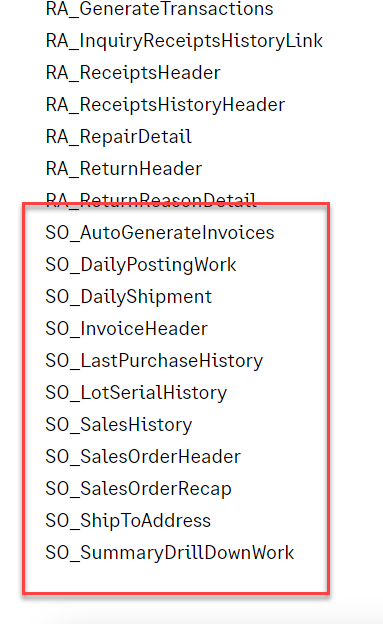
While you are on the phone with them, ask why under the CHANGE tab heading, SO HISTORY tables aren't included on the change list. Is this an oversight dating back to when the history tables were added to the mix? IMHO, this is a serious oversight of their coding. What do we link those tables to? What could be a reason beside taking the easy way.
------------------------------
Jeff Schwenk
Bottomline Software, Inc.
(540) 221-4444
------------------------------
Original Message:
Sent: 01-16-2024 20:39
From: Wayne Schulz
Subject: Delete/Change AR Customer won't delete a customer with AR history
When I review the Sage KB - Files affected by Delete and Change Customers Utility - this list doesn't include files like the AR Cash Receipts History.
If I run through the DELETE/CHANGE and ask for customer number xxxx to be DELETED then Sage AR will give a log which doesn't contain any errors
Yet when I go back to the xxxx customer --- it's still there. I try to manually delete it on the customer maintenance screen and I get the message that I can't delete because Cash Receipts history exists and that I should use the DELETE utility to delete customers with history.
I'm going to call Sage and open a case because something seems odd with this process and I expect that the AR Delete should remove customers that have history.
Note that AR Change allows me to change a customer number from x to y and all resulting history is changed as well ( as the Sage KB seems to indicate should happen with a change ).
------------------------------
Wayne Schulz
wayne@s-consult.com
Schulz Consulting
(860) 516-8990
Moodus, CT