Has anyone resolved this Crystal csv export 'DEFAULT_NULL' issue?
v2020.1 - When running custom report from Sage 100 menu and export to csv format, the default delimiter (") and separator (,) are missing; "DEFAULT_NULL" shows (see screen-shot in addt'l post below) and therefore the user needs to be sure to manually enter it every time. It was working fine on their prior v2014.5 system.
It happens on multiple workstations (with or without Crystal installed), as well as the client's server, and it happens on my local system too. It's happened on a machine with Crystal 2011, on a machine with Crystal 2016, and on a machine without Crystal. It's fine if you run it directly inside Crystal Reports, so it would seem to be some sort of Crystal runtime issue.
It looks like this issue (Sage KB article #83953) surfaced in 2017 of which Crystal SP18 apparently resolved it, but not currently - and Sage Engineering said a Crystal SP shouldn't be needed for our current issue because the v2020 Crystal Runtime includes SP21.
I already gave the client some workarounds, including running the report/export directly in Crystal, or instead export to xls and then 'save as' csv.
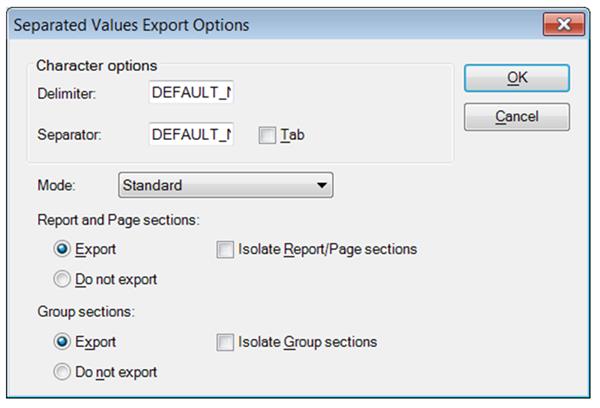
------------------------------
Brett Zimmerman
Net at Work
Greater Boston Area
------------------------------