I heard through the grapevine that Sage is apparently deferring action on this issue until v2024. Hopefully they'll also address v2023 at that time. I still dislike Sage's suggested resolution of implementing 64-bit, which to me isn't much of a solution and is not very customer-centric.
Original Message:
Sent: 08-09-2023 17:56
From: Kevin Moyes
Subject: Daily Transaction Register hangs
Yes, what Jeff said.
In an ideal world we'd get a proper fix for this, and all the 64-bit bugs resolved, and all the Mod Squad quick-wins, and all the product improvements in the Ideas site / Ideation90... but we don't live in that world.
If I run into a situation where a client of ours has this problem, and the work-arounds are not feasible (for good reasons), you bet I'll be complaining. Until that day comes, I'm OK with Sage engineering prioritizing other activities.
------------------------------
Kevin Moyes
Technical Systems Analyst
Munjal White Consulting Co.
Toronto ON
------------------------------
Original Message:
Sent: 08-09-2023 17:37
From: Jeff Schwenk
Subject: Daily Transaction Register hangs
My take home from the recent 90M Tech roundtable was that the "fix" was WAY "deep" in the "code" and the solution was run in 64 OS for WIN 11. The general "feeling" from tech support was that 64 OS is ready for prime time. Not much (if any) pushback from the 90M attendees on this recommended "fix". @Wayne Schulz started the thread on 64 OS issues shortly after the meeting.
------------------------------
Jeff Schwenk
Bottomline Software, Inc.
(540) 221-4444
Original Message:
Sent: 08-09-2023 15:35
From: Brett Zimmerman
Subject: Daily Transaction Register hangs
Right, @Wayne Schulz, thanks. But many clients prefer a 'fix' and not just a permanent workaround. Folks see this as an extra step., but at least it's a reasonable workaround.
------------------------------
Brett Zimmerman
Net at Work
Greater Boston Area
Original Message:
Sent: 08-09-2023 13:52
From: Wayne Schulz
Subject: Daily Transaction Register hangs
I think the other workaround was to run the DTR directly and not as part of the updates that you are prompted for.
------------------------------
Wayne Schulz
wayne@s-consult.com
Schulz Consulting
(860) 516-8990
Moodus, CT
Original Message:
Sent: 08-09-2023 13:42
From: Brett Zimmerman
Subject: Daily Transaction Register hangs
I do see that 64-bit is suggested as a 'fix' but that seems ridiculous! Are others really doing that just to fix this bug? I don't see myself recommending that just for this. Seems like 64-bit still isn't really ready for Primetime. Also, wondering if anyone else has tried the following in Adobe (from the Sage City post):
In Adobe Select
Edit>Preferences>Security (Enhanced)
Deselect Enable Protected Mode at Startup
Select Enable Enhance Security
------------------------------
Brett Zimmerman
Net at Work
Greater Boston Area
Original Message:
Sent: 08-09-2023 13:24
From: Brett Zimmerman
Subject: Daily Transaction Register hangs
Can't believe there's still no fix!!
------------------------------
Brett Zimmerman
Net at Work
Greater Boston Area
Original Message:
Sent: 05-08-2023 12:57
From: Brett Zimmerman
Subject: Daily Transaction Register hangs
I just helped a client with this issue on Win10 (v2022.2 Test system). To-date I've only seen it on Win11 (as advertised).
------------------------------
Brett Zimmerman
Net at Work
Greater Boston Area
Original Message:
Sent: 05-01-2023 12:58
From: Beth Bowers
Subject: Daily Transaction Register hangs
I've had to UNDO that several times due to the Win 11 issue.
------------------------------
Beth Bowers
(269) 358-0989
Original Message:
Sent: 05-01-2023 12:51
From: Jeff Schwenk
Subject: Daily Transaction Register hangs
I have started setting up security to automatically update the DTR. So much smoother. Or I have a talk with the head of accounting to develop an SOP to check this periodically (Fridays)
------------------------------
Jeff Schwenk
Bottomline Software, Inc.
(540) 221-4444
Original Message:
Sent: 05-01-2023 10:59
From: Kevin Moyes
Subject: Daily Transaction Register hangs
We have set up an unposted DTR nightly alert for a few of our clients (using Visual Cut)... unrelated to this problem. It's quick and easy to set up (if they have an automated reporting tool like VC / SA).
------------------------------
Kevin Moyes
Technical Systems Analyst
Munjal White Consulting Co.
Original Message:
Sent: 05-01-2023 10:28
From: Brett Zimmerman
Subject: Daily Transaction Register hangs
I think the biggest downside to this is all the unposted G/L data in the DTR that just sits out there 'waiting' until someone realizes. The last 2 clients I assisted had several pages of unposted data, going back a couple/few months.
------------------------------
Brett Zimmerman
Net at Work
Greater Boston Area
Original Message:
Sent: 04-29-2023 05:27
From: Beth Bowers
Subject: Daily Transaction Register hangs
My issue was INSTALLING InstaDocs.
------------------------------
Beth Bowers
(269) 358-0989
Original Message:
Sent: 04-28-2023 22:37
From: Jeff Schwenk
Subject: Daily Transaction Register hangs
@Beth Bowers posted an issue with Avalara running in 64 bit a few months back. Did this get resolved? Yes, I agree with @Wayne Schulz I just don't sense a lot of people on the 64 bit bandwagon. v2023 might be the year to try.
------------------------------
Jeff Schwenk
Bottomline Software, Inc.
(540) 221-4444
Original Message:
Sent: 04-28-2023 17:33
From: Wayne Schulz
Subject: Daily Transaction Register hangs
I've seen 100% Deer-in-Headlights response from Sage to every question about "How many Sage 100 users have installed 64-bit."
Either Sage doesn't have telemetry to know this or there aren't many
In any case - thank you for being a pioneer!
------------------------------
Wayne Schulz
wayne@s-consult.com
Schulz Consulting
(860) 516-8990
Moodus, CT
Original Message:
Sent: 04-28-2023 16:14
From: Kevin Moyes
Subject: Daily Transaction Register hangs
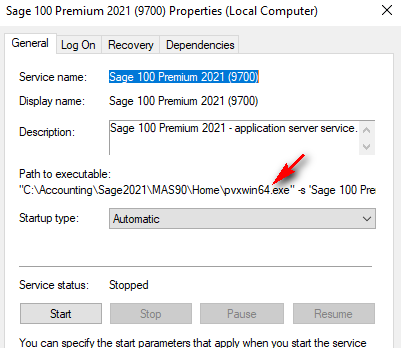
For Advanced / Premium, you probably have to re-create the service. We're having that problem today with a client changing to 64-bit and an error when starting the service.
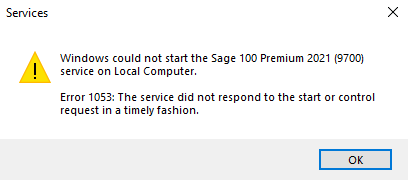 Remove the service, reboot, recreate it, and things work.
Are we the first ones to discover this? Nothing on it in the KB that we can see.
------------------------------
Kevin Moyes
Technical Systems Analyst
Munjal White Consulting Co.
Original Message:
Sent: 04-28-2023 12:56
From: Kevin Moyes
Subject: Daily Transaction Register hangs
Functionally there should be no difference... just compatibility issues to watch for, and a potential performance boost to CPU intensive activities.
Safe to try, and easy to change back and forth (when nobody is using Sage 100).
------------------------------
Kevin Moyes
Technical Systems Analyst
Munjal White Consulting Co.
Original Message:
Sent: 04-28-2023 12:50
From: Beth Bowers
Subject: Daily Transaction Register hangs
I ran it as a test in 2022 just to see what happened, but then had to switch back to 32 bit. Apparently I never had to run an older version the entire time I was running as 64 bit...
------------------------------
Beth Bowers
(269) 358-0989
Original Message:
Sent: 04-28-2023 12:46
From: Kevin Moyes
Subject: Daily Transaction Register hangs
Only do it on Customer systems that have issues and don't have any 32-bit workstations. There's no need to switch to 64-bit on your local system.
------------------------------
Kevin Moyes
Technical Systems Analyst
Munjal White Consulting Co.
Original Message:
Sent: 04-28-2023 12:36
From: Beth Bowers
Subject: Daily Transaction Register hangs
Whoa, wait a minute - older 32 bits will no longer run? I am not using a VM for each version, so that would definitely be an issue.
------------------------------
Beth Bowers
(269) 358-0989
Original Message:
Sent: 04-28-2023 12:07
From: Wayne Schulz
Subject: Daily Transaction Register hangs
Converting 32-bit to 64-bit ( from the Sage help files)
- All Sage 100 versions before 2021 are 32-bit only.
- You should do this only if you no longer use any earlier 32-bit versions of Sage 100 installed on the same computer and if all of your Sage 100 workstations are running the 64-bit version of Windows.
- If you have an earlier 32-bit version of Sage 100 installed on the computer, it will no longer work after you convert version 2021+ to 64-bit
To convert from 32-bit to 64-bit
On the computer where Sage 100 2021+ is installed, open the folder where the Sage 100 installation program is located.
Click or double-click the 32_64_Bit_Switch_Utility.exe file.
Click Next and then enter the password for the Sage 100 Administrator account.
Click Convert.
Sage 100 is converted to the 64-bit version.
The Workstation Synchronization program automatically upgrades the workstations the next time Sage 100 is started on the workstation.
------------------------------
Wayne Schulz
wayne@s-consult.com
Schulz Consulting
(860) 516-8990
Moodus, CT