Sage 100

 View Only
  • 1.  Customized lookup for item maintenance pulls wrong data when adding LastSoldDate

    Posted 06-15-2021 10:23
    Customer is on Sage 100 Standard 2014. Customer requested that I add the LastSoldDate to Item Maintenance lookups, but the date that appears in the lookup is not the LastSoldDate, but rather the LastReceiptDate.

    Is this a dictionary thing that can easily be fixed? I was unable to find anything in the Sage KB. And as far as I know they are on the latest release with 2014.7.

    ------------------------------
    Greg Stiles
    S & W Microsystems
    Torrance CA
    310.787.1010
    ------------------------------


  • 2.  RE: Customized lookup for item maintenance pulls wrong data when adding LastSoldDate

    Posted 06-16-2021 03:39
    I tried on my v2014 (didn't note the PU version sorry) and LastSoldDate is appearing correctly (so is LastReceiptDate). Since LastReceiptDate is the next sequential field, try adding that too and note if you see the next field LastPhysicalCountDate. Also add ImageFile the one previous to LastSoldDate to see if LastSoldDate appears. Maybe that could be your workaround (just rename the column header). That might be easier than figuring out whether it's the dictionary that's off or the physical file.

    ------------------------------
    Alnoor Cassim

    Email: alnoor@asifocus.com
    Ph: 949-689-9887
    Orange County, CA
    ------------------------------


  • 3.  RE: Customized lookup for item maintenance pulls wrong data when adding LastSoldDate

    Posted 06-16-2021 11:39
    @Alnoor Cassim you are absolutely right. My dictionary seems to be different from yours, but the theory applies. I can change the column heading, but, how about reformatting it as a date?
    Can this actually be fixed?
    Is PU7 the latest update available?
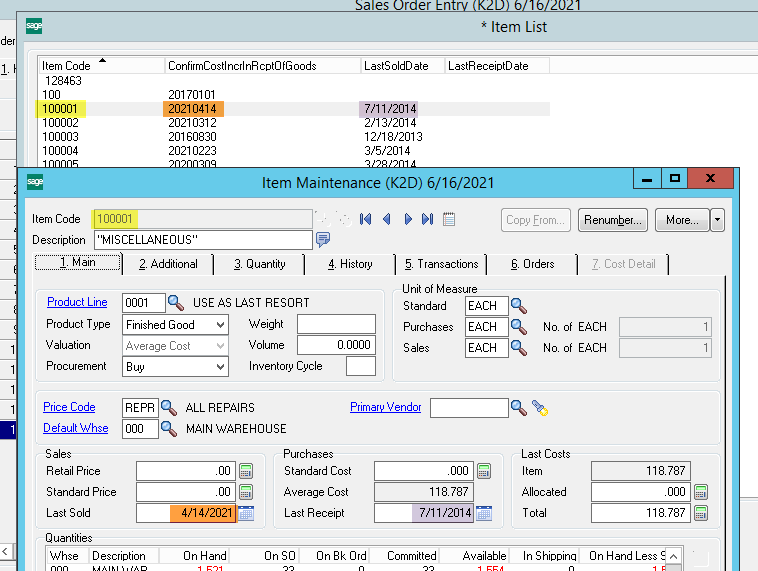
    ​​


    ------------------------------
    Greg Stiles
    S & W Microsystems
    Torrance CA
    310.787.1010
    ------------------------------


  • 4.  RE: Customized lookup for item maintenance pulls wrong data when adding LastSoldDate

    Posted 06-16-2021 11:42
    Did you try LM - Utilities - Lookup Conversion?

    ------------------------------
    Kevin Moyes
    Technical Systems Analyst
    Munjal White Consulting Co.
    Toronto ON
    ------------------------------


  • 5.  RE: Customized lookup for item maintenance pulls wrong data when adding LastSoldDate

    Posted 06-16-2021 11:50
    @Kevin Moyes the lookups were created after ​upgrading them to 2014, so no. Will Lookup Conversion fix lookups created on the same version? Also, as with @Alnoor Cassim, my internal 2014.7 does not have this problem. Can this be data related? I can test it on another company code. I didn't mention this earlier because I didn't think it was applicable, but this was an upgrade from 3.6 to 5.1 (2014), with a stopover at 3.7, but the custom lookup was created after the upgrade.

    ------------------------------
    Greg Stiles
    S & W Microsystems
    Torrance CA
    310.787.1010
    ------------------------------


  • 6.  RE: Customized lookup for item maintenance pulls wrong data when adding LastSoldDate

    Posted 06-16-2021 11:59
    It should be safe to try.
    If you're feeling bold, you can check the lookup files to see if there is anything obviously wrong, but I don't know anything about the specifics of how things are structured.  (I just remember Carmen mentioning where ALE data was stored during a MOTM session).


    ------------------------------
    Kevin Moyes
    Technical Systems Analyst
    Munjal White Consulting Co.
    Toronto ON
    ------------------------------


  • 7.  RE: Customized lookup for item maintenance pulls wrong data when adding LastSoldDate

    Posted 06-16-2021 11:56
    Edited by Alnoor Cassim 06-16-2021 12:39
    To get a better idea whether it's the dictionary or physical file that's off, some things you can do:
    1. Run a Crystal report or Excel query off of CI_Item using the columns we mentioned to see if same issue occurs . This is important because ALE has its own dict for legacy modules  which shouldn't apply here but sometimes it's relevant.

    2. DFDM CI_Item and select that ItemCode. Now look at the fields we talked about both with the Formatted Display box checked (dictionary view) and unchecked (raw data view). Look at the total number of columns in both views too to see if they are different. 

    If it looks physical table is off but dict is correct, as that is more likely, you can use KB 23940 that @Andrew Hagenbach mentioned where you do the steps for the C/I module code and a test company code.


    ------------------------------
    Alnoor Cassim

    Email: alnoor@asifocus.com
    Ph: 949-689-9887
    Orange County, CA
    ------------------------------


  • 8.  RE: Customized lookup for item maintenance pulls wrong data when adding LastSoldDate

    Posted 06-16-2021 19:50
    @Kevin Moyes - "No ALE customizations to convert" is the message when running the lookup conversion utility.

    @Alnoor Cassim, a crystal report has the correct data.
    DFDM shows the correct data switching between formatted and unformatted display shows the same number of fields.
    The problem does not exhibit in the other company code.

    going to find KB23940...​​

    ------------------------------
    Greg Stiles
    S & W Microsystems
    Torrance CA
    310.787.1010
    ------------------------------


  • 9.  RE: Customized lookup for item maintenance pulls wrong data when adding LastSoldDate

    Posted 06-16-2021 23:42
    Thanks for all the help, @Alnoor Cassim & @Kevin Moyes.

    Running the SY_Activation_Bus program  to activate C/I for the one company code that had the problem fixed the issue.

    KB 23940  How to update files or tables from the dictionary using the SY_Activation_Bus program
    ​​

    ------------------------------
    Greg Stiles
    S & W Microsystems
    Torrance CA
    310.787.1010
    ------------------------------