That's a nifty little trick. Thanks,
@Kevin Moyes,
@Alnoor Cassim!! Hopefully it doesn't cause issues down the road for this v2013 to v2021 scenario.
What I'm in the process of performing is essentially merging two systems' system files. I have a v2013 to v2021 Upgrade (company 2), of which the v2021 system is already up and running and in use by the other company (company 1). So obviously during migration of company 2 I can't simply re-migrate system files because obviously that'll overwrite the existing company 1 stuff (e.g. Tax Codes/Schedules, screen modifications, UDF's, security, etc.). I'm planning to just manually re-create the user Logons and Roles, but it appears I need to use the Customizer Export/Import Wizard for the custom Office stuff, and VI for the Tax Codes/Schedules. One of the main concerns I have though is if anything does get overwritten, e.g. Tax Schedules.
------------------------------
Brett Zimmerman
Net at Work
Greater Boston Area
------------------------------
Original Message:
Sent: 11-09-2021 16:03
From: Buffy Lubinski
Subject: Customization Import
Original Message:
Sent: 11/9/2021 3:46:00 PM
From: David Overholt
Subject: RE: Customization Import
Thanks Kevin,
I'm putting that one in "important things to remember" folder. Then I just need to remember it is there if I ever need it.
Original Message:
Sent: 11/9/2021 1:27:00 PM
From: Kevin Moyes
Subject: RE: Customization Import
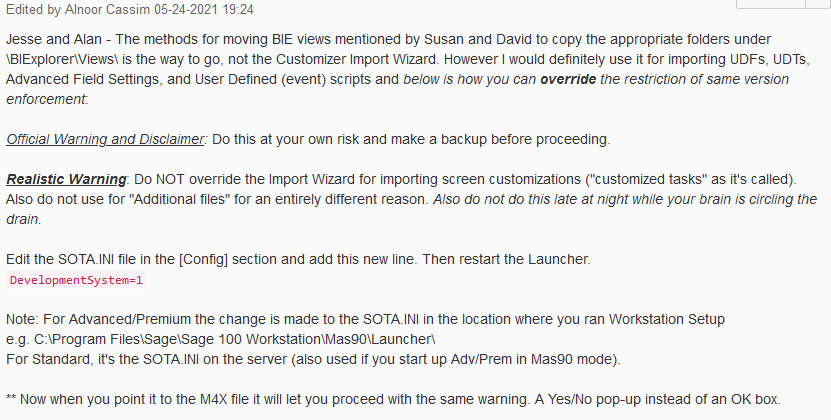
Found it:
------------------------------
Kevin Moyes
Technical Systems Analyst
Munjal White Consulting Co.
Toronto ON
------------------------------
Original Message:
Sent: 11-09-2021 13:21
From: Kevin Moyes
Subject: Customization Import
I am pretty sure there is a sota.ini hack to flag a system for development, allowing you to import the M4X... but I can't find the reference.
------------------------------
Kevin Moyes
Technical Systems Analyst
Munjal White Consulting Co.
Toronto ON
Original Message:
Sent: 11-09-2021 12:41
From: David Overholt
Subject: Customization Import
Here is how I handled that once before.
· Import the M4x file into a clean install with demo data using the same version (2017 in your case)
· then upgrade that install to the newer version upgrading my local install that just has demo data is usually much quicker than upgrading the client data.
o I think you can even skip converting company data and still do the export but I don't remember for certain.
· Then export it out of that upgraded version so you can import at your client's 2020 version.
If anyone has an easier way to accomplish this, I'm all ears!