Sage 100

 View Only
  • 1.  Customer's SO script gets error 88 when run for a second time from customer maint

    Posted 09-09-2022 05:34
    Hi Everyone and script experts.

    We are helping a customer who wrote their own script, to enable/disable/hide certain controls in Sales Order.  The script works fine when run in Sales Order Entry, and also works fine the first time the customer opens up a sales order from the orders tab of customer maintenance.  The error comes up after they close the sales order, and go to open another  order for the customer (from the orders tab)

    Script is being run against the sales order header table.  Version 2020 Advanced.

    Any insight on why the script would work fine in SO entry, and the first time from Customer maintenance, but pop the error 88 on the 2nd order from customer maintenance would be greatly appreciated - thank you.

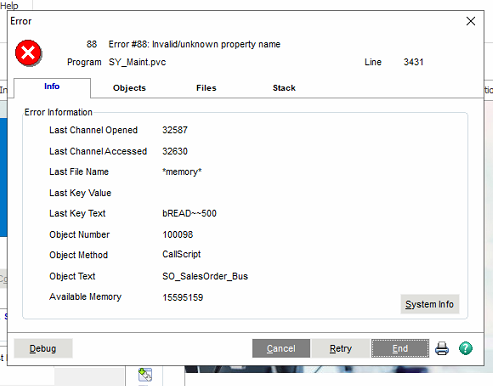
    The error is:
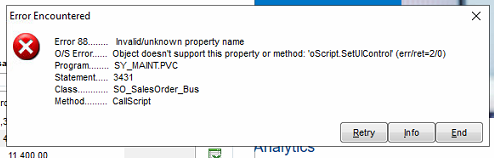


    and the script:  (there is more of the same type of logic in the script, but this is the "top" of the script, which is where things fail the 2nd time)
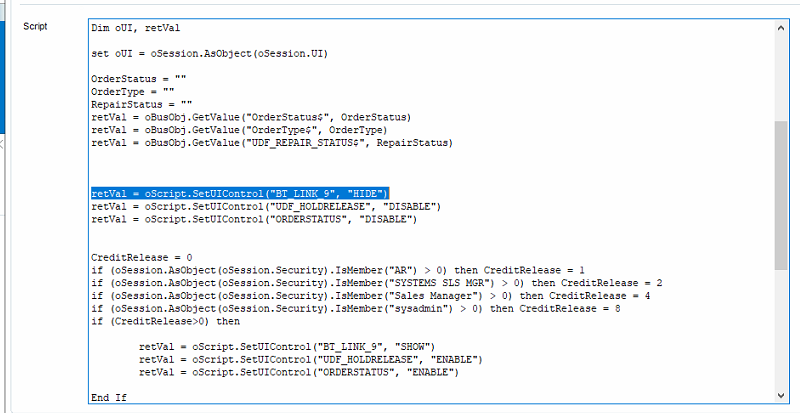


    ------------------------------
    Jeff Fiddelman
    Exeplex, LLC
    ------------------------------


  • 2.  RE: Customer's SO script gets error 88 when run for a second time from customer maint

    Posted 09-10-2022 04:04
    Edited by Alnoor Cassim 09-10-2022 17:55

    Jeff - The 1st 2 things they are strongly advised to do is the following:

    1. This line should be changed slightly: Set oUI = oSession.AsObject(oSession.UI)
    If oSession.UI<>0 Then Set oUI = oSession.AsObject(oSession.UI)

    2. Change the IsMember lines to the short version. The long version itself can cause Error 88s in exactly this situation. Use this format:
    If oSession.IsMember("AR") > 0 Then CreditRelease =1 
    'and so on

    Now after recompiling this PostRead script and closing all S/O Entry windows from Customer Maint, I think they'll be good but if error still occurs, there are 2 alternate ways to hide and show controls. Use whichever one works but try it 1 at a time in this order. Recompile each time. However, 1 more thing must be added to the script to support it:

    'Add the following at the top of the script: 
    If IsObject(oUIObj) = False Then
      oUIObj = oScript.UIObj 'Updates will not have UIObj
      Set oUIObj = oSession.AsObject(oUIObj)
    End If
    'Button and UI scripts already have oUIObj set but event scripts like PostRead do not.

    Using the BT_LINK_9 line as an example which can be adapted for the other lines:

    1. Use the Visible property of SetControlProperty (from the Nomads property list):
    oUIObj.SetControlProperty "BT_LINK_9", "Visible", 0 'Change 0 to 1 if you want to SHOW instead of HIDE

    2. Issue the direct pvx command to HIDE / SHOW a Nomads control:
    oScript.Execute "HIDE CONTROL BT_LINK_1.ctl" 'Change HIDE to SHOW when necessary


    ------------------------------
    Alnoor Cassim
    ------------------------------


  • 3.  RE: Customer's SO script gets error 88 when run for a second time from customer maint

    Posted 09-11-2022 13:45
    In addition to everything Alnoor said, another approach is to use the ScriptObject property of the oBusObj if valid.  Weird things happen with certain script events when drilling down between tasks so sometimes you have to specify the exact object handle you are after.  Below is an example of checking if the ScriptObject property is valid and if it is, using its SetControlState method.  There is no need to use parenthesis or grab the returned value since it doesn't really matter with this method.
    If oBusObj.ScriptObject <> 0 Then
    	oSession.AsObject(oBusObj.ScriptObject).SetUIControl "BT_Link_9", "HIDE"
    Else
    	' Use alternate methods here.
    End If​


    ------------------------------
    David Speck II
    Tennessee Software Solutions
    ------------------------------


  • 4.  RE: Customer's SO script gets error 88 when run for a second time from customer maint

    Posted 09-13-2022 10:47
    Alnoor - (and David)

    Thanks so much - the issue was the ismember lines and the short version seems to have resolved the problem.

    Thanks again

    Jeff F.

    ------------------------------
    Jeff Fiddelman
    Exeplex, LLC
    ------------------------------