Sage 100

 View Only
  • 1.  Custom Views - Inventory - SAGE 100 STD v2019 PU#4 - Did not survive.

    Posted 11-30-2022 10:32
      |   view attached
    I just upgraded a client from SAGE 100 STD v2019 PU#4 to SAGE 100 STD v2022.  The client had created 5 custom views in the Item Inquiry and Inventory Maintenance functions.  I have a copy of the old version 2019 in my computer lab. I plan to just recreate the views in SAGE 100 v2022.  Without the user login information, is there a way to "see" what the custom views look like?  Th views were created in one company code = CPC and by two users, CM & GJ.  Attached is a list of the views in SAGE 100 v2019.

    ------------------------------
    Michael McDonald - Consultant
    Michael T McDonald CPA
    (616) 813-8887 - mike@mcdcpa.com
    ------------------------------


  • 2.  RE: Custom Views - Inventory - SAGE 100 STD v2019 PU#4 - Did not survive.

    Posted 11-30-2022 10:45
    Did you run the Lookup Conversion utility after the upgrade?
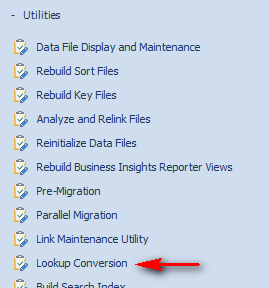
    ALE settings are stored in SOA files, so not easy to review, but you can take a look using DFDM if you need to.


    ------------------------------
    Kevin Moyes
    Technical Systems Analyst
    Munjal White Consulting Co.
    ------------------------------


  • 3.  RE: Custom Views - Inventory - SAGE 100 STD v2019 PU#4 - Did not survive.

    Posted 11-30-2022 10:49
    If you can get into the old version, you should be able to see at the lookup settings in the Lookup Wizard... if you can find them.


    ------------------------------
    Kevin Moyes
    Technical Systems Analyst
    Munjal White Consulting Co.
    ------------------------------


  • 4.  RE: Custom Views - Inventory - SAGE 100 STD v2019 PU#4 - Did not survive.

    Posted 11-30-2022 11:52
    I have seen this issue with just about every 2022 upgrade we have done - custom item lookups get corrupted and have to be recreated.

    ------------------------------
    Phil McIntosh
    President
    Friendly Systems, Inc.
    ------------------------------


  • 5.  RE: Custom Views - Inventory - SAGE 100 STD v2019 PU#4 - Did not survive.

    Posted 11-30-2022 12:22
      |   view attached
    @Kevin Moyes and @Phil McIntosh,,, Yes, I did perform the "Lookup Conversion" in SAGE 100 v2022​. Attached is the "Lookup Conversion Log".  Do I have to have the user login and password,, to see what the "Custom Views" look like? ​

    ------------------------------
    Michael McDonald - Consultant
    Michael T McDonald CPA
    (616) 813-8887 - mike@mcdcpa.com
    ------------------------------

    Attachment(s)

    txt
    Look_up Conversion_log.txt   25 KB 1 version


  • 6.  RE: Custom Views - Inventory - SAGE 100 STD v2019 PU#4 - Did not survive.

    Posted 11-30-2022 12:42
    No, that should not be needed.  Just find the entry and Modify to see the details.


    ------------------------------
    Kevin Moyes
    Technical Systems Analyst
    Munjal White Consulting Co.
    ------------------------------


  • 7.  RE: Custom Views - Inventory - SAGE 100 STD v2019 PU#4 - Did not survive.

    Posted 11-30-2022 13:14
    I'm glad someone posted about this. We have run into this on two different 2022 upgrades and I thought maybe it was just something we were doing or not doing. I haven't searched the Sage KB in a few weeks but when I last searched, all I found was an older article that said you needed to recreate the lookup.  I didn't find anything specific to upgrade to 2022 though. I had to use DFDM one of the two clients as the corrupted lookup would not show up in library master > main > user lookup wizard.

    ------------------------------
    David Overholt
    DWD Technology Group
    ------------------------------


  • 8.  RE: Custom Views - Inventory - SAGE 100 STD v2019 PU#4 - Did not survive.

    Posted 11-30-2022 14:10
    Edited by Michael McDonald 11-30-2022 14:13
    @David Overholt  .That is exactly what​ I am seeing in version 2022.  Even though the "Lookup Conversion Log" show a lot of entries, when I visit the User Lookup Wizard I see nothing.  Something is corrupt in the sy1qxx.soa files. More ideas?.

    ------------------------------
    Michael McDonald - Consultant
    Michael T McDonald CPA
    (616) 813-8887 - mike@mcdcpa.com
    ------------------------------


  • 9.  RE: Custom Views - Inventory - SAGE 100 STD v2019 PU#4 - Did not survive.

    Posted 11-30-2022 15:30

    Michael,

    I was able to locate the records for that company/user/lookup I didn't take notes, but I knew the user and company code that was producing the error I think maybe it was in the error message but maybe I just knew it in this case. The lookup was CI_Item. I made backups of


    SY1Q01

    SY1Q02

    SY1Q03

    SY1Q04


    I Then went through DFDM and manually deleted the records for that user/company/lookup from all 4 of those tables.  Once I did that the user was seeing the standard lookup.


    I noticed that inactive item was a field in every lookup that I had problems with and that made me wonder if it was related to the new option to exclude inactive items from lookups


    Do not miss out on our 2022 Sage 100 Year-End Tips Webinar: View the details


    David Overholt

    DWD Technology Group, Inc.

    9921 Dupont Circle Drive West, Suite 300 | Fort Wayne, IN 46825

    260.423.2414 main

    800.232.8913 toll free

    sagesupport@dwdtechgroup.com

    www.dwdtechgroup.com


  • 10.  RE: Custom Views - Inventory - SAGE 100 STD v2019 PU#4 - Did not survive.

    Posted 11-30-2022 20:51
    Edited by Carmen Cruz 11-30-2022 21:02
    Sorry wrong answer.  Removed