Original Message:
Sent: 10-14-2024 11:14
From: David Speck II
Subject: Custom Office - Add an Expression
That is not how the Expression feature works. Here is an example of the available options to pick from and details from the online help document. It sounds like you would be better off using a User-Defined Script to accomplish this.
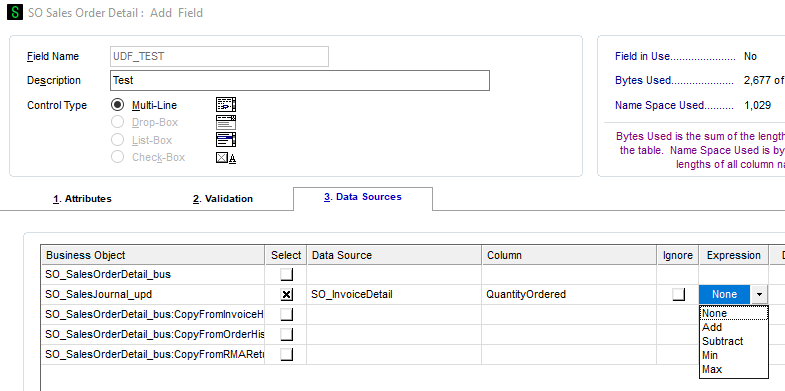
Expression
Select the expression to use for the business object. This field is available only for numeric and date columns.
Select None if you do not want to use expressions.
Select Add to add the source value to the existing (destination) user-defined field (UDF) value.
Select Subtract to subtract the source value from the existing (destination) UDF value.
Select Min to keep the lesser value of the existing (destination) UDF or use the source value.
Select Max to keep the greater value of the existing (destination) UDF or use the source value.
Note The Min and Max expressions are used for date columns; all expressions are used for numeric columns.
NoteExpressions can be defined only for update business object sources.
The IM Item Warehouse by Period table has one record for each period and year. The Add and Subtract expressions will sum the destination UDF value rather than replace the destination UDF value.
If the source UDF has a value of 10/1/2008, and the destination currently has 11/1/2009, and MIN is selected, the destination UDF will be overwritten with the 10/1/2008 value. The Min and Max expressions can be used to select what is updated to the destination UDF.
------------------------------
David Speck II
Blytheco LLC
------------------------------
Original Message:
Sent: 10-12-2024 17:07
From: Michele Herzog
Subject: Custom Office - Add an Expression
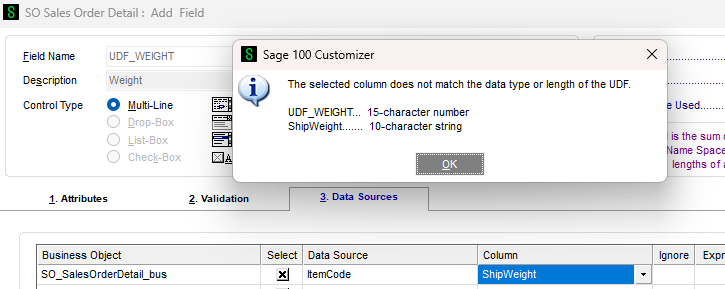
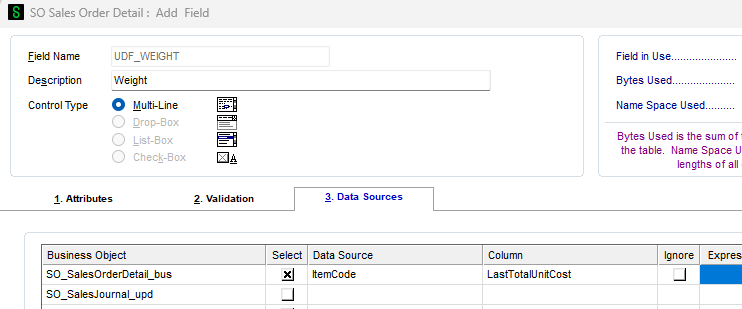
Well I thought the ShipWeight was numeric because the the LineWeight that I can get a total on the header is. For numeric, I can't pick the ShipWeight as I now see it is a 10 chr string. I randomly tried another field, below and I still could not type in the Expression field. Maybe I'm picking fields that do not allow for an Expression. I know numeric means all the fields have to be numeric.
------------------------------
[Michele] [Herzog] [CPA,CITP, CGMA]
[Overland Park] [KS]
[816-520-1365]
Original Message:
Sent: 10-12-2024 16:45
From: Doug Higgs
Subject: Custom Office - Add an Expression
Is the UDF a numeric data type?
------------------------------
Doug Higgs
Midwest Commerce Solutions, Inc
(312) 315-0960
Chauffeur, Chef, and Personal Assistant to Sprinkles
Original Message:
Sent: 10-12-2024 16:42
From: Michele Herzog
Subject: Custom Office - Add an Expression
I tried on the SO Detail and I can't type in the Expression field.
------------------------------
[Michele] [Herzog] [CPA,CITP, CGMA]
[Overland Park] [KS]
[816-520-1365]
Original Message:
Sent: 10-12-2024 15:44
From: Doug Higgs
Subject: Custom Office - Add an Expression
Maybe it needs to be totaled at the detail level first and then passed to the header. A running total.
------------------------------
Doug Higgs
Midwest Commerce Solutions, Inc
(312) 315-0960
Chauffeur, Chef, and Personal Assistant to Sprinkles