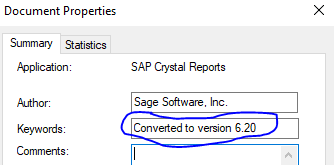
If you manually have this in the Summary Info (with the right version, of course), it will skip the update part
------------------------------
Beth Bowers
Mom to Peanut, ChiChi, Canton, Cagney and Daisy (I miss you, Sammy)
Tennessee Software Solutions
(269) 358-0989
------------------------------
Original Message:
Sent: 07-27-2022 10:08
From: Wayne Schulz
Subject: Crystal Reports
The whole process of Crystal Custom Reports is confusing. You create a current Crystal, tack on the CUSTOM to the end. Add it to the Sage menu. You are AGAIN prompted to update the report to a current version. It's probably a bug but a confusing one when the report being added is clearly at the current release because you just ran it and saved it against current data.
Yes, there's probably some reason that only Sage would love for this confusing UI prompt.
------------------------------
Wayne Schulz
wayne@s-consult.com
Schulz Consulting
(860) 516-8990
Moodus, CT
------------------------------
Original Message:
Sent: 07-25-2022 11:44
From: Kevin Moyes
Subject: Crystal Reports
That checkbox has proven unreliable for me, and I always run MASCRCW manually.
------------------------------
Kevin Moyes
Technical Systems Analyst
Munjal White Consulting Co.
Original Message:
Sent: 07-25-2022 07:43
From: David Overholt
Subject: Crystal Reports
One thing to note about the check boxes in convert company data screen, the utilities for converting reports and updating custom office screen to current: Those utilities don't actually run unless you check the box to convert all companies. I guess that I'm still not 100% sure they work as expected even then.